Author: pro

  • All You Need To Know About ‘ Supply Chain Attack’ And How To Prevent Them

    All You Need To Know About ‘ Supply Chain Attack’ And How To Prevent Them

    We have been looking at cyberattacks in our previous articles and today bring us to another form of cyberattack known as the ‘supply chain attack.’ We will be going in-depth as usual to show you more about this kind of of of cyberattack.

    What Is A ‘Supply Chain Attack? 

    This is a type of cyberattack that aims to cause damage to its target by exploiting the vulnerabilities in its supply chain network.

    The attacker continuously hacks and infiltrates the network to access its target’s network to damages and outages that harm the company. Over 40% of cyber-attacks recorded in 2020 came from extended supply chains.

    The main idea behind this kind of attack is that the attacker suspects the company’s key suppliers are likely more vulnerable to attacks on the target itself. This makes the suppliers a weak link to the company’s overall network.

    Supply chain attacks are more commonplace than attacks targeted at companies and originate through hacking attempts or the use of malware.

    What They Do

    In recent times, the supply chain network of companies has become a prime target for cybercriminals.

    This vulnerability arises from the fact that a weak link within a company’s supply chain can serve as an entry point for cybercriminals to infiltrate larger organizations, leveraging the data supplied through these chains.

    Such attacks highlight vulnerabilities within the target’s supply network, indicating that the security measures are as weak as the least secure link in its chain.

    The adoption of various technological means has led to a substantial increase in the volume of data, exchanged electronically through platforms such as the Internet, smartphones, and cloud computing.

    While this electronic exchange of data enhances efficiency, it also introduces a certain level of risk, making companies susceptible to cyber theft.

    Cybercriminals, recognizing the value of this data, employ various means to acquire it. Once successful, supply chain attacks empower cybercriminals to infiltrate affiliated companies.

    An illustrative case is the 2013 Target breach, where attackers exploited third-party security credentials, compromising Target’s security measures.

    Gaining access to login credentials and network entry points, the attackers infiltrated Target’s computer system, compromising the personally identifiable information of over 70 million customers.

    This breach inflicted significant damage, totaling $200 million, leading to the resignation of the CEO.

    This incident underscores the critical importance of fortifying security measures throughout the entire supply chain to mitigate the risks associated with cyber threats.

    Prevention

    One can take several ways to make sure their systems are well protected from supply chain attacks. Here are some of them that you can use to protect yourself.

    • Understand and Assess Your Supply Network: It is imperative to establish a level of trust with your supply chain vendors concerning information access on your systems. This collaborative relationship enables the tracking of risk factors, including ownership, supplier relations, and potential attack surfaces. Utilizing open-source tools, continuous monitoring throughout the supply cycle, and employing multidimensional analytics can enhance the assessment process.
    • Identify Risks of Third-Party Suppliers: To preemptively address potential supply chain attacks, it is crucial to identify valuable assets that could serve as motivators for hackers. This proactive approach aids in understanding which components of your supply chain systems require protection. This knowledge is essential for effective prioritization of your cybersecurity budget.
    • Response and Remediation Planning: Integrating your supply chain into your response and remediation plan is paramount. Despite thorough pre-monitoring efforts, overconfidence can be detrimental, as unforeseen risks may persist. It is unwise to assume that suppliers will autonomously handle security. A comprehensive response and remediation plan should account for potential vulnerabilities and include collaborative measures with suppliers to fortify security measures.

    Conclusion

    Safeguarding against supply chain attacks is crucial, as they have become increasingly prevalent due to their effectiveness as a gateway for unauthorized access.

    It is imperative to implement comprehensive safety measures to mitigate these risks and protect valuable intellectual assets.

    Leaving nothing to chance in securing your supply chain is paramount to maintaining the integrity and security of your company’s sensitive information.

  • Some Popular Cryptocurrencies You May Not Have Heard Of

    Some Popular Cryptocurrencies You May Not Have Heard Of

    Bitcoin indeed stands out as the most widely recognized cryptocurrency, having reached notable price peaks, such as nearly hitting $20,000 in 2017.

    Despite varying opinions on the sustainability of the cryptocurrency market and concerns about potential bubbles, interest and investment in cryptocurrencies persist.

    It’s crucial to acknowledge that Bitcoin is just one among many cryptocurrencies in existence. While some investors may find the current price of Bitcoin limiting, there are alternative cryptocurrencies that offer investment opportunities at more accessible price points.

    In this article, we will explore some lesser-known cryptocurrencies that are steadily gaining traction.

    These alternatives provide investors with options that are relatively more affordable than Bitcoin, presenting diverse opportunities within the dynamic cryptocurrency landscape.

    What Is Cryptocurrency? 

    A cryptocurrency is a form of digital currency characterized by its resistance to counterfeiting through the use of cryptographic techniques. Often described as a virtual currency due to its lack of physical manifestation, cryptocurrencies exist exclusively in electronic form.

    The digital nature of cryptocurrencies is underscored by their existence and trade solely on online platforms.

    Transactions are conducted within decentralized networks, facilitated by blockchain technology, ensuring a secure and transparent record of financial activities.

    While cryptocurrencies lack a physical presence, their valuation is conventionally expressed in terms of traditional fiat currencies, such as dollars or euros.

    This allows for a tangible measure of their worth in the context of widely recognized and accepted forms of monetary value.

    Some Popular Cryptocurrencies You May Not Have Heard Of

    Vertcoin

    Numerous contemporary cryptocurrencies trace their lineage, both in terms of structural foundations and network architecture, back to Bitcoin, widely regarded as the pioneering cryptocurrency.

    Vertcoin stands as a notable example, having been designed with additional decentralization measures.

    The development team behind Vertcoin has established a commendable track record in enhancing the network’s capabilities.

    Currently, there are approximately 41 million Vertcoins in circulation, with a predetermined maximum supply of 84 million units.

    As of the latest market data, one Vertcoin is valued at $1.11. It is important to note that Vertcoin, like many cryptocurrencies, is recognized for its inherent volatility, a characteristic that warrants careful consideration for potential investors and market participants.

    IOTA

    IOTA stands out in the digital currency landscape with its distinct focus on facilitating secure machine-to-machine payments.

    What sets IOTA apart from traditional cryptocurrencies is its deviation from the conventional blockchain support network; instead, it employs direct acyclic graph (DAG) technology.

    A noteworthy feature of IOTA is its feeless transaction system, irrespective of the transaction’s size.

    This approach contributes to enhanced scalability, faster processing times, and the ability to handle an unlimited number of transactions.

    In contrast to Bitcoin, a frontrunner in the cryptocurrency realm, IOTA addresses certain limitations commonly associated with scalability, transaction speed, and fees. Capitalizing on these advantages, IOTA has the potential to redefine the cryptocurrency landscape and potentially surpass Bitcoin.

    As of the latest market data, one IOTA is valued at $2.21, with a potential lower selling price of $0.57, positioning it as one of the more cost-effective investment options within the current cryptocurrency market.

    Investors may find the combination of unique features and affordability to be compelling reasons to consider IOTA for their portfolios.

    Cardano

    Cardano distinguishes itself as a fully open-source cryptocurrency, positioned to redefine the landscape of smart contracts through a revolutionary approach.

    The platform aims to introduce superior and advanced features, surpassing existing developments in the cryptocurrency space.

    In terms of affordability, Cardano emerges as one of the more economically accessible cryptocurrencies, with a current price per coin standing at $0.93.

    Notably, there are over 26 billion Cardano coins in circulation, marking a significant portion of its predetermined maximum supply of 46 billion coins.

    Investors may find Cardano to be an intriguing option, given its commitment to open-source principles, innovative smart contract capabilities, and an affordable entry point into the cryptocurrency market.

    The balance of features and cost-effectiveness positions Cardano as a noteworthy player in the dynamic and evolving realm of digital currencies.

    Litecoin

    Litecoin is an open-source peer-to-peer cryptocurrency that was introduced under the MIT/X11 license.

    Originating as an early derivative of Bitcoin, Litecoin shares substantial similarities with its predecessor.

    The development of Litecoin was spearheaded by the Litecoin Core development team.

    With a circulating supply exceeding 62 million out of a capped maximum of 84 million, Litecoin has established itself as a notable player in the cryptocurrency market.

    An additional aspect contributing to its versatility is its acceptance in transactions involving PayPal.

    As of the latest market data, Litecoin is valued at $185.77. The ongoing popularity and acceptance of Litecoin underscore its significance within the cryptocurrency landscape, offering users a viable and widely accepted digital currency option.

    Conclusion

    The potential for lesser-known cryptocurrencies to surpass Bitcoin in the industry is a subject of ongoing debate.

    While some of these alternative cryptocurrencies boast unique features absent in Bitcoin, a significant discrepancy in price underscores the substantial lead that Bitcoin maintains.

    Observing the current market dynamics, it’s evident that these lesser-known cryptocurrencies have considerable ground to cover to reach Bitcoin’s valuation.

    The investment landscape remains dynamic, and the future trajectory of these digital assets is uncertain.

    As such, individuals considering investment in these alternatives should exercise diligence, keeping a close eye on developments and market trends.

    The cryptocurrency market is inherently unpredictable, and forecasting its evolution is challenging.

    Investors are advised to stay informed, conduct thorough research, and make investment decisions based on a comprehensive understanding of the dynamics at play in this rapidly evolving industry.

    You can also read this guide covering everything you need to know about Litecoin.

  • Some Insight On Mobile Banking

    Some Insight On Mobile Banking

    Individuals who entrust their finances to banking institutions are likely familiar with the concept of ‘mobile banking.’

    For those seeking a deeper understanding of this financial service, this article aims to provide valuable insights into its intricacies.

    What Is Mobile Banking? 

    In straightforward terms, mobile banking refers to the practice of conducting financial transactions using a mobile device, such as a smartphone or tablet.

    The process involves actions like receiving transactions from a bank on your phone, settling various bills, or sending money internationally.

    One of the notable advantages of mobile banking is its flexibility, allowing financial transactions to take place virtually anywhere. However, it is crucial to acknowledge the security concerns associated with this method.

    In our modern age, the widespread embrace of mobile banking across various banks and financial institutions underscores its growing convenience.

    Many individuals prefer mobile banking due to its elimination of the need to physically deposit a check or visit an ATM.

    Nevertheless, users must exercise caution while accessing mobile banking apps to prevent the compromise of personal information.

    Security remains a paramount consideration in maximizing the benefits of this modern financial convenience.

    Cybersecurity

    Cybersecurity has become very important in the use of mobile banking operations in recent times. Cybersecurity consists of a wide range of measures used to keep all electronic information safe and private to avoid cases of theft and damage.

    It also makes sure that data does not end up being misused. This extends from personal information to complex government systems as well.

    Cyberattacks

    In the realm of cybersecurity, three primary types of cyberattacks exist:

    1. Backdoor Attacks: Backdoor attacks occur when cybercriminals employ alternative methods to access a system, bypassing the usual authentication processes. While some systems may have intentionally designed backdoors, others unwittingly acquire them through errors or vulnerabilities.
    2. Denial-of-Service (DoS) Attack: Denial-of-service attacks are orchestrated to prevent the legitimate owner of a system from accessing it. In this type of attack, cybercriminals intentionally input incorrect passwords multiple times, leading to the system becoming locked or overwhelmed, thereby denying authorized users access.
    3. Direct-Access Attack: Direct-access attacks involve the use of bugs and viruses to infiltrate a system. The objective can vary, ranging from extracting sensitive information to modifying the system’s functionality. This type of attack leverages vulnerabilities in the system’s defenses to compromise its integrity.

    Understanding these three categories of cyber threats is essential for individuals and organizations alike, as it facilitates the development of effective cybersecurity measures to safeguard against potential risks.

    How To Secure Clients Against Cyber Attacks

    Some of the steps that financial institutions can take to protect their clients against cyberattacks on mobile banking include;

    1. Educating their clients about cyber attacks and the use of strong and unique passwords
    2. Make sure not to access client data from a public location

    Advantages Of Mobile Banking


    Certainly, let’s refine and elaborate on the advantages of mobile banking in a professional yet accessible manner:

    1. Convenience: The advent of high-speed internet has significantly enhanced the convenience of financial transactions, allowing individuals to conduct their banking affairs from the comfort of their homes. Mobile banking leverages this connectivity, providing users with a streamlined and accessible platform for various transactions.
    2. Ease of Access: One of the prominent benefits of mobile banking is the elimination of the need to endure long queues at traditional bank branches. Users can effortlessly access their bank accounts at any time, even outside regular banking hours. The flexibility to manage accounts and perform transactions, including quick fund transfers, contributes to a more user-friendly and efficient banking experience.
    3. Reduced Errors: Mobile banking applications play a role in minimizing errors that users might encounter in manual transactions. The user-friendly interfaces and built-in safeguards help customers navigate financial processes more accurately, reducing the likelihood of mistakes compared to traditional methods.

    Embracing mobile banking not only enhances the efficiency of financial transactions but also promotes a more seamless and error-resistant banking experience for users.

    Disadvantages Of Mobile Banking

    Mobile banking also has some disadvantages, although they are few. The errors are;

    1. Restricted Offerings: The current landscape of mobile banking exhibits limitations in its range of services. While there are numerous plans aimed at expanding functionality, the majority of offerings remain informative, focusing on features like checking bank balances and submitting credit card applications. Efforts are ongoing to diversify and enrich the array of services available.
    2. High Charges: A notable challenge in mobile banking lies in the disparity between the costs incurred by users and the perceived benefits. The charges associated with mobile banking transactions are currently deemed excessive, outweighing the advantages users gain from the convenience. Striking a balance between affordability and the value proposition of mobile banking remains an area requiring attention.
    3. Technical Issues: Mobile banking applications commonly grapple with technical problems, particularly in the realms of security and associated costs. Security concerns, such as the potential compromise of personal information, pose significant hurdles. Resolving these technical challenges is imperative to ensure the seamless and secure functioning of mobile banking applications.

    Addressing these challenges is crucial for the continued evolution and widespread acceptance of mobile banking, ultimately enhancing its effectiveness and ensuring a more favorable cost-benefit ratio for users.

    Conclusion

    Mobile banking offers individuals the convenience of accessing their bank accounts from virtually anywhere, provided they have a technological device and an internet connection.

    When opting for mobile banking, it is crucial to familiarize yourself with all relevant information, particularly insights shared by qualified professionals in the field. This ensures a comprehensive understanding of the subject matter.

  • 10 Best Laptops To Buy In Ghana (Our Top Picks)

    10 Best Laptops To Buy In Ghana (Our Top Picks)

    Maybe you have searched for laptops for sale in Ghana or how much does a laptop cost in Ghana. Are you also looking for the best or cheapest laptops in Ghana?

    If you are reading this article, then you are at the right place, in this article I am going to take you through laptop prices in Ghana and also cover laptop shops in Ghana where you can get all the laptops you have been looking for.

    Laptop computers have become common now. It is normal to see a laptop computer almost anywhere that you pass.

    Due to the popularity that it has enjoyed since its inception, computer manufacturers have switched to producing more laptops than desktop computers.

    Desktop computers are still available to get, though, if you want one. However, laptops offer whole new flexibility, and they can be used to work anywhere as soon as needed.

    We have rounded up some of the latest laptops from different manufacturers that you should look at if you are in the market for a high-performance machine that can travel along with you anywhere.

    Latest laptop computers to get:

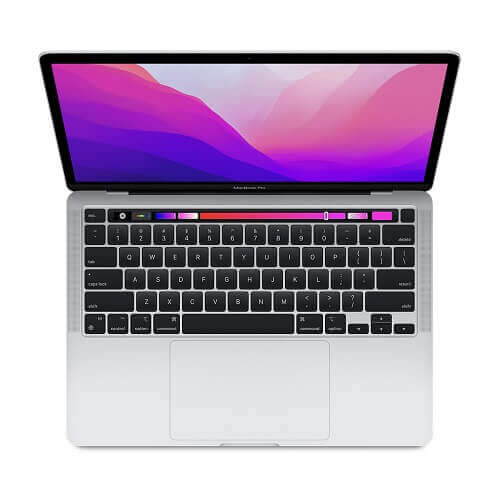
    1. Apple MacBook Air

    Apple MacBook Air price in Ghana

    The new MacBook air is regarded as the best apple laptop so far and also one of the most expensive that money can buy if the money is there.

    An Apple M1 chip powers Apple’s new machine after Apple decided not to go the Intel way as it did with the previous devices.

    The new MacBook comes with an outstanding performance, including 4K video editing. The battery life is also one of the best at the moment and can last for about 11 hours after it had been charged. It can again run apps from your iPhone or iPad.

    Apple MacBook Air Price In Ghana

    The price of Apple MacBook Air is GHS 8,900 across all laptop shops in Ghana.

    Apple MacBook Air Specs

    • CPU: Integrated 7-core/ 8-core
    • RAM: 8 to 16GB 
    • Display: 13.3”
    • Storage space: 256GB to 2TD SSD

    2. Dell XPS 15

    The dell XPS 15 is one of the best laptop computers from Dell at the moment.

    The machine comes with some of the best modern techs from Intel, and it can even be modified to have a discrete GPU.

    It has one of the best designs ever seen on a laptop computer and comes with a Windows 10 operating system.   

    Price Of Dell XPS 15 In Ghana

    The price of Dell XPS 15 is GHS 8,500 across all laptop shops in Ghana such as Franko trading, Compu Ghana, Jumia and many more.

    Specs Of Dell XPS 15

    • CPU: 10th generation Intel core i5 to i7
    • Graphics: Nvidia GeForce GTX 1650 Ti
    • RAM: 8GB to 64GB
    • Display: 15.6”
    • Storage: 256GB to 1TB

    3. HP Spectre x360

    The 2011 model of the HP Spectre is certainly not one to joke about.

    The new model now sports the current 11th-generation processor from Intel and Iris Xe graphics.

    This makes it one of the best-performing laptops money can buy. Although the new model is expensive, it makes up for the price with excellent security features and high blasting speakers to make you enjoy all the sounds that will come out of it.  

    Price Of HP Spectre x360 In Ghana

    The price of HP Spectre x360 is GHS 9,800 across all laptop stores in Ghana.

    Specs Of HP Spectre x360

    • CPU: 11th-generation Intel core i5 to i7
    • Graphics: Intel Iris Xe 
    • RAM: 8GB to 16GB
    • Display: 13.3.”
    • Storage: 256GB to 2TB

    4. LG Gram 17

    The LG Gram 17 is certainly a big laptop with its 17″ display.

    The computer uses an Intel processor, which helps it to feel light despite its size. It also has one of the best batteries in its class.

    The battery on the LG Gram can last up to 14 hours, which means that it is an ideal machine for those that travel to places where power sources are not readily accessible.

    Price Of LG Gram 17 In Ghana

    The price of LG Gram 17 is GHS 6,500 across all laptop stores in Ghana.

    Specs Of LG Gram 17

    • CPU: Intel i7
    • Graphics: Intel Iris Plus
    • RAM: 16GB
    • Display: 17.”
    • Storage: 512GB

    5. Acer Swift 3

    Although its design may look straightforward and modest, the Acer Swift 3 is a machine that will give you all you need to work and play with.

    This machine is reasonably priced compared to the other laptops in its class. It comes with a backlit keyboard that makes work much more accessible, especially for someone like me who types a lot.

    It also has a spacious trackpad that allows you to explore the full depths of the screen. For those on a budget but still want something that can compete with the big boys, the Acer Swift 3 is the machine you are looking for.

    Price Of Acer Swift 3

    The price of Acer Swift 3 is GHS 3,500 across all laptop stores in Ghana.

    Specs Of Acer Swift 3

    • CPU: Intel core i7
    • Graphics: Nvidia GeForce MX150 or Radeon Vega 8
    • RAM: 4GB to 8GB   
    • Display: 14”
    • Storage: 128GB to 1TB

    6. Huawei Matebook D14

    Huawei Matebook D14 I5

    The HUAWEI MateBook D14 i5 is a sleek and powerful laptop that offers a great balance of performance, portability, and affordability.

    It features a 14-inch FullView display with a resolution of 1920 x 1080, making it perfect for streaming videos, browsing the web, and working on documents.

    The laptop is powered by an 11th-generation Intel Core i5 processor, and comes with 8GB of RAM and 512GB of storage, providing plenty of power and storage for all your needs.

    Specs

    • Display: 14-inch FullView display with a resolution of 1920 x 1080
    • Processor: 11th generation Intel Core i5
    • RAM: 8GB
    • Storage: 512GB
    • Operating System: Windows 10 Home
    • Battery: 56Wh (up to 11 hours of local video playback)
    • Weight: 1.38kg
    • Dimensions: 322.5 x 214.8 x 16.9 mm
    • Connectivity: Wi-Fi 6 (802.11ax), Bluetooth 5.0, USB-C, HDMI, 3.5mm audio jack
    • Camera: 1MP
    • Audio: Dolby Atmos Sound System
    • Fingerprint sensor
    • Charging: 65W USB-C power adapter (included)

    Price Of Huawei Matebook D14

    The price of Huawei Matebook D14 is GHS 20,000 across all laptop stores in Ghana.

    7. HP Pavilion i3 x360 14-EK0013DX 12th Gen

    HP Pavilion i3 x360 14-EK0013DX 12th Gen

    This is a 2-in-1 laptop from HP’s Pavilion series, featuring a 14-inch touchscreen display and a 12th-generation Intel Core i3 processor.

    The x360 design allows for the screen to be flipped around and used in various modes, including laptop, tent, stand, and tablet.

    Specs

    • Processor: 12th generation Intel Core i3
    • RAM: 8GB
    • Storage: 512GB SSD
    • Display: 14-inch touchscreen
    • Operating System: Windows 10
    • Other features: 2-in-1 design with a 360-degree hinge

    Price Of HP Pavilion i3 x360 14-EK0013DX 12th Gen

    The price of HP Pavilion i3 x360 14-EK001

    8. Dell Inspiron 15 (3511)

    Dell Inspiron 15 (3511)

    The Dell Inspiron 15 (3511) is an 11th-generation Intel Core i5-powered laptop with a 15.6-inch touchscreen display.

    It comes with 8 GB of RAM and a 256 GB solid-state drive for storage. Additionally, this package includes a free bag and a TCL mobile WiFi device.

    Specs

    • Processor: Intel Core i5 11th Gen
    • Display: 15.6-inch touchscreen
    • Memory: 8 GB RAM
    • Storage: 256 GB SSD
    • Additional items included: Free bag and TCL mobile WiFi device

    Price Of The Dell Inspiron 15

    The price of The Dell Inspiron 15 is GHS 6400 across all laptop stores in Ghana

    9. Asus I3 Notebook (8/256 SSD) X515J Plus Free Bag And TCL Mobile WIFI

    asus I3 Notebook (8 256 SSD)

    This notebook from ASUS is powered by an Intel Core i3 processor and has 8GB of RAM, making it suitable for everyday use such as web browsing, document editing, and basic video playback.

    It also comes with a 256GB SSD, which provides faster boot times and improved performance compared to a traditional hard drive. The notebook also comes with a free bag and TCL mobile wifi.

    Specs

    • Processor: Intel Core i3
    • RAM: 8GB
    • Storage: 256GB SSD
    • Display: 15.6 inches
    • Operating System: Windows
    • Connectivity: WiFi, Bluetooth
    • Additional features: Free bag and TCL mobile wifi

    Price Of Asus I3 Notebook

    The price of Asus I3 Notebook is GHS 5000 across all laptop stores in Ghana.

    10. Travelmate Spin P6

    Travelmate Spin P6

    The Travelmate Spin P6 is a 2-in-1 laptop designed for business professionals on the go.

    It features a 360-degree hinge that allows the screen to be flipped around and used as a tablet, making it versatile and convenient for presentations, meetings, and everyday use.

    Specs

    • Operating System: Windows 10 Pro
    • Processor: Intel Core i5-10210U
    • Memory: 8GB DDR4 RAM
    • Storage: 256GB SSD
    • Display: 14-inch FHD IPS Touchscreen
    • Graphics: Intel UHD Graphics
    • Battery Life: Up to 10 hours
    • Connectivity: WiFi 6, Bluetooth 5.0, USB-C, HDMI, and SD card reader
    • Weight: 3.3 pounds
    • Dimensions: 12.7 x 8.5 x 0.7 inches
    • Security: Fingerprint reader and TPM 2.0
    • Additional Features: Backlit keyboard and HD camera

    Price Of Travelmate Spin P6

    The price of Travelmate Spin P6 is GHS 5600 across all laptop stores in Ghana.

    Conclusion

    The list above is a few of some of the best laptops that you can buy in Ghana.

    If you are someone who can spend a bit higher than the average person on a computer that performs in almost every area, then these machines are worth taking a look at.  

  • All You Need To Know About AirtelTigo Money

    All You Need To Know About AirtelTigo Money

    By the end of this article, you will have a clear understanding of how AirtelTigo Money works, how to use it for various transactions, and how to safeguard your funds while enjoying the convenience and efficiency that mobile money services offer.

    The mobile money industry in Ghana has witnessed significant growth over the years, largely due to the efforts of telecommunication companies that have made this platform accessible to their customers.

    In Ghana, mobile money services have become an integral part of daily life for almost everyone. People use these services not only for sending and receiving money but also for saving and managing their finances.

    While mobile money is widely embraced, not everyone is familiar with all the nuances and features of the platform.

    Some individuals even hand over their mobile phones to others to perform transactions on their behalf, which can be risky.

    This practice increases the chances of fraud or unauthorized access to the funds in a person’s mobile money account.

    AirtelTigo, one of Ghana’s prominent telecom operators, offers a mobile money service that prioritizes the security and convenience of its customers.

    AirtelTigo Money is a digital money service tailored to meet the specific needs of AirtelTigo customers.

    In this article, we will guide you through all you need to know about AirtelTigo Money, providing you with a comprehensive understanding of its features, benefits, and how to use it effectively and securely.

    AirtelTigo Money is designed to empower users with the knowledge and tools they need to make the most of this mobile money service while ensuring the safety of their funds and financial transactions.

    This service enables customers to send and receive money on a secure network, offering peace of mind and protection against potential theft or fraud.

    Whether you are new to AirtelTigo Money or seeking to enhance your knowledge of its features and capabilities, this article will serve as a valuable resource to help you navigate the world of mobile money with confidence.

    Registration

    For AirtelTigo users who have not registered yet and want to do so,  there are two ways to go about it.

    You register for the AirtelTigo mobile money service by going to any of their offices near you.

    If you are not near any of their offices, you can carry out the registration by yourself at home.

    For the official registration, you just visit their office and they conduct the registration for you.

    For the self-registration, there are two ways through which you can get it done. For the first way, All you have to do is to dial the shortcode *510#.

    After that, you choose option 8 and follow the prompts to register on the platform.

    You can also send a WhatsApp message to a special number that the telecommunication network has provided exclusively for people who want to register for the AirtelTigo mobile money service.

    All you have to do is to save the number ‘057 700 0084’. After that, you go to your WhatsApp messenger app and then send a simple ‘Hi’ to the number.

    You will receive a reply showing you the things you need to register for the mobile money service.

    These things will mostly be a valid identification card, your name, and your birth date. After the registration is complete, you will now be able to send and receive money fast and conveniently on the network.

    Now that you have finished registering on the network, you will need to make your first transaction on the network.

    How To Send Money Using AirtelTigo Money

    Below are the steps through which you can spend money on the AirtelTigo mobile money service.

    1. Dial the shortcode *100# to open the AirtelTigo mobile money menu
    2. Select the first option ‘1’
    3. Now, you enter the number of the recipient to whom you are sending the money.
    4. Here you the amount of money that you will be sent to the person in Ghana cedis, that is in figures and send.
    5. You will receive a notification that the money has been sent to the number that you just provided.

    The person you sent the money to will then go to an AirtelTigo mobile money agent and collect the money. Always make sure to type your PIN and the number of the recipient correctly to avoid any errors.

    Withdrawing Funds

    When you want to withdraw money from your account, you can do so through the following steps. However, you will need to visit an AirtelTigo mobile money agent before you input the steps shown.

    • Dial the shortcode *100# again to bring up the mobile money menu
    • Select the third option which is ‘cash withdraw’.
    • You then enter the agent code which is made up of 5 digits
    • The next step is to enter the amount of money that you intend to withdraw in cedis.
    • Now, enter your secret PIN code.
    • The agent will then give you the amount after he had finished with his part. You will then get a message to notify you of the withdrawal. This message will include the location of the agent who just gave you the cash, the time and date of the transaction, your balance in your account, and the reference number.

    One needs to go with a valid identification card whenever he or she is going to withdraw money from a mobile money agent.

    You might also want to check out how to borrow airtime from all the networks in Ghana and MTN mobile money registration process.

  • Importance Of Technology In Safety

    Importance Of Technology In Safety

    Technology has been responsible for the change and advancement in the world in the last century such as gene editing, machine learning, and artificial intelligence. However, its advancements have been without any repercussions.

    Cybercrime has been more than enough proof that the negative side of technology very much exists as it keeps progressing.

    Technological advancement has been tuned to cover the safety and efficiency of the highly interconnected world that is a result of the same technology.

    Many measures have been put in place to curb the malpractices on the internet such as the ability to monitor human trafficking.

    Technologies have also been built to help people monitor the progress of their health without having to see the doctor for everything.

    Technology has now unveiled new ways through which we can monitor and communicate dangerous situations.

    Below are some ways through which technology is keeping people safe.

    Public Emergency Response

    For emergency responders to be effective, they have to be provided with the right information.

    Without good information like the venue of the emergency or how severe the situation is, the safety of people could be in jeopardy.

    One of the new ways through which effective information is shared is Multi-access Edge Computing (MEC).

    It helps to shift the use of cloud functions closer to people. together with the use of 5G, they are very important in dealing with public safety.

    With their speeds that are 10 times faster than 4G, video surveillance, real-time analytics, and video, and voice recognition, these technological tools help to provide accurate information and seamless communications in times of emergencies.

    It also allows for real-time response to emergency issues through edge computing and artificial intelligence.

    This also allows for setting off safety systems, making visual assessments, and sounding off alarms before the emergency team arrives at the scene to take care of the problem.

    Security Apps

    Technological innovations have now addressed the distance between an emergency police call and potentially dangerous situations.

    There are a handful of crimes such as stalking, domestic abuse, and break-ins which do not seem like a serious situation until it becomes too late to deal with it or call the relevant entities for help.

    During situations like this, potential victims are not able to make phone calls since that will provoke the attacker to carry out his or her act right away due to the fear of being reported and arrested.

    With the emergence of mobile phone apps that can help the relevant entities pinpoint their exact location come to the scene and keep users protected.

    Mobile apps such as Noonlight can help its users to connect with relevant entities whenever they feel that they are in danger through its several connected safety platforms.

    Users can call help or cancel it by just pressing a button. The app recently added an automatic crash detection and response’ feature to it. This new feature can detect when a user’s location, motion, and force change.

    It can also detect when there is a crash by the user and automatically call the relevant emergency entities. In this way, people who are not able to make phone calls physically will still be able to receive the help that they need.     

    Wearable Gadgets

    Wearable gadgets are also a new way through which one can spot a potentially harmful situation.

    Not all dangerous situations are physical as some dangerous situations can be in the form of health issues that cannot be detected until it becomes too late.

    With the introduction of wearable gadgets, the safety of the wearer is ensured as the gadget monitors the health indicators of the wearer through its provision of accurate patient data of the wearer to healthcare providers such as personal doctors.

    The KardiaBand can monitor the heart rhythm of the wearer and can even perform an electrocardiogram test while on the go.

    The band alerts the wearer when it discerns an irregular heartbeat of atrial fibrillation.

    This wearable gadget is ideal for patients who can suffer a sudden cardiac arrest instead of the much bigger defibrillator vest. It is also able to provide the wearer with monthly reports which help to limit the number of times that the wearer may be in danger.

    Security Cameras

    Security cameras have become commonplace now. A lot of state-building and wealthy private owners have security cameras and gadgets installed on their properties.

    These cameras can detect when an intruder tries to break into the premises and alert the owners without the intruder finding out.

    Some can also set off a loud alarm that could scare the intruder to abandon their mission. Some of the security cameras send their data to computers which are monitored by security guards while others have built-in technologies that can alert law enforcement agencies straightaway.      

    From the above article, we can see that technology has improved the safety of people through the various gadgets that have been produced.

    As time goes on, we will be witnessing much sharper and more effective gadgets and tech that will be performing much better than the ones we have today. The positive effects of technology may far outweigh its negative side.  

  • Upcoming WhatsApp Features To Look Out For This Year

    Upcoming WhatsApp Features To Look Out For This Year

    WhatsApp has indeed become a global sensation since its inception, emerging as the most widely used personal messaging app across the world with billions of users.

    The app’s journey to the top was solidified when Facebook acquired it for a whopping $19 billion, leading to a series of updates and transformations.

    Over the years, WhatsApp has consistently outpaced its competitors, securing its position as the go-to messaging app for individuals worldwide.

    However, this popularity hasn’t been without its challenges, as the app’s owners found themselves entangled in a controversy surrounding a new privacy policy.

    This policy, specifically for the WhatsApp Business platform, raised concerns as it seemingly granted WhatsApp significant access to user information, potentially for targeted advertising on Facebook.

    Despite the controversy, WhatsApp remains committed to enhancing user experience through regular updates and the introduction of new features.

    Here’s a sneak peek at some of the upcoming features that will soon grace this beloved messaging app:

    Emoji Reactions

    WhatsApp is considering introducing emoji reactions, a feature familiar to users of other social media platforms.

    This functionality allows users to respond to specific messages within a chat using a range of emojis.

    This addition aims to streamline communication by providing quick and expressive responses, akin to the reaction feature on various messaging platforms.

    Avatars

    Another potential feature involves personalized avatars, allowing users to create digital self-representations.

    While specific details are scarce, this feature could bring an element of personalization and amusement to WhatsApp, similar to Bitmoji on Snapchat or avatars on other social media platforms.

    Display Profile Photo in Notifications: An upcoming update might include the display of the sender’s profile photo in system notifications upon receiving a new message.

    Currently, notification previews show only the message text and the sender’s name. This enhancement aims to make it quicker and easier for users to identify the sender at a glance.

    Multi-Device Support

    WhatsApp is exploring the possibility of allowing users to operate their accounts independently on up to four devices.

    This is a departure from the current system where the account is linked to a phone and can be mirrored on only one device.

    With multi-device support, users could take video calls on computers or tablets and send messages from any connected device, offering greater flexibility in communication.

    It’s essential to note that these features are either in the development stage or based on rumors, and their final implementations may differ from the descriptions provided.

    Mute

    Almost every user of the messaging app has people of groups that he or she would want to mute for a long time so that they do not have to see their messages again without deleting such contacts.

    Due to this wish which Facebook may have heard about, the messaging app will be getting a new feature known as the ‘Always Mute’ feature.

    It will be available for Beta users of the app on both Android and IOS who will want to mute a chat for as long as they want.

    This option will replace the ‘1 year’ mute option. This feature was spotted a few months ago on the Android Beta 2.20.197.3 update.

    Once this update is rolled out for all versions of the app, users will now be able to mute those annoying chats for eternity and just forget about it as if they had deleted it.

    New Storage Usage

    We always keep an eye on the amount of storage that has been used by WhatsApp on our smartphone devices.

    A new storage section has been designed for the app and this was spotted on Android Beta v2.20.201.9.

    The new update will improve the storage section while allowing users more visual cues to make the managing of the storage section much easier to handle.

    Expiring Media

    WhatsApp unveiled a feature in an update that allowed users to delete media that they had sent to people within a specific time frame, after which the media would be able to be deleted by the user.

    It also unveiled a feature that made messages expire after a certain period. There is however a new feature in the works known as the ‘Expiring media’.

    This new feature allows users to send media messages that will be deleted from the recipient’s device as soon as he or she leaves the chat page on the app.

    This feature will not alert the recipient to the fact that the media message they received has been deleted from their devices after they left the chat. The media messages will just simply vanish from the chat.

    Multi-Device

    This is yet another amazing feature that will be coming to WhatsApp very soon that the messaging app’s large number of users have been waiting for.

    This new feature will allow users multiple supports on the messaging app. Check out how to message someone on WhatsApp without saving the number.

    The new feature was seen in development in Android Beta version 2.20.143. This new feature will give users the ability to clone their WhatsApp accounts on different devices.

    For example, one Whatsapp account will be usable on a different device apart from the one on which it was initially installed.

    You can also make new friends on WhatsApp, if you don’t know, now you know. read this guide to know how to make new friends on WhatsApp.

    Wallpapers

    A new wallpaper feature will also be making its way to WhatsApp without even knowing their numbers.

    This new feature was also spotted while being developed on Android Beta version 2.20.199.5.

    This new feature will allow users of the messaging app to choose a wallpaper that will be based on a theme that is used in the app.

    Talking about WhatsApp features, you can read this guide covering how to remove the archived box from the top of your WhatsApp chat screen, also check out this article covering a new way to take a screenshot on Snapchat without the other person getting a notification.

    The messaging app will question whether you would want to download the WhatsApp wallpaper app when you try to choose a default wallpaper.

    To stay abreast of the latest features and improvements, users are advised to keep their WhatsApp app updated regularly. The future of WhatsApp holds exciting possibilities for enriched communication experiences.

    So these are some of the great new features that will be coming to WhatsApp users very soon. All these features are in development to be rolled out for both Android and IOS devices.       

    knowing whether someone has saved your number in their contact list can be of interest. If you’d like, I can provide you with information or tips on the trick you mentioned. Feel free to share more details, and I’ll assist you accordingly.

  • In-depth Look At The Antivirus Software

    In-depth Look At The Antivirus Software

    I am sure that we all know what antivirus is, or we have heard the name before. And we all know an antivirus is a security software used to protect our companies against computer threats like malware.

    I have already gone in-depth on firewalls, and I think that begs for an in-depth on antivirus since they both do a similar job on a computer system.

    So before we can go in-depth on the antivirus, we first need to know precisely what it is.

    What Is Antivirus?

    Application software indeed serves as a crucial defense mechanism for computer systems against potential threats and malicious programs originating from the internet or connected peripherals. Nevertheless, the fortification against the perils of the internet is incomplete without the presence of a firewall.

    The primary function of antivirus software lies in its ability to systematically scan the computer, identifying any malicious programs present.

    Subsequently, it takes appropriate action, either by eliminating the detected threats or isolating them in quarantine, contingent upon the severity of the malicious software.

    This multi-step process forms the pathway through which antivirus software safeguards a computer system from potential threats.

    Mode Of Operation

    Scanning

    Upon initiating the antivirus program, the preliminary step is to conduct a scan to ascertain the presence of any malicious programs that may have infiltrated the system.

    Notably, various types of scans are available, each delving to a specific depth within the computer’s architecture in its quest to uncover potential threats.

    A light scan, characterized by its efficiency, targets specific sections of the computer and typically concludes within a few minutes.

    Conversely, a deep scan adopts a more exhaustive approach, scrutinizing nearly every facet of the computer system.

    While this thorough examination enhances the likelihood of detecting deeply embedded malicious programs, it comes at the cost of a lengthier scanning duration, often extending up to an hour to complete.

    Detection

    Following the completion of the antivirus scan, the software becomes cognizant of the presence of any malicious software within the computer.

    At this point, the antivirus system proceeds to pinpoint the specific file or location where the identified malicious software has taken residence within the computer’s system.

    This meticulous process is instrumental in preparing the antivirus for the subsequent actions it will undertake to neutralize or quarantine the detected threats, thus fortifying the overall security of the computer.

    Identification

    Once the antivirus successfully identifies the presence of malicious software during the scan, it goes a step further by recognizing the specific type of malicious program that constitutes the detected threat.

    This discernment is crucial as it enables the antivirus to tailor its response and implement appropriate measures to neutralize or contain the identified malicious program effectively.

    By categorizing the nature of the threat, the antivirus enhances its ability to counteract a diverse range of potential risks, contributing to a more robust defense against cyber threats.

    Removal

    Following the identification of malicious software, the antivirus initiates decisive action against the malware.

    This involves the removal of the infected file, subsequently replacing it with an original, uninfected backup version of the program.

    This restorative approach aims to eliminate the threat posed by the detected malware and restore the integrity of the affected program to its pristine state.

    In instances where the antivirus encounters challenges in identifying and removing the virus, it adopts a proactive measure.

    In such cases, the antivirus discards the infected file and seamlessly substitutes it with a virus-free backup version, ensuring the continued functionality of the program while mitigating the potential harm posed by the malicious software.

    Antivirus Generations

    Indeed, the progression of antivirus technologies has been prompted by the continual advancement of malware programs. Let’s delve into each generation:

    1. First Generation:
      • Characteristics: Utilized simple scanners relying on virus signatures for identification.
      • Limitations: Restricted to specific virus signatures, unable to effectively combat ‘wildcard’ viruses.
    2. Second Generation:
      • Approach: Moved away from reliance on virus signatures, adopting a heuristic approach.
      • Method: Searched for code blocks associated with viruses, allowing for a more dynamic identification process.
    3. Third Generation:
      • Key Feature: Introduced memory-resident antivirus programs.
      • Recognition Method: Identified viruses based on their activities within the computer system, rather than relying solely on structural attributes.
    4. Fourth Generation:
      • Integrated Approaches: Combined multiple antivirus methods, including scanning and monitoring.
      • Behavior-Blocking: Acted as behavior-blocking software, embedded within the computer’s operating system.
      • Real-time Observation: Monitored real-time actions for virus-like behavior, enabling immediate blocking of uncertain actions.
      • Preventive Measures: Proactively prevented potential damage to the computer system by swiftly blocking suspicious activities.

    This progression highlights the adaptive nature of antivirus technology, continuously refining its capabilities to effectively counter the evolving landscape of malicious programs and protect computer systems more comprehensively.

    Antivirus Limitations

    1. They only support ‘common interface file system’ and not NIFS file protocol
    2. It cannot check on read-only files

    Conclusion

    The continuous evolution of antivirus software is a direct response to the ever-increasing sophistication and malicious intent embedded in the daily release of new virus programs.

    Antivirus developers have adeptly incorporated the latest technologies to enhance their software’s capability to identify and eliminate these highly sophisticated threats.

    The current landscape of malicious programs often presents challenges even for advanced antivirus solutions, as some viruses are engineered to evade detection by conventional means.

    This level of sophistication necessitates ongoing innovation in antivirus technologies to stay ahead of the evolving threat landscape.

    Contemporary antivirus software is equipped with cutting-edge features and advanced heuristics to not only identify known viruses but also to detect and neutralize previously unseen threats.

    This proactive approach is crucial in ensuring the resilience of computer systems against the relentless and increasingly sophisticated nature of modern malware.

  • Popular WhatsApp Features And How They Work

    Popular WhatsApp Features And How They Work

    WhatsApp, a widely used mobile messaging app, boasts billions of users worldwide. After acquiring the app for a staggering $19 billion, Facebook now owns it.

    As the go-to messaging platform, WhatsApp offers an array of impressive features. From making voice and video calls to sharing media messages and documents, it allows users to stay connected in various ways.

    Additionally, you can even track the location of your contacts on the map. In this article, I will guide you through the remarkable features of WhatsApp and explain how they work. So, let’s dive in.

    Checkmarks In WhatsApp And What They Mean

    whatsapp checkmarks or blue ticks

    The checkmarks in WhatsApp let the sender know whether his or her message has been received. One checkmark means that the message has been sent, but the recipient is not online or connected to the internet.

    Two checkmarks mean that the message has been delivered to the recipient’s phone.

    When you see two blue checkmarks, it indicates that your message was delivered and that the recipient has read it.

    A red exclamation sign means that your message has not been sent, probably because you don’t have an internet connection.

    There is an exception for the checkmark.
    You can have a double checkmark even though you see the recipient online for a long time after you sent the message.

    This indicates that the recipient has turned off their read receipts when it occurs.

    In this case, they will read your message, but there will not be a double blue checkmark. This is usually used by people who want to avoid replying to some messages.

    Last Seen

    whatsapp last seen

    You can hide the last seen on your WhatsApp by going to the settings menu, then going to account, and then privacy.

    You can then switch the Lasts seen between everyone, my contacts, or nobody.

    You might want to also check out this new WhatsApp feature which allows you to remove archived chats from the chat screen.

    WhatsApp On Computer

    whatsapp on computer

    There are several ways through which you can use WhatsApp on a computer.
    The most recommended one is to download the WhatsApp app for your computer.

    After installing it, you then link it to your phone by scanning the QR code that it gives you on WhatsApp on your phone.

    It will then connect it so that you can chat on your computer. However, WhatsApp on your phone must be open.

    You can use WhatsApp on your phone by downloading the Bluestacks emulator app, allowing you to use the mobile app on your computer.

    After downloading the Bluestacks app, you install the mobile WhatsApp app on the app and start chatting.

    What makes WhatsApp so unique is its simplicity and the impressive list of features that it offers.

    Apart from sending messages and making calls, users can also send documents on the app.

    They can also look up the location of each other on the map that the app offers.

    Users can also share pictures and videos with all their contacts by posting on their WhatsApp stories to view them 24 hours.

    The WhatsApp app can also be linked to your Facebook account to directly send pictures and videos from your WhatsApp story to your Facebook story.

    You can again back up your data to either the smartphone’s internal storage or you can back them up to your cloud storage.

    Mute Chats

    If you want to silence a group chat or individual chat, you can mute it. Open the chat, tap the contact or group name, and select “Custom Notifications.” From there, you can choose to mute the chat for a specified period.

    Reply and Quote Messages

    You can reply to a specific message within a chat by long-pressing the message and selecting the reply icon. This allows you to quote the message and provide context in your response.

    Search Messages

    WhatsApp allows you to search for specific messages within a chat. In the chat, tap the three dots in the top-right corner and select “Search.” You can enter keywords to find specific messages.

    Pin Chats

    For easy access, you can pin the conversations that are most crucial to you at the top of your list. Swipe right on a chat and press the pin symbol to accomplish this. Chats that are pinned stay at the top of the list.

    Starred Messages

    Certain communications can be “starred” for convenient access at a later time. Press and hold a message, then tap the star icon to accomplish this. Your starred messages are located in the chat settings.

    Status Updates

    You can share text, images, videos, and GIFs as status updates on WhatsApp Status, and they will vanish after 24 hours. On the Status page, you may see your contacts’ most recent status updates.

    WhatsApp Web

    You may use WhatsApp on your PC by using WhatsApp Web. In order to utilize it, launch WhatsApp on your phone, click the three dots in the upper-right corner, choose “WhatsApp Web,” and then scan the QR code located on the website.

    Dark Mode

    WhatsApp offers a Dark Mode theme that changes the app’s background to dark colors, which can be easier on the eyes in low-light environments. You can activate Dark Mode in the app’s settings.

    Group Chats

    You can create group chats in WhatsApp to chat with multiple contacts simultaneously. To start a group chat, go to the Chats tab, tap the new chat icon, and select “New Group.” You can add participants, set a group name, and manage group settings.

    Voice Messages

    WhatsApp allows you to send voice messages. Hold down the microphone icon in a chat, record your message, and release the icon to send it. The recipient can play the voice message by tapping on it.

    Status Updates

    WhatsApp Status is comparable to other social media networks’ Stories. As 24-hour-only status updates, you can share text, images, videos, and GIFs. Select “My Status” from the Status tab to create a new status.

    WhatsApp Web

    WhatsApp Web is a feature that lets you use WhatsApp on your computer’s web browser. To use it, open WhatsApp on your phone, tap the three dots in the top-right corner, select “WhatsApp Web,” and scan the QR code on the web page.

    Document Sharing

    You can send documents through WhatsApp. In a chat, tap the attachment icon and select “Document.” Choose a document from your device, and it will be sent to the recipient. WhatsApp supports a variety of document types.

    Location Sharing

    You may let contacts know where you are in real time with WhatsApp. Launch a conversation, tap the icon for the attachment, choose “Location,” and then select “Share Live Location.” The length of time that your location is transmitted can be customized.

    Video and Image Sharing

    You can send photos and videos to your contacts. In a chat, tap the attachment icon and select “Photo” or “Video.” Choose the media you want to send, add a caption if desired, and press the send button.

    End-to-End Encryption

    Because WhatsApp uses end-to-end encryption, messages are only read by you and the recipient. The content of your messages is private and not accessible to anybody else, not even WhatsApp.

    End-To-End Encryption

    end to end encryption

    In today’s digital world, where malware allows cybercriminals to spy on people, WhatsApp uses an end-to-end encryption system that makes it hard for third-party people to view your messages.

    Calls

    a call on whatsapp messenger

    WhatsApp allows its users to make both video calls and voice calls with anyone irrespective of the country as long as the person has WhatsApp installed.

    However, WhatsApp Web has yet to get the video call feature. You can, however, do video calls on WhatsApp web through the messenger room.

    Open your WhatsApp web and log into your account.
    Click on the three-dotted icons and select ‘Create a Room.’
    A message will appear asking you to continue on Messenger. Click on it
    You will be allowed to create a room and then start your video calls.

    Not to mention the ability to transmit and receive documents, movies, and images. If you want to take the greatest photos to send to your loved ones, be sure to read our post on the top Android camera applications. You can also use WhatsApp to know if someone has stored your number.

  • Here Is Why You Should Try Assassin’s Creed Video Games

    Here Is Why You Should Try Assassin’s Creed Video Games

    Technological advancements have ushered in a completely new era of entertainment experiences.

    The evolution of technology has not only transformed how we consume entertainment but has also opened up exciting possibilities and innovations that redefine our interaction with various forms of media.

    This continuous progress ensures that the world of entertainment remains dynamic, offering fresh and immersive experiences to audiences.

    Video games can now be found in almost every house you enter.

    Video games are a great way to release stress and relax.

    They are also one of the ways through which people entertain themselves or pass the time.

    There are hundreds of video games out there that several electronic companies have developed.

    A little survey will probably find that most people enjoy esports and adventure games a lot.

    This would be great made up of young people as well.

    People in Ghana are no exception when it comes to playing video games.

    In Ghana, the video games that most people seem to play a lot are the sports and combat genres.

    However, we would like to introduce another genre of video games to you, the historical genre.

    Most people in Ghana are already familiar with the Assassin’s Creed video game series, and it is relatively common among avid video game players.

    However, for those of you who do not know anything about it and the avid history fans here, kindly allow us to take you on a bit of a journey. 

    The Assassin’s Creed video games were launched in 2007, with the first game bearing the same title.

    Ubisoft develops the video games in this series, and they are set around actual historical events that happened in the years in which the games are set.

    This makes the games a great and fun way to learn some history as you play.

    The main mechanic of the game is to use stealth in most cases to dispatch your enemy as you uncover secrets and foil plots in an age-long battle between the Assassins and the Templars.

    The Templars are a group of people mostly made up of people with power and wealth who want to control the violent nature of humankind by ruling them with order and taking away their free will.

    assasin's creed game screen

    On the other hand, the assassins are a secret sect of highly skilled killers who believe that humankind must be allowed their free will to make their own decisions regarding their nature.

    This caused a fight between the Templars and the Assassins for ages into the present day.

    Apart from the main characters of the game and their immediate family members being fictional, most of the people you will encounter in the video game are actual individuals who existed in the time frame in which the particular game is set.

    The protagonist of the game revisits the memories of his ancestors, who were skilled assassins, using a device called the Animus.

    This innovative technology serves as a conduit, allowing the main character to delve into the historical experiences and skills of their forebears, creating a unique and captivating gameplay dynamic.

    In essence, the player takes on the role of a modern-era character who navigates the memories of their ancestors from thousands of years ago.

    Through the Animus device, players get to control and experience the actions and adventures of their historical predecessors, creating a fascinating blend of contemporary and ancient storytelling within the game.

    There has been a total release of 11 console games aside from those released for mobile devices.

    Let us a brief look at some of the games, the most popular ones.

    All The Popular Assasin’s Creed Video Games

    Assassin’s Creed

    assasin's creed 1

    In the inaugural game of the series, players are introduced to the primary modern-day character, Desmond Miles.

    Desmond engages with the Animus to experience the memories of his assassin ancestor, Altair Ibn La’Ahad, who lived during the 1100s.

    This narrative setup adds layers to the gameplay, intertwining the present and the past, providing players with a rich and immersive gaming experience.

    Altair, faced with the consequences of a failed mission that led to a fellow assassin losing an arm, is entrusted with a series of missions to redeem himself.

    Through these tasks, he seeks to restore honor to the Brotherhood. Over time, Altair’s journey takes a transformative turn, and he emerges as the mentor of the assassin Brotherhood.

    This character evolution adds depth to the storyline, showcasing Altair’s growth from a perceived failure to a respected leader within the Brotherhood.

    Assassin’s Creed 2

    assasin's creed 2 image

    The second game in the series introduces a new ancestor character known as Ezio Auditore.

    This game is set in Italy in the 1400s and follows Ezio’s induction into the brotherhood as he avenges his father and elder brothers’ deaths.

    Ezio is one of the best-known characters of the series and is regarded as a fan favorite among avid players of the game series alongside Altair.

    You will see historical people like Rodrigo Bolgia, the real-life pope during that time, and his evil son Cesare Bolgia and his daughter Lucrezia Borgia.

    You will also meet a young Leonardo Da Vinci, yes the world-famous Leonardo who painted the Mona Lisa, and Italian politician and writer Niccolo Machiavelli.

    Assassin’s Creed 3

    assasin's creed 3

    Set in America in the 1700s during the time that America was a colony of England.

    This game brings a new character known as Conor as he fights to destroy Templar’s influences. This game also introduces historical figures to the player.

    Assassin’s Creed Brotherhood

    assasin's creed brotherhood

    The third game picks off exactly where the second game left off and is set in the early 1500s.

    The player now controls a middle-aged Ezio, and the game is set in Italy once more as he fights to rid Rome of the Templar’s influence.

    You will meet an older version of the real-life characters you met in the second game, such as Leonardo and Machiavelli.

    Assassin’s Creed Revelations

    assasin's creed revelation

    The fourth game is the final time in which you will be using Ezio.

    This time he is an older man in his 50’s and sets out on a journey to find a library that Altair constructed.

    The player controls both Ezio and Altair in this game. However, Altair’s scenes are not that many.

    That game also shows the final years of Altair in his 90’s.

    The game is set in the Ottoman Empire (modern-day Turkey).

    It introduces real-life characters such as Sultan Suleiman the Magnificent, a prince at that time, his father Sultan Selim the Grim, and his uncle Prince Ahmet.

    It also gives the player a view of Ottoman culture after years of killing bad guys in Italy.

    Assassin’s Creed Rogue

    assasin's creed rogue

    This game follows the story of an assassin who betrays the brotherhood and joins the Templars after witnessing events that make him think that the killers were causing more harm than good. 

    Assassin’s Creed Origins

    assasin's creed origin

    Origins is the game that shows the beginnings of the assassin brotherhood in ancient Egypt.

    The player controls an Egyptian medjay known as Bayek, who takes it upon himself as the protector of Egypt to bring down the beginnings of the Templar organization, which is known as the ‘Order of Ancients.’

    Players will meet the famed Cleopatra, who was one of the last Pharaohs to rule Egypt. 

    Wondering which one to choose between Fifa 21 and PES 21? This article takes you through everything you need to know about Fifa 21 vs PES 21, also check out how to get free Robux if you are addicted to that gaming platform like me.