Category: Tutorials

  • How To Block Pop-Up Ads On Android Phones [Infinix, Tecno, And Samsung]

    How To Block Pop-Up Ads On Android Phones [Infinix, Tecno, And Samsung]

    Pop-up ads are one of the most annoying things one can encounter on their smartphones, and I believe if you are seeing some on your android smartphone right now, you might be looking for ways to block them.

    They distort the incredible experience of a mobile browser when they keep popping up with annoying ads and notifications whiles you are browsing. There have been lots of users who usually complain about these ads.

    These complaints usually come from people who are using mobile devices from Infinix and Tecno.

    These two smartphones come with so many ads and sometimes instant apps that most people get frustrated when using.

    Although the companies who manufacture these phones pledged to do something about the frequent adverts popping up because it mostly comes with the android mobile operating system, that solution has not arrived yet.

    And the sad thing about this is that the phone apps that display ads on your phone without your consent make money from the ads shown to you.

    It is up to the users themselves to find ways to block the pop-up ads from interfering with the usage of their mobile phones.

    Because of this, we have compiled together some ways through which you will be able to block the pop-up ads from your mobile phones.

    Since we know that you can find pop-up ads on almost every phone, we have also added some ways to block pop-up ads on your Samsung mobile devices. Read through the steps below and see these solutions for yourself.

    Note that some may work while others will not since the source of the pop-up ads is from apps as installed well.

    How To Block Ads On Android

    There is also another way to block the ads apart from updating your launcher by using third-party apps.

    One such app is called ‘AdBlocker Android’ this app can prevent ads from popping up on your device when you are busily using it.

    AdBlocker is an app android app. It allows you to block tracking and disable all ads that would have appeared on your mobile while busy using it.

    It also allows you to select the search engine you prefer, and the app is free for all to download on the google play store.

    How To Block Ads On Infinix And Tecno Phones

    The pop-up ads generally found on these devices are usually from the phone itself due to the Hi-launcher and the XOS launcher that these devices use.

    You will be able to hide the ads that come from these operating systems.

    1. First, you will need to install an update to the launchers. You will be able to get the latest versions of the launchers on the Google Play Store. Install the update and then return to the home screen.
    2. Now you open the HiOS menu scroll down to ‘other setting’ and click on it.
    3. Now look for ‘application recommendation’ and then switch it off. After this, you will get rid of the annoying pop-up ads on your Infinix phone.

    How To Disable Pop Up Ads On Samsung

    Samsung mobile devices do not have launchers that come with pop ads. The only way you will see pop-up ads on your device is through an app that you have installed.

    In this case, you will have to find the app that allows ads to pop up on the phone and either disable it or delete it together. 

    How To Disable Pop-Up Ads On Chrome

    You can also disable the pop ads that are displayed on your mobile device via Google Chrome. You can do so by disabling the ads through the settings in the browser.

    1. Open the Google Chrome app.
    2. Click on the settings
    3. Scroll down to the site settings’ and click on it
    4.  Look through for the pop ads and turn them off

    How To Block Ads Via Background Data

    Some apps may use the background data to show ads on the device. To stop these ads, you will have to restrict the background data.

    1. Display the apps on your mobile
    2. Look for the app that may be causing the ads to show
    3. Tap on it and then tap on ‘mobile data.’
    4. Now select ‘background data.’
    5. Tap on the ‘allow background data’ option

    Conclusion

    seeing pop-up ads on your phones can be pretty annoying because almost everybody hates pop ads.

    It slows down your operating system and makes it difficult for you to use the phone the way you want it.

    In this article, we went through how to block pop-up ads on your Android phone, whether it is an Infinix phone, Tecno phone, or Samsung Smartphone.

    We also talked about blocking ads on your Chrome browser to enjoy browsing without any ads interruption.

  • How To Find A Specific Video On Facebook

    How To Find A Specific Video On Facebook

    Thinking of how to find a video on Facebook without any hassle? then this article is definitely for. Facebook is a social media site where people can meet each other and be friends. Apart from people meeting to socialize on the site.

    They can also view photos of their friends and watch their videos posted on the site.

    Not only pictures and videos of friends, people can follow the pages of their favorite athletes and business, as well, and also watch the photos and videos that they post.

    You could again come across a promotional video posted by business pages that you are not following.

    However, videos on Facebook are disorganized because the site was made for sharing photos but not videos.

    If you are possibly looking for a video you once watched but cannot remember the name, there are several ways through which you will be able to search for the particular video.

    Ways To Easily Find Videos On Facebook

    There are many ways to do this, some of them are:

    Using The Facebook Search Bar

    One of the easiest ways will be to type the name of the video in the Facebook search bar.

    This is when you can remember some part of the name of the video you are looking for.

    All you have to do is to type the part of the video name that you remember. And then select the ’videos’ tab so that Facebook will display only videos to you.

    You then scroll through and see if the video you are looking for will show up. This also works pretty well if you are looking for some videos to watch.

    For example, if you want to manage real estate videos, you type real estate in the search bar and browse through the results and watch the one that catches your attention.

    Searching For The Videos Through Search Engines

    One other way you can use to find Facebook videos is by the use of a search engine. This is because search engines index the content of Facebook videos.

    You can even use your favorite to locate the video that you are looking for. You can use ‘subject video: Facebook,’ which will then search for any recent videos.

    Or you can use ‘subject video facebook,’ which then widens the search area much more significantly.

    You will have to change the subject for each particular thing that you are searching for.

    Both ways of searching for the video will get you the video you are looking for.

    It has become somehow difficult to be able to see the kind of Facebook live videos that have been uploaded in your vicinity.

    It was always cool to what kind of live videos that people had been uploading. You can still see some of these videos if you use the ‘#live’ search in the Facebook search bar.

    You can search for videos that have been uploaded by some specific people or some company or a brand.

    All you have to do will be to go to the person or company who made the post and then click on the video tab there.

    You will see a list of videos that the person or company has posted.
    You can also find a video that you previously watched if you cannot remember where you found the video or its name.

    This is much easier to find than the category of videos. All you have to do is to:

    How To Find A Specific Video You Just Watched

    • Click on the small menu arrow, which you can find at the top of the Facebook page.
      Then you click on the activity log from the options.
    • The activity log contains all the recent things you have done, including likes and comments. You can also find a video in which you have been linked.
    • Tap on the Facebook search bar and type in ‘video’ there will be a slew of options like ‘videos by me’ and ‘videos recently watched’ and others.
    • Choose the most relevant one and then looking through for the video you are looking for.

    Finding any video on Facebook should be easy now that you know many ways to teaching you how to find a video on Facebook. We hope you enjoyed this article and learned something, recently facebook, WhatsApp and Instagram went down, for more than 6 hours, you can click here to read our article covering what happened that caused the outage.

  • How To Get More Views On Your YouTube Videos

    How To Get More Views On Your YouTube Videos

    Maybe you have read our article on how to make money online and have got to know that aside from blogging, Youtube is the second platform to make money online in Ghana.

    As we all know, YouTube is a video-sharing platform that sees more than a thousand video uploads in a day from all over the world.

    Videos of all kinds are posted on the video-sharing site because it is one of the places where almost everyone goes when they want to watch videos.

    Upcoming musicians post their videos there because it raises their chances of being seen by music managers or record label executives.

    Certified musicians also post their music videos there. They want people to see them because they can earn money from the high number of views that they will get.

    If you are someone who is thinking about posting your video on the YouTube platform but is scared that it will not be seen by people due to the number of videos circulating on the site, there is some good news for you.

    Do not worry at all. We will be showing just how you can get your videos seen on the YouTube video-sharing website.

    How To Get More Views On Your Youtube Videos

    Below are some of the ways through which you can get your videos seen on YouTube easily.

    Do Good Keyword Research

    One of the greatest things that determine if your video will be seen easily is the keywords that you use for your video.

    Most people always search for a video by searching with a specific keyword and then looking through the available result to see what they like.

    You need to select keywords that related very well to the content of your video as well as the category in which your video falls.

    Your video will just get lost among the vast number of videos on the site if you do not choose good keywords.

    This will cause people who may have liked your video to miss the chance to see it. Before you post your video, you should do some research about the keywords used concerning your kind of video before you name the video for posting.

    Make use Of Video Tags

    Tags are also one of the most important items that can guarantee that your video will be seen by its targeted audience.

    A lot of people either put a few tags or skip it altogether when they post a video and then they wonder why the views on their videos are small.

    When you fill the tags on your video with keywords that are very well related to your video and its category, it appears much faster to people when they use that keyword to search for what they are looking for.

    The tags help people who are searching for a specific video see your videos when they search. Always make sure to add some tags that give an idea of what your video is actually about.

    Include Transcript In Your Videos

    It is also highly advisable to post the transcript of your video in the description of the video to improve its chances of being seen by the search engine.

    Posting the transcript in the description is sure to get you an advantage over other people since most people always overlook this particular part.

    Use Catchy Titles

    You must include one or two of the most important keywords of the video in the title before you upload it.

    You should think of using titles that are easily searchable by people. It is not advisable to try to use clickbait as this will ward people off your subsequent videos since they will perceive those to be clickbait as well.

    The clickbait normally works for well-known channels, not the unknown content creator who is now trying to gather an audience.    

    Use Catchy Video Thumbnails

    Custom video thumbnails are also a very great way of getting your video seen by people.

    A good video thumbnail will certainly draw in people once they come across your video after searching.

    Make sure to use specific photos for the thumbnails. You then need to make the images you have chosen for the thumbnail look great and clean with text and graphics with an application like Photoshop or Canva.

    These thumbnails can even be indexed in the Google search engine. In this way, you will be seen when people search on Google aside from the YouTube search bringing you up.

    You should look at which thumbnails stand out by searching the keyword of your video on YouTube and then looking at the thumbnails that show up.

    Your thumbnail should let viewers know right away that it is you when they see the thumbnail, and it should also be strong enough so that it does not fade into the background.

    So these are some of the ways which help to get one’s video seen on YouTube easily. Thank you for taking the time to read through this article ad we hope that you apply what you have read to grow your views on YouTube.   

  • How To Solve Microsoft .NET Framework Error

    How To Solve Microsoft .NET Framework Error

    Computers are very complex machines that use codes and commands to function that most people are unaware of.

    Computers use these codes and controls to operate various applications installed on the computer to allow it to run correctly.

    Without these codes and commands, your computer will likely not function well or may not function at all.

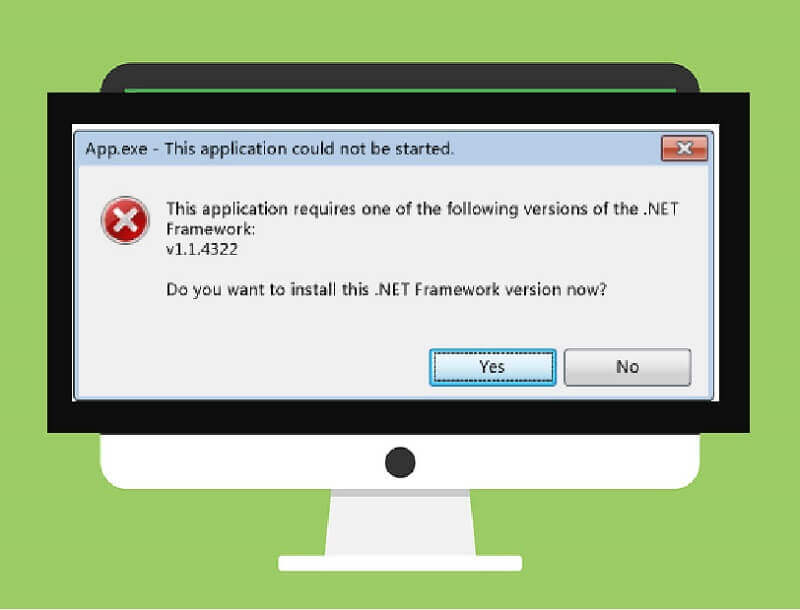
    One of the issues that most people usually encounter with their computers when installing a new program is the Microsoft .NET framework error.

    This error usually occurs when installing an application on a new computer or a computer that just had a new operating system installed on it.

    When Does .Net Framework Error Occur?

    The error occurs typically as the application being installed would be asking for an older version of the .NET framework software.

    This is when your computer runs a newer version of the software, which could be a .NET framework 4.0 or above. Most applications will request an older version of the software, especially the .NET framework 2.0 or above.

    Since Microsoft did not include the older version of the software on later devices, the error thus occurs.

    Sometimes this error can also occur if the .NET framework has been damaged. However, this issue can be resolved relatively quickly when it happens.

    In this article, we would show you some of the easier ways to solve the .NET framework error issue when it pops up while you are installing a new program on your computer.

    These solutions may not work for every computer, depending on the cause of the issue. However, trying out all the answers if one does not work could help solve the problem.

    How To Solve Microsoft .NET Framework Error

    a picture of microsoft .net framework error

    One of the easier ways to solve the .NET framework issue is when the application that you are installing provides an avenue to download the software during its installation.

    Some applications have been built to rectify the problem themselves when they sense that the .NET framework software is missing from the computer.

    It then automatically connects to the internet after giving it permission to download and install the .NET framework software.

    All you have to do is to have an internet connection that the application can use to download the software.

    Another way of solving the issue is to uninstall and reinstall the software. This is when you already know that you have the software on your computer.

    When this happens, it could be that the software has been damaged. Reinstalling it, in this case, usually solves the problem.

    Sometimes, reinstalling the software may not work. You would then have to use a .NET framework repair tool to fix the problem.

    Fortunately, you can download the repair tool software freely on the internet. You have to open the Google search engine on your browser and type ‘.NET framework repair tool download.’

    This would bring several results to you from where you can download the repair tool and install it on your computer to repair the .NET framework issue.

    One of the best recommended ways to solve this issue is to get the .NET framework software yourself to install onto the computer.

    Like most computer software, the .NET framework software can be purchased and then installed onto your computer.

    However, the good news is that you can download this software free of charge from the internet.

    You can get the software by opening the Google search engine and then typing in the name of the software version that you need and then clicking search. Several results will be available to you to choose from.

    Some sites may not work, so if you cannot get the software from the first site that you open, do not worry.

    Try the other search results as well. This usually happens when you are using a mobile smartphone to search for the software or use a budget browser to search for the software.

    Once you have been able to download the software, you then install it on your computer before installing the application that you needed to install.

    It is advisable to have an internet connection when installing the .NET framework software as it may want to download some components from the internet to aid with its installation.

    So these are a few ways through which you can solve the .NET framework issue when it appears on your computer. We hope that this article has been helpful.

    Also if you ever try loading a webpage and you find it not loading, then you can check out this article covering how to fix a webpage not loading.

  • How To Save WhatsApp Status On Your Phone Or Stop The Timer

    How To Save WhatsApp Status On Your Phone Or Stop The Timer

    Hello there once again. Welcome to my blog. Recently WhatsApp has introduced a new form of status that allows you to post a picture and a video available to your friends and disappear after 24 hours.

    This new form of status is exciting since you can let your friends see or know the mood you are in, and also, you can share funny short clips or inspirational videos.

    On this article, I am going to show you how to save WhatsApp status on the phone and how to stop the timer and watch that status.

    Saving WhatsApp Statuses

    So you don’t have to ask someone to send you a picture/video you viewed.

    1. Open your File Manager
    2. Press “option” key 》settings 》check “view hidden files.”
    3. Go back to the File Manager and scroll to the WhatsApp folder.
    4. Open the “Media” folder
    5. Usually, the first folder you should see is “.statuses.”
    6. That folder contains all the viewed statuses over the 24-hour period.
    7. Take note that they automatically delete themselves after 24hr.
    8. To save the viewed file for the future, move/copy it/them to another folder of your choice.

    To stop the status timer, press and hold the screen, and the timer will stop as soon as you remove your hand from the picture or video. Then the timer will continue.

  • How To Easily Recover Files From Formatted Sd Card

    How To Easily Recover Files From Formatted Sd Card

    There are many data recovery software available, but this particular data recovery software has been tested, mainly for SD cards. It helps you recover all types of files from your corrupted memory cards, be it videos or pictures, for free.

    If you have an SD card asking to be formatted or an SD card that is corrupt and not opening again, go ahead and format it without worrying.

    Here is how to do it.

    Formatted sd card recovery software free download:  Download and Install the SD Data Recovery Wizard Freeware from here for Windows EaseUS Data Recovery Wizard Free. And for Mac EaseUS Data Recovery Wizard Free.

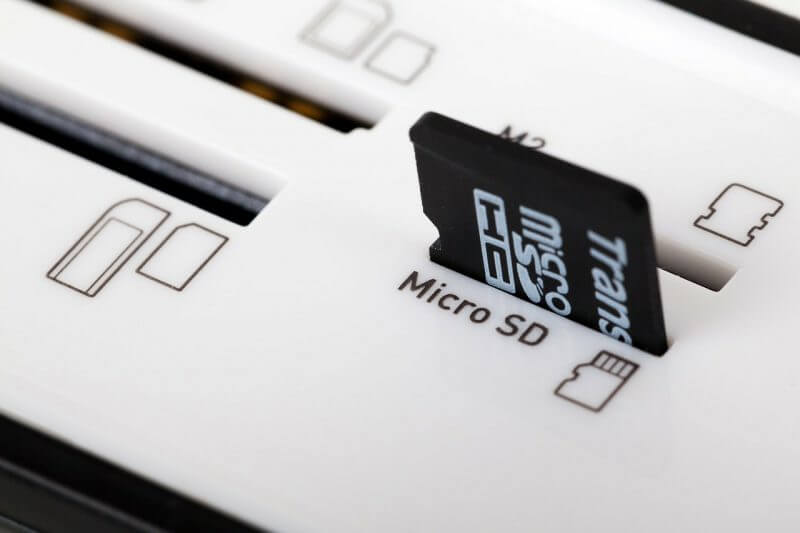
    1. Connect your SD card to your computer via any means. (SD Card Reader, SD Card port, etc.)
    2. Run the installed SD Card Recovery Wizard and select the file type to be recovered. Select all file types if you want to recover all data from the SD card.
    3. Next, select the disk name of the SD card. (make sure to confirm the disk from “My Computer”) and click Scan.
    4. After a scan has been completed, you can then preview the recovered files and see which file you want to recover.
    5. Select the files you want to recover and then click recover and wait to save the file on your computer.
  • How To Make Money On Social Media In Ghana

    How To Make Money On Social Media In Ghana

    The world is now living in a digital age where almost everything is run by technology. Individuals use technology.

    Businesses use technology to operate. Hospitals use technology. Sports use technology. Social media is a part of technology that has now become an inseparable part of people’s everyday lives no matter their country of residence.

    People use social media applications and sites such as Facebook, Instagram, WhatsApp, Twitter, Snapchat, Telegram, and others to connect and interact with their loved ones and friends.

    As technology keeps advancing with the progress of the world, social media has also advanced along with it.

    Social media is now used for a lot more activities than just connecting with friends and loved ones.

    Businesses now make use of social media to advertise their services and products to potential customers.

    Some of these businesses even conduct affairs right on social media and sell products and services to customers right on the Internet without having to meet the customers physically.

    Businesses now making use of social media to conduct business created yet another advantage for social media users.

    People are now able to earn money on social media through various means. Some are even earning a living on social media without having to sell anything at all.

    In today’s article, we are going to take you through some of the ways through which you could earn money on social media. This is viable for people who use social media heavily or people who spend the majority of their time on social media.

    The Best Social Media Channel To Make Money From?

    Instagram is undeniably one of the best social media platforms to make money from, and it’s a favorite among social media influencers, models, and the fashion industry.

    Instagram offers some of the most powerful tools for influencers compared to other platforms.

    While it’s advisable to maintain a presence on various social media sites if you’re serious about making a living through technology, Instagram is the number one platform you should prioritize.

    Following Instagram, YouTube is another significant platform for content creators.

    To embark on a successful social media career, you’ll need a substantial following, particularly on Instagram.

    Your followers are the foundation of your potential earnings in the social media world. Without an audience to view your posts, there won’t be any brands or individuals interested in hiring you to promote their products or services.

    Before you start thinking about monetizing your social media presence, it’s a good idea to build a following of at least a thousand engaged followers.

    These are the individuals who can help you turn your social media presence into a source of income. So, focus on growing your following and creating engaging content to attract potential business opportunities.

    How To Make Money On Instagram

    Gather Enough Followers

    When you have been able to gather enough followers on your Instagram account, the next step would be to indulge in activities that can monetize the following you have gathered.

    One way through which you can make money is to join a network of social media influencers.

    These networks are used to connect people to various brands based on the kind of following that the person has and the stuff that they post about.

    The people that follow you do so based on what you post. For example, if you are someone who posts a lot about weight lifting and gym workouts, then once you join an influencer network, brands that sell products or services related to weight lifting and gym workouts will then be able to locate you.

    One of the influencer networks that you could join is Brandwatch.

    Choose An Attractive Brand

    Becoming an attractive choice for brands as an influencer is closely tied to your engagement level with your followers.

    Brands often select influencers based on how effectively they can engage their audience. This means you need to be skilled at creating captions that encourage your followers to interact with your content.

    Your primary goal is to encourage your followers to like, tag, view, comment, and share your posts.

    This level of engagement not only enhances your relationship with your followers but also catches the attention of brands looking for effective influencers.

    In addition to creating engaging content, it’s crucial to make time to respond to your followers’ comments or, at the very least, like their comments when responses aren’t possible.

    This interaction fosters a sense of connection, making your audience more likely to trust your recommendations when you endorse a brand or product.

    Being a successful influencer requires effort and dedication, which is why not everyone can do it.

    By engaging with your followers, you not only strengthen your influence but also create a loyal and receptive audience that’s more inclined to try out the brands and products you recommend.

    Ask Your Friends To Engage In Your Posts

    Hosting giveaways is a fantastic way to motivate your followers to engage with your social media content. After all, who doesn’t love the opportunity to win free things?

    Giveaways can not only boost engagement but also increase the number of followers you have. When you run giveaways, you create excitement and incentives for people to interact with your content, share it, and encourage their friends to follow you as well.

    A great perk of giveaways is that they can be sponsored by brands that seek your influencer services. This means you may not have to bear the costs yourself, making it a win-win situation.

    The brand gains exposure, you boost your engagement and followers, and your audience has a chance to win something valuable.

    So, giveaways are an excellent strategy to build a lively and engaged community around your social media presence.

    Make Good Use Of Hashtags

    Using hashtags effectively can significantly impact the visibility of your social media posts. It’s advisable to include multiple relevant hashtags in each of your posts.

    Research has shown that using hashtags can boost engagement and increase the number of people who see your content.

    This, in turn, can lead to an increase in your followers, as individuals interested in your content may decide to follow you.

    To optimize your hashtag strategy, use a variety of relevant hashtags that relate to the content of your post. This broadens the reach of your posts and attracts a diverse audience.

    Another crucial aspect of building a successful social media presence is finding your niche. When trying to monetize your social media accounts, it’s essential to align with brands and partnerships that resonate with your values and the content you post.

    Don’t simply partner with any brand that offers money. If a brand’s values or products don’t align with yours, it’s wise to politely decline the partnership.

    Consistency is key when it comes to maintaining a strong bond with your followers. Regularly posting content that aligns with your niche and core values is crucial.

    Deviating from your usual content can lead to a decline in engagement and potential unfollows, as your audience might feel disconnected from your content.

    Making a living through social media is a journey that requires time and effort. It won’t happen overnight, and, like any other venture, it demands patience and continuous efforts to improve and engage your audience.

    The key is to remain persistent, stay true to your values, and seek innovative ways to connect with your audience.

    With dedication and a well-thought-out strategy, you can leverage your social media presence to achieve your goals.

  • How To Hide Your Private Files Inside Calculator App On Android Smartphone

    How To Hide Your Private Files Inside Calculator App On Android Smartphone

    At some point or another, we’ve all wished we knew how to make our media files private so that no one else could see them.

    Here I will show you how to conceal your files, meaning those that you would want the person who retrieves your phone not to see. Just follow these steps.

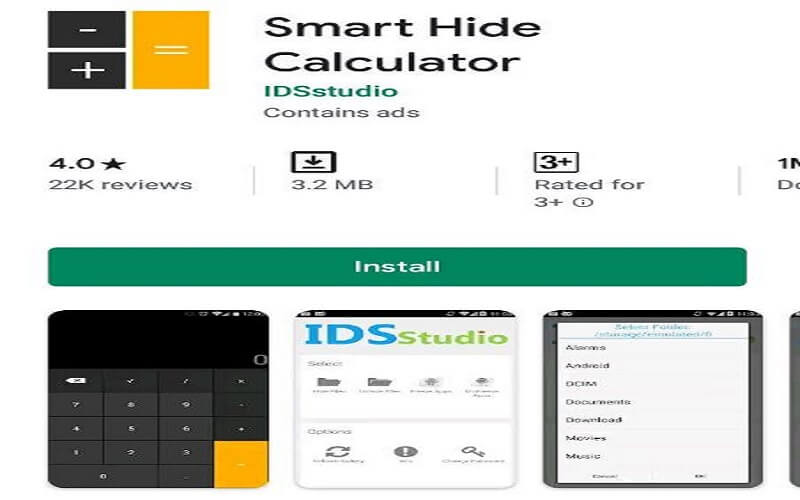
    • The first step is to get the Smart Hide Calculator app on your Android device. You can find it on Google Play.
    • Launch the app now; a password request will appear. To unlock or lock your private hidden files, you must set a Password that is both difficult to remember and reasonably complicated.
    • You and anybody else who gains access to your Android device will only be able to see the fully working Calculator app if you confirm the PasswordPassword.
    • Access the vault by entering the PasswordPassword and tapping the “=” button to begin using the app or adding your confidential files.
    • After that, type in your password and hit the “=” button. Like “Hide Files,” “Unhide Files,” Change Password, etc., the app will provide you with options.
    • Pick the drive, the folder, or specific files (films, music, photos, documents, etc.) that you wish to conceal, then click the Hide Files icon.
    • Once you hit the “Ok” button, your most sensitive documents will be safely tucked away in the world’s most reliable app: your calculator.

    To reveal the hidden files, navigate to the vault and use the “Unhide Files” option.

    Do not worry if you happen to misplace your PasswordPassword. To reset your password, press the master key combination 123456789+987654321.

    One of the most effective ways to conceal crucial Android files and folders is with the Smart Hide Calculator app.

  • How To Enable Screen Pining On Android

    How To Enable Screen Pining On Android

    One reason the majority of people use Android is the fact that it gives the user full control to explore every feature in it.

    Such as installing any Android app from any source, screen pining, changing your phone transition and if you are more into technology you can root the Android device you are using (at your own risk). 

    In this article, I am going to guide you on how to enable screen pinning on Android 8 and 9 Devices or any Android version.

    What Is Screen Pining? 

    Screen pinning is a feature in an Android phone that allows you to pin a specific screen on the phone screen, this keeps the other apps locked and can’t be operated, making the only pinned app function.

    This feature is very useful to people who give their phones to people. also if you are a parent and your kid wants to play a game on your phone, all you have to do is to pin that specific game and your kid can’t navigate anywhere except only play that game.

    The Practical Uses Of Screen Pinning

    Screen pinning serves various practical purposes, making it a valuable tool for Android users. Here are some scenarios where screen pinning comes in handy:

    1. Sharing Your Device: When you want to share your Android device with a friend or family member but don’t want them snooping around other apps or data, screen pinning allows you to lock the device to a specific app. For example, you can pin a game or a photo gallery, ensuring that the person using your device can only access what you permit.
    2. Guiding Children: As a parent, you may hand over your smartphone or tablet to your child for entertainment or educational purposes. Screen pinning allows you to pin an educational app or game, so your child doesn’t accidentally exit the app or stumble upon unsuitable content.
    3. Securing Sensitive Information: If you need to share your device temporarily with someone, like when seeking technical support, screen pinning ensures that your private information remains inaccessible. You can pin the screen to a specific app, allowing the technician to assist you without accessing your data.

    Enabling Screen Pinning On Your Android Device

    Before you can take advantage of screen pinning, you need to enable it on your Android device. Here’s how to do it:

    1. Go to your device’s Settings.
    2. Scroll down and select Security & Location.
    3. Keep scrolling until you find Screen Pinning and tap on it.
    4. Slide the toggle switch to turn the screen pinning ON.

    With screen pinning enabled you are now ready to pin specific apps or screens. Let’s explore how to do this.

    screen pining settings

    screen pining security

    screen pining step 3

    screen pining on

    screen pining overview button

    screen pining

    screen pining

    Pinning A Specific App

    Pinning an app is a straightforward process that ensures your chosen app remains in the forefront. Here’s how to do it:

    1. Navigate to the app you want to pin.
    2. Tap the Overview button on your Android device (usually the first control button).
    3. Among the open apps, select the app you wish to pin. For instance, if you want to pin the Photos app, make sure it is the currently running app.
    4. In the lower-right corner, you will see a pin icon. Tap on it.

    The selected app is now pinned, and your device is locked to it.

    Unpinning The App

    To unpin the app and return to normal device operation, follow these simple steps:

    1. Touch and hold both the Back button and the Overview button simultaneously.
    2. The app will be unpinned, and you can freely navigate your device as usual.

    In a world where privacy, security, and device control are paramount, Android’s screen pinning feature shines as a valuable asset.

    By following our guide, you’ve unlocked the power to harness screen pinning on your Android device, and in doing so, you’ve gained the ability to share your smartphone or tablet with confidence.

  • How to Know If Your Message Has Been Read on WhatsApp

    How to Know If Your Message Has Been Read on WhatsApp

    Hello and welcome to my blog. Have you ever been chatting with someone that you don’t see it ticking blue anytime you send a message to someone?

    You can send a message and believe the WhatsApp message read, but no blue tick makes you feel ignored.

    Then I’ve got you covered. In this article, I will show you how to know that your friend has read your message even if he or she has turned off read receipts.

    I know what I am going to teach many people will be vexed, but I apologize, I mean no harm, and to those whom this post will help too, I beg to show some love by sharing this post and subscribing to my blog. so let us get started

    Sending a message to someone and you could see that the message has been sent, you can see it ticked twice, but it doesn’t tick blue, you will start to wonder if the person has been away from his or her phone or he or she has been ignoring you, (this comes to your mind especially when there is a misunderstanding between both of you).

    The actual trick is they have Read Receipts turned off from their WhatsApp account privacy settings.

    The trick to know is easy. All you have to do is to send a non-lengthy voice recording to them.

    If they are with their phone, they might decide to play the voice and listen to what you recorded at their end. As soon as they download and listen, you will see the messages ticked blue indicating that they have read your previous messages.