Author: pro

  • This Is Why You Really Need A Bank Account And Not Just A MoMo account

    This Is Why You Really Need A Bank Account And Not Just A MoMo account

    The Mobile Money (MoMo) service has undeniably become an integral aspect of financial transactions, providing a convenient means for individuals to send and receive money regardless of geographical locations.

    Over the past decade, it has played a significant role in shaping the financial landscape of the country’s economy.

    While the popularity of MoMo has led some individuals to view it as a sufficient replacement for traditional banking services, it is crucial to recognize that MoMo, despite its numerous advantages such as bill payments, swift money transfers, and airtime acquisition, is not designed to substitute traditional banking.

    It is imperative to understand that the inception of the mobile money service aimed at facilitating transactions within the banking sector rather than supplanting it.

    MoMo should be perceived as a complementary feature within the banking industry, implemented to streamline and simplify financial transactions.

    Now, let’s delve into the reasons why the Mobile Money service was not introduced to replace the traditional banking system but rather to augment its capabilities and accessibility.

    With The Transfer Of The Huge Amount Of Money

    One notable limitation of the Mobile Money service is the daily transaction cap, restricting users to send a maximum of GHS 5,000 in a single day.

    Beyond this limit, individuals are required to split larger amounts, incurring additional charges for each segment of the sum transferred.

    For transactions of substantial sums, especially those integral to business purposes that necessitate the transfer of larger amounts without segmentation, the Mobile Money service may prove impractical.

    In such instances, traditional banking services emerge as the more viable option.

    Banks offer the flexibility to transfer nearly any amount of money, providing a seamless solution for transactions involving significant sums.

    The absence of stringent daily limits in the banking sector makes it the preferred choice for handling substantial financial transactions, ensuring efficiency and convenience, particularly in the realm of business dealings.

    You Can’t Request For Huge Amount Of Loans


    While many telecom companies now provide loan services on their mobile money platforms, these offerings typically cater to small amounts with a repayment period of one month.

    In scenarios where a substantial loan is required, such as clearing goods detained at the port due to financial obligations to port authorities, the loans available through mobile money services may not suffice.

    For significant financial needs like clearing goods at the port, where a substantial loan is imperative, turning to a bank becomes a more suitable and practical option.

    Banks are equipped to provide larger loans with more extended repayment terms, accommodating the specific financial requirements associated with substantial transactions and business operations.

    Mobile Money Limits

    The Mobile Money accounts, depending on the account type, are subject to limits on the amount of money that can be stored.

    While some accounts have a limit of GHS 10,000, others may allow for GHS 20,000.

    While these limits may appear substantial for individuals with modest incomes, they can become a constraint for those experiencing significant financial growth.

    For instance, if an investment in Kobocoin triples, resulting in a substantial increase in funds, the Mobile Money account proves insufficient due to these restrictions.

    In such scenarios, where financial gains surpass the limits imposed by mobile money accounts, opting for a bank account becomes imperative.

    Banks offer the advantage of unrestricted deposit limits, accommodating substantial sums of money, making them a more viable and secure option for managing substantial financial portfolios and investments. You can check out this guide to know how to increase your mobile money limit.

    International Transfers

    While mobile Money services often facilitate international money transfers, there are limitations on the amounts that can be sent.

    These restrictions contrast with the flexibility offered by banks, where individuals can send any desired amount internationally.

    The unrestricted nature of bank transactions makes them more suitable for substantial international transfers, particularly for significant financial transactions or business-related activities.

    In scenarios where the scale of the transaction surpasses the limits imposed by Mobile Money services, opting for a bank provides the necessary flexibility and convenience to meet the specific needs of the transaction.

    Safety

    A significant drawback of the Mobile Money service is the vulnerability to losing all funds in the event of forgetting the PIN or losing the phone associated with the account.

    In such unfortunate circumstances, the funds essentially become the property of the telecom provider.

    In contrast, banks offer a more resilient security structure. If a client forgets their PIN or encounters a similar issue, banks typically employ identity verification methods, such as using the account holder’s name during the account opening process.

    This allows for account access without the risk of losing funds entirely.

    The added layer of security and recovery options provided by banks ensures more robust safeguarding of financial assets, mitigating the risk of permanent loss due to PIN forgetfulness or phone loss.

    Conclusion

    As you can see, these are some concrete reasons I have given you. And no, the banks are not paying me anything to convince you.

    Just read more articles so I can keep educating you. That’s how I make my money. 

  • The Best Telecom Networks In Ghana? Find Out Our Top Picks

    The Best Telecom Networks In Ghana? Find Out Our Top Picks

    When considering the top telecom services in Ghana, names like MTN, Vodafone, and Airteltigo often take the spotlight.

    Each of these telecom networks possesses distinct advantages, making it challenging to single out one as the absolute best.

    Acknowledging that none of these networks is flawless in service delivery, it becomes essential to focus on the specific areas where each excels over its competitors.

    Rather than searching for the overall best telecom network, the key lies in identifying the one that dominates in the areas relevant to your usage preferences.

    In this article, we’ll spotlight MTN, Vodafone, and Airteltigo—the foremost telecom companies in Ghana—to outline their respective strengths.

    By understanding their unique advantages, readers can make informed decisions based on their specific needs.

    The prevalence of dual SIM capabilities in smartphones underscores the importance of having choices, allowing users to leverage the strengths of different networks simultaneously. Let’s delve into the details.

    MTN Ghana

    mtn logo

    MTN often faces criticism from users regarding issues such as poor call quality and swift depletion of data bundles and airtime.

    While other networks, like Airteltigo, offer more longevity for certain usage patterns, MTN has maintained one of the largest customer bases in Ghana primarily due to its pioneering mobile money service.

    Being the first to introduce mobile money in Ghana, MTN’s service has become the most widely used in the country.

    Many individuals maintain an MTN SIM specifically for mobile money transactions. Despite the introduction of similar services by other networks, MTN’s mobile money remains a frontrunner.

    The MTN mobile money service stands out for its speed, flexibility in loan services, and widespread accessibility throughout Ghana.

    If your priority is a telecom network with robust mobile money services, MTN Ghana would be a suitable choice.

    Vodafone

    vodafone-Ghana

    Although MTN Ghana beats Vodafone Ghana in terms of the mobile money service, Vodafone gets one back with their data bundles.

    This is because data is very important to smartphone users. Without data, you will not be able to browse and download from the internet.

    Vodafone has by far the cheapest data bundle prices among the telecom networks in Ghana.

    With the ‘made4me’ plan, you can get 5 GB of data for just GHS 5.50. This is by far the cheapest in Ghana at the moment. 

    Here are the prices of some of their data bundles which are the cheapest in all of the telecom companies.

    • 300MB for GHS 2 for daily use
    • 400MB for GHS 2.15 for daily use
    • 1.5GB for GHS 3.25 for daily use

    So if you are looking for the best network in terms of data bundle prices, then Vodafone Ghana is the telecom network you are looking for.

    AirtelTigo

    airteltigo

    In the realm of calls and SMS services, AirtelTigo emerges as the preferred telecom company.

    Renowned for offering some of the best call packages, the company provides subscribers with attractive call bundles, including options for international calls.

    Whether for personal or business communication, AirtelTigo stands out for its comprehensive and competitive call services.

    A notable feature is the absence of expiry dates on call bundles, allowing users the flexibility to utilize them at their convenience.

    AirtelTigo offers these bundles at appealing prices, ranging from GHS 2 to GHS 15, and includes accompanying data bundle packages.

    Additionally, AirtelTigo boasts one of the top browsing networks in Ghana. While occasional slowdowns may occur due to weather conditions, the overall browsing experience is highly regarded, making AirtelTigo an excellent choice for both calls and SMS charges in the country.

    Conclusion

    This article highlights that each telecom company in Ghana excels in specific areas, attracting users who value services in those particular domains.

    As such, determining the “best” network becomes subjective, and the choice ultimately depends on individual preferences and priorities.

    Rather than seeking the overall best network, it is advisable to select the one that aligns with your specific needs and preferences, ensuring a tailored and satisfactory telecom experience. 

  • Trying To Restore Backup From Your MTN Backup? Here Is How To Go About It

    Trying To Restore Backup From Your MTN Backup? Here Is How To Go About It

    Restoring your contacts is a crucial task, especially when using MTN Ghana, where they emphasize the importance of regular backups.

    If someone else has already performed the backup for you, and now you’re looking to retrieve your contacts, this article will guide you through the process.

    Before delving into the restoration process, let’s first understand the service we’re discussing for those who might be unfamiliar with it.

    Once we have a clear understanding, we can proceed with the step-by-step guide on how to restore your contacts on the MTN Ghana network.

    What Is The Mtn Backup Service?

    The service provided by MTN Ghana to back up contacts is a valuable feature for subscribers. It ensures the security of contacts by storing them on the cloud, safeguarding against potential loss in case of mobile device issues.

    This option provides a convenient means for MTN Ghana users to restore their contacts to their SIM cards whenever necessary. Now, let’s proceed with the steps to restore your contacts using this service.

    Backup Requirements

    To utilize the MTN backup service for contacts, there are specific requirements that need to be met. Firstly, ensure that you have a 128k SIM card, as SIM cards with lower capacities may not support the backup service.

    Additionally, the device used for backup should be manufactured by one of the following: Samsung, Lenovo, Xiaomi, Vertu, Nokia, LG, Alcatel, Motorola, Panasonic, Sony, Meizu, or ZTE. Meeting these requirements will enable a smooth and successful contact backup process.

    Starting The Backup Process

    Here is how to restore the contact on your mobile device. There are two processes through which you can do this.

    You can activate the MTN Backup service either through customer care or through the MTN menu on your mobile device.

    1. First, to activate it through customer care, call the MTN 100 line and then choose nay Ghanaian language of your choice to transact in
    2. Choose 5 so that you will be connected to an agent
    3. After the agent takes your call, explain to him or her that you want to activate the backup service on your device and listen to what the agent will say
    4. After it is done, you will be sent a message alerting you that the service has been activated on your phone. Anytime a backup is done, you will receive a message to notify you.

    Activating Through The SIM

    1. Go to your phone menu and select my MTN
    2. Choose ‘MTN backup’
    3. Choose ‘synchronize from the list that comes
    4. You will be notified that the activation has been successful
    5. Click on ‘ok’ and then wait for a while
    6. A payment confirmation will be sent to you. Enter the PIN of your mobile money wallet
    7. Now choose option 1

    Restoring Contacts

    When trying to restore the backup contacts to your mobile device, there are some simple steps to follow. 

    1. You will have to visit the MTN backup portal online
    2. After you have accessed it, go to the devices menu on the MTN backup menu and then check. Check to see the last device that was used to make the backup.
    3. Now choose the new one which you would like to restore the backup contacts onto
    4. Now select ‘sync now
    5. You will be sent a message that the synchronization is in progress.
    6. Click on ‘continue’ and then wait for it to complete
    7. After it has been completed, you will then see that all the backup contacts have been restored to the device you are holding. In this way, you will be able to keep all your contacts safe.

    FAQS

    Are payments to be made when I backup my contacts?

    The MTN backup is not free as it comes with some small charges. You will have to pay an amount of GHS 0.65 when you start the service on your mobile device. You will be making this payment every month through your mobile money wallet.

    How many contacts can I back up on the MTN backup service?

    You can backup a total of 200 contacts from your SIM card and another 5000 from your mobile onto the service for safekeeping.

    Conclusion

    Restoring your contacts through the MTN backup service is a quick and straightforward process, ensuring that you retrieve all your contacts effortlessly onto your new device without any loss.

    To initiate the service, simply activate it on your mobile phone. The service will then automatically back up your contacts every two weeks, ensuring that all newly added contacts are securely saved.

    This feature is particularly beneficial for individuals who may forget to back up their contacts regularly, providing an automated and reliable solution for contact security.

  • Nasco Fridges Prices In Ghana

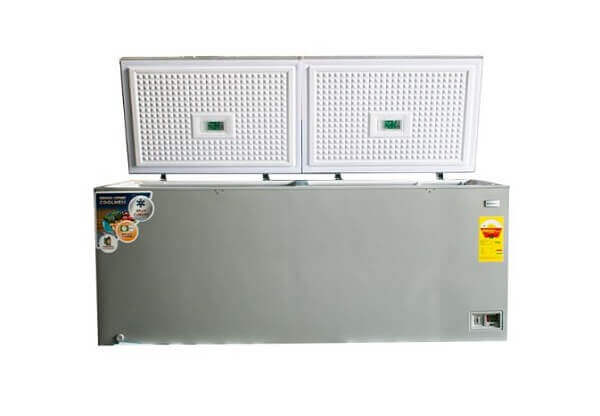
    Nasco Fridges Prices In Ghana

    It’s crucial to make informed decisions when investing in appliances like fridges, especially considering the specific conditions and fluctuations in power supply.

    Nasco has indeed gained a reputable standing in Ghana for providing quality electronic appliances, and their fridges are highly sought after.

    When considering purchasing a Nasco fridge, it’s important to acknowledge not only the brand’s reputation but also the range of features and designs they offer.

    Nasco is known for its energy-efficient appliances, a crucial factor in regions with occasional power fluctuations.

    The elegant and attractive designs of Nasco fridges add to their appeal, making them not just functional but also aesthetically pleasing.

    The article rightly emphasizes the importance of being well-informed about the prices of Nasco fridges, aiding potential buyers in setting realistic budgets.

    Nasco Fridge Features

    The refrigerators we offer boast numerous commendable features, distinguishing them as cost-effective alternatives compared to many competitors in the market.

    Additionally, they exhibit remarkable energy efficiency. It’s not often one encounters a refrigerator that is both economical and energy-conscious in a single purchase. This rarity sets our products apart in the market.

    Types Of Nasco Fridges

    Nasco fridges also come in several types. We have the 

    1. Side-by-side fridge
    2. Top freezer fridge
    3. Bottom freezer fridge
    4. Double door 
    5. Tabletop fridge

    Nasco Fridge Prices In Ghana

    Let us now take a look at the various prices of the fridges so that you can be on your way to shopping. Below are the prices of some of the fridges from Nasco.

    FridgePrice
    Nasco 600 LTR side-by-side premium fridgeGHS 3,899,00
    Nasco 528 LTR side-by-side fridgeGHS 4,299,00
    Nasco 528 LTR side by side fridgeGHS 4,799,00
    Nasco 198 LTR top mount fridgeGHS 1,399,00
    Nasco 99 LTR double door fridgeGHS 949,00
    Nasco 135 LTR top mount fridgeGHS 1,299,00
    Nasco 90 LTR double door fridgeGHS 829,00
    Nasco 140 LTR top mount fridgeGHS 949,00
    Nasco 200 LTR top mount fridgeGHS 1,199,00
    Nasco 70 LTR table top fridgeGHS 649,00
    Nasco 98 LTR table top fridgeGHS 699,00

    Conclusion

    As you can see from the list above, Nasco fridges are one of the cheapest in the country if you look at the kind of features and quality that they come with.

    So now that you know about the Nasco fridges and their prices in Ghana, it is time to get up, get in your car, and go do some electrical shopping.

    I advise you to go along with a pickup truck to transport the fridge back home. You can also check out Hisense fridge prices and Midea fridge prices and then decide on which one you want to buy.

  • Look Out For These Things Before You Buy A Used iPhone In Ghana

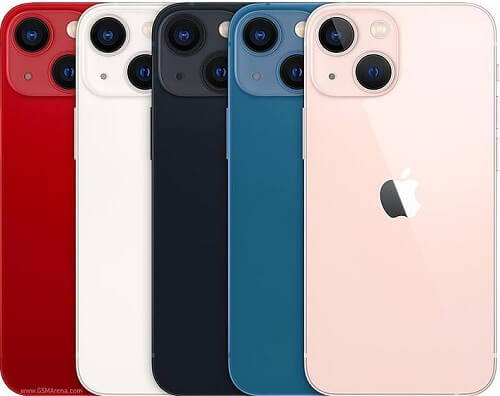
    Look Out For These Things Before You Buy A Used iPhone In Ghana

    The iPhone, crafted by Apple, stands among the most globally acclaimed smartphones, sharing the spotlight with Samsung.

    In Ghana, the perception persists that owning an iPhone is synonymous with affluence, given its reputation as a premium and relatively expensive gadget.

    As a result, a significant number of individuals aspire to acquire an iPhone once their financial means allow. Recognizing the hefty price tags on new iPhones, many opt for pre-owned devices that are more budget-friendly.

    However, before finalizing the purchase of a used iPhone, it’s crucial to be mindful of certain considerations.

    In this article, we’ve outlined key factors to scrutinize before making your investment in a pre-owned iPhone.

    Battery

    Given that a new phone doesn’t come with 100% battery health, it becomes crucial to assess the battery condition before making a purchase.

    The prior owner may have used the iPhone extensively over the years without replacing the battery, leading to a potential weakening of its capacity by the time it hits the market for resale.

    To evaluate the strength of the battery, utilize a feature within the phone that provides insight into its health status.

    A battery health percentage of 80% and above signifies a satisfactory condition, ensuring that the battery can still perform effectively at that level of health.

    This assessment is a prudent step to ensure the overall longevity and performance of the device.

    Locked Or Unlocked?

    iPhones come equipped with a distinctive feature designed to thwart unauthorized access in case of theft.

    They are categorized into factory-unlocked, locked, and temporarily locked iPhones. Despite these security measures, certain software developers have devised methods to bypass these locks, presenting potential vulnerabilities.

    When purchasing an iPhone, it’s crucial to understand the distinction between factory-locked and other locked categories.

    If opting for a factory-locked iPhone, ensure the accuracy of this classification during the purchase process.

    Given the intricate nature of iPhones, one effective method to confirm if an iPhone is factory-locked is by initiating a reset.

    If, after resetting, you regain access to all the features, it affirms that the iPhone is indeed factory-locked and secure.

    Size Of Memory

    The iPhone’s memory size is a crucial factor to consider, ranging from 16GB to 512GB. When specifying the iPhone model you desire, it’s imperative to verify the memory size before completing the purchase.

    Ensure that the seller demonstrates the specified memory capacity within the phone’s settings, providing you with concrete confirmation and safeguarding against any potential misinformation or deception.

    This proactive approach ensures a transparent and trustworthy transaction.

    Check The Other Features

    Prioritizing the verification of all iPhone features is essential, and there is no specific order for this examination.

    However, when dealing with higher-end models such as the iPhone X to 12 Pro Max, it is advisable to start by checking the functionality of the Face ID, given the absence of a home button on these models.

    Conversely, the lower models, equipped with a home button, feature the Touch ID. Ensuring the proper operation of these biometric authentication methods is crucial, as they play a pivotal role in determining your access to the phone, particularly if it becomes locked.

    Adopting a comprehensive approach to inspecting all features safeguards against potential issues and ensures the device’s overall functionality.

    Is It Original?

    You should also make sure that you are buying an original phone. With the iPhone, you can check to see if it is original or not. 

    1. Go to the settings
    2. Select ‘general’
    3. Select ’about’

    Upon receiving the phone, take note of the model, serial number, and model number. To verify the authenticity, copy the serial number and conduct an online search, typically on Google, to confirm its originality.

    Once the search results confirm its authenticity, you can proceed with confidence, ensuring that you are acquiring an original and genuine iPhone.

    This extra step provides an added layer of assurance in the authenticity of the device you are purchasing.

    Conclusion

    Thoroughly inspecting all features and functionalities, along with additional checks, before finalizing a purchase is crucial. Unfortunately, some sellers may attempt to sell faulty phones, only to later deny any issues once the transaction is complete.

    By diligently examining the phone’s performance beforehand, you safeguard against such situations, ensuring that you acquire a fully functional and reliable device from the outset.

    This proactive approach enhances the transparency and integrity of the purchasing process.

    Make sure not to fall victim to such scams by always checking these before you buy. If you do not know much about iPhones, ask someone who already uses one to go with you on the purchase.  

  • Think Your Whatsapp Is Being Spied On? Here Is How To Detect It

    Think Your Whatsapp Is Being Spied On? Here Is How To Detect It

    Various motivations might lead someone to attempt to hack into your phone and spy on your WhatsApp conversations.

    A technologically adept, jealous lover suspecting infidelity or a mischievous individual seeking access to sensitive chats or media are just a couple of potential scenarios.

    Despite WhatsApp’s claim of end-to-end encryption, it’s important to recognize that this doesn’t render it entirely immune to hacking attempts.

    Given WhatsApp’s status as the world’s largest messaging app, skilled hackers may concentrate their efforts on developing programs to spy on it, surpassing its encryption measures.

    While the prospect of someone spying on your WhatsApp conversations exists, there’s no need for immediate alarm.

    You can take steps to safeguard your privacy and chat with peace of mind. Notably, breaking into WhatsApp involves significant resources due to its high-level security.

    Any potential hacker must first gain access to your device to install the spying tool.

    It’s crucial to comprehend that without device access, spying on your messages is impractical unless someone physically observes your chats.

    This underscores the importance of not sharing your devices, particularly if you store private information on them.

    Refraining from lending your phone to others is a proactive measure to mitigate the risk of unauthorized access to your WhatsApp conversations.

    Signs Your Phone Has Been Hacked

    Here are some ways to detect if someone has been able to gain access to your account. People who allow other people to have access to their phones should make these checks as soon as people.

    High Temperatures 

    An abrupt increase in your device’s temperature could signal the presence of a spying tool. Many of these applications demand substantial energy resources, often resulting in elevated temperatures within the device.

    Monitoring the temperature of your device can serve as a potential indicator of unauthorized activities. If you notice an unusual and persistent rise in temperature, it’s advisable to investigate further to ensure the security of your device and the integrity of your data.

    Regularly checking for such anomalies can be a proactive measure to detect potential security threats and take appropriate actions to safeguard your privacy.

    Battery Drainage

    Monitoring your battery life can serve as another method to detect the presence of a spy app on your device.

    Spy apps often operate in the background, consuming additional resources and putting a strain on the battery.

    If you observe a sudden and significant decrease in your battery life, it could be an indication that a spyware application is actively running on your device.

    Spyware tends to utilize various functionalities, including accessing your device’s location and using data, contributing to increased energy consumption.

    Being attentive to unusual battery drainage patterns is a valuable practice in identifying potential security threats.

    If you suspect spyware, it’s advisable to investigate further and take necessary measures to secure your device and protect your privacy.

    Regularly assessing your device’s performance can contribute to the early detection of any suspicious activities.

    Data Usage

    Spyware apps can lead to faster depletion of your data than usual, as they actively use it to transmit stolen information from your WhatsApp to the hacker.

    This unauthorized data usage not only accelerates data consumption but also poses a risk of downloading third-party apps without your consent.

    If you observe a rapid depletion of your data, especially when not actively using your device, it raises suspicions of potential spyware.

    Monitoring your data usage patterns and being vigilant about unexpected data consumption can help in identifying and addressing security concerns.

    Taking prompt action to investigate and mitigate such issues is crucial to maintaining the security and privacy of your device.

    Background Noise

    Unusual noises or interference during phone calls can be indicative of potential spyware. Spyware may compromise the integrity of your calls, allowing unauthorized access to listen in on your conversations.

    If you consistently hear unexpected noises, echoes, or other disturbances during calls, it’s advisable to investigate further for the presence of spyware.

    Ensuring the security of your communication is essential, and promptly addressing any suspicious activities can help safeguard your privacy.

    Regularly monitoring call quality and being attentive to unusual sounds during conversations are proactive measures in detecting and mitigating potential security threats on your device.

    How Your WhatsApp Can Be Hacked

    Here are some of the ways through which your WhatsApp can be hacked. 

    Whatsapp Web

    Certainly, Emmanuel. The feature you are referring to is called WhatsApp Web, an extended functionality of WhatsApp that facilitates chatting on your computer.

    To enable this, you connect your computer to your phone by scanning a QR code displayed on the computer screen.

    This feature provides users with the convenience of accessing their WhatsApp conversations through a dedicated application. If you have any further questions or need clarification, feel free to ask.

    Backup File

    Once a hacker gets to access your phone, they can access your backup file by going to the file manager. They can then transfer it to their device and look at it. 

    Apps

    Some apps can be used to spy on your phone. All the person has to do is to get access to her phone and then plant the app on it.

    How To Protect Your WhatsApp And Your Device

    1. Always make sure that your phone is locked. Never type the lock code in the full glare of someone who lives with you
    2. Always make sure that you log out of WhatsApp Web on your computer
    3. Never connect to any wifi that you do not know. Always connect to the ones whose sources you know
    4. Do not install apps from just anywhere from Google. This should be taken seriously. If you do that a lot, please stop
    5. Never let anyone have access to your phone out of your sight. Always look at what they are doing and take your phone as soon as they finish
    6. Use the two-step verification on WhatsApp

    Conclusion

    It’s really important to be careful with your WhatsApp to keep it safe. The best way to stop anyone from hacking you is to not let people use your phone.

    You don’t have to be a tech expert to hack someone. They can put a spying program on your phone and give it back to you. So, it’s a good idea to never let others use your devices.

    If you want more advice or information about keeping your things safe, just ask!

     You can also check out how to know if someone has accessed your Facebook account.

  • Here Is How To Borrow Airtime From The Various Telecom Networks

    Here Is How To Borrow Airtime From The Various Telecom Networks

    In situations where you find yourself in an unfamiliar place and your airtime is depleted while seeking directions or, perhaps, when visiting your crush’s parents and there’s no immediate access to purchase airtime, knowing the codes for borrowing airtime becomes crucial.

    Assuming you’ve preemptively read this article, the solution to your dilemma is at hand. Allow me to guide you through the codes necessary for borrowing airtime from your service provider.

    Fortunately, leading telecom companies now offer the convenience of borrowing airtime, which you can repay with a modest interest when you next top up.

    The following sections will outline the borrowing procedures for some of the prominent telecom companies in the country, ensuring you are well-equipped to handle such situations.

    Stay tuned to learn the steps for airtime borrowing and safeguard yourself from unexpected communication hitches.

    How To Borrow Airtime From MTN

    mtn
    1. Dial *506#
    2. Select the amount of airtime that you would like to borrow from the list that pops up
    3. If the available amount is too high then you can choose ‘request advance options’ and choose lesser options there

    You can also borrow a bundle by choosing the data advance below

    After selecting the one you want, you will then be credited with the borrowed airtime and a notification will show you how much you will pay when you top-up, if you request for MTN quick loan and you don’t qualify, click here to check out why you do not qualify.

    Borrowing Airtime From Vodafone

    vodafone-Ghana

    Acquiring airtime from Vodafone is a straightforward process. During a call when your airtime is depleted, you will receive a prompt instructing you to press 1 for SOS airtime.

    To efficiently manage and select the desired amount of airtime, it is recommended to terminate the call and dial *505#.

    This allows you to navigate the options and specify the precise amount of airtime you require.

    It’s important to note that eligibility levels may influence the ability to manually select the airtime amount.

    In instances where such eligibility is lacking, the system will automatically credit your account with an appropriate amount.

    Borrowing Airtime From AirtelTigo

    airteltigo

    Securing airtime from AirtelTigo is a convenient process. Simply dial *558# and await the credited amount.

    The amount credited is contingent on your eligibility level, with a higher level resulting in a GHS 5.00 airtime allocation.

    AirtelTigo allows for consecutive borrowing up to three times before reaching the borrowing limit.

    It’s noteworthy that each successive borrow will yield a diminishing amount compared to the previous one.

    Following this, borrowing is only permitted after settling the outstanding balance.

    Borrowing Airtime On Glo

    1. Just dial *5321#
    2. Select the amount that you wish to borrow. You cannot borrow if your SIM is too new, below 3 months old
    3. Press on 1 to confirm the transaction

    Conclusion

    Acquiring airtime from these telecom companies is a straightforward process. However, a crucial aspect to emphasize, particularly for MTN users, is the importance of timely repayment.

    While the borrowing process is user-friendly, adhering to the repayment timelines is essential, especially when utilizing MTN services.

    Timely repayment ensures a smooth and continuous borrowing experience while maintaining a positive relationship with the telecom provider.

    Responsible borrowing practices contribute to a seamless and reliable communication experience.

    You can also check out MTN call packages, Vodafone shortcodes and Vodafone made4me bundles.

  • How To Partition Your Windows 10 Hard Drive

    How To Partition Your Windows 10 Hard Drive

    Hard drive partitioning involves dividing the storage space of a computer’s hard disk into distinct sections, offering several advantages to the system owner.

    By partitioning the hard drive, users can allocate space for crucial file backups on one partition, while the other partition serves for the temporary storage of Windows files and installed programs.

    There are two primary methods for partitioning a drive. The first involves utilizing the built-in ‘Windows Disk Management Tool,’ which provides a native solution for this purpose.

    Alternatively, users can opt for third-party applications such as Easeus Partition Master, GParted, or Mini Tool Partition to perform the partitioning.

    Despite the availability of third-party tools, it is recommended to use the Windows partition tool for this task.

    Leveraging the native Windows tool ensures compatibility and stability, reducing the potential risks associated with external applications. This approach simplifies the partitioning process while maintaining system integrity.

    How To Partition Your Windows 10 Hard Drive Using Windows Tools

    Follow the steps below to partition your hard drive using the Windows tools. The steps described below can be used to partition for Windows 10, 8, and 7.

    1. Click on the file explorer on the taskbar
    2. Click on ‘this PC’ which can be found on the left navigation panel
    3. From the menu that appears, click on ‘Manage’ to open the computer management window
    4. Click on ‘Disk management
    5. Now right-click on the disk that you want to partition
    6. Choose the shrink volume from the drop-down menu
    7. Input the amount of space that you want to shrink or partition in MB 
    8. Click on ‘shrink’ and then wait as Windows creates the partition
    9. After the partition has been completed, you will be able to see the new unallocated space
    10. Right-click on the unallocated space and then choose ‘new simple velum’ from the menu that drops down.
    11. Follow the instructions until the new volume is created

    After the creation is complete, your hard drive will now have a new partition. You can use that to back up your most needed files

    Using Third-Party Apps 

    While it is possible to use third-party applications such as Easeus Partition Manager, GParted, and various others for hard drive partitioning, it is not the recommended approach.

    Despite the availability of these external tools, we advise utilizing the Windows partition manager, which is a native feature designed for this specific purpose.

    The Windows partition manager is an integrated tool created to ensure compatibility and system stability during the partitioning process.

    Although third-party apps may offer similar functionalities, relying on the native Windows tool reduces the potential risks associated with external applications.

    For optimal performance and reliability, it is recommended to leverage the features provided by the Windows operating system for hard drive partitioning.

    Benefits Of Creating A Partition

    1. Keeps your important files safe
    2. Allows for easy re-installation of Windows operating systems
    3. Can install and run multiple operating systems on the computer easily without many fuses
    4. Simple backups
    5. Improves PC security

    Conclusion

    As delineated in the article, the process of creating a partition is characterized by its simplicity, requiring a manageable level of effort.

    The inherent benefit of this procedure lies in its capacity to ensure the safety and security of your most vital files.

    By designating a specific segment of the hard drive to house essential data, you fortify the organization and protection of critical information.

    This pragmatic approach significantly contributes to the overall management and security of your digital assets. 

    Check out our recent articles:

  • All You Need To Know About The DSTV Remote, Resetting, And Programming

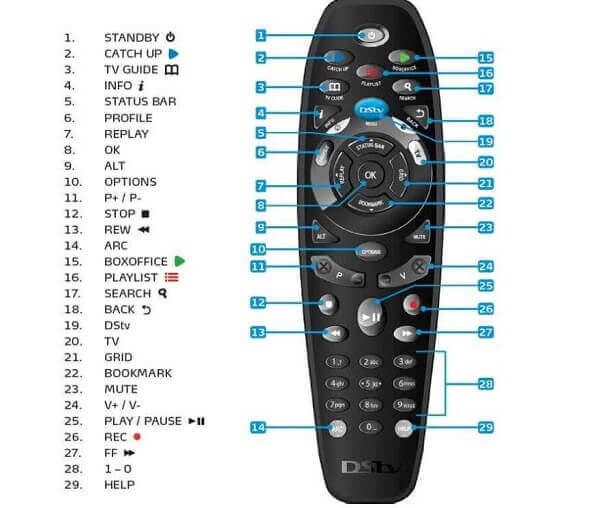
    All You Need To Know About The DSTV Remote, Resetting, And Programming

    It is reasonable to assume that a significant portion, approximately 60%, of the Ghanaian population possesses at least one DSTV decoder in their household.

    Consequently, these households are equipped with at least one DSTV remote control.

    In a previous article, we delved into troubleshooting common issues affecting the remote control and provided solutions.

    Building upon that, it is essential to explore additional aspects of the DSTV remote to optimize its functionality, ensuring an enhanced experience of the diverse entertainment offerings associated with owning a DSTV subscription.

    This article aims to shed light on often overlooked features and practices related to the TV remote.

    By delving into these aspects, readers can glean valuable insights to maximize their enjoyment of the extensive entertainment options provided by DSTV.

    Without further ado, let’s delve into the intricacies of the DSTV remote to empower users with a comprehensive understanding.

    Connecting Your DSTV Remote To The Decoder

    If you’ve recently acquired a DSTV decoder and managed the installation independently, you may find yourself well-versed in setting up the satellite dish but uncertain about connecting the remote. Let’s explore the process of connecting the remote to the decoder.

    The connection between the remote and the decoder involves selecting one of three options: TV1, TV2, or TV3. This choice is pivotal, especially when troubleshooting an unresponsive remote.

    To adapt the DSTV Explora remote to specific needs, it’s crucial to understand how to switch between TV1, TV2, or TV3 settings.

    This flexibility allows users to configure the remote according to the specific requirements of the moment.

    Whether it’s TV1, TV2, or TV3, the ability to adjust the remote settings ensures seamless functionality and addresses any issues related to unresponsiveness.

    Let’s delve into the steps to make this essential configuration for an optimal user experience.

    How To Set The Remote

    If you do not know how to set the remote under either of the above-mentioned TV settings, here is how to go about it.

    All you have to do is to press and hold the needed button for about three seconds until you see the green light blinking on the designated TV. For example, on TV1. 

    If you happen to see that the green light is blinking below the ‘Back’ button, then it means that the remote is set to TV2 mode.

    Pressing and holding the ‘Back’ button for three seconds. The green light will then blink on TV2.

    If you wish to set the remote to work under TV3, the procedure is quite simple as well but requires a bit more than the earlier ones.

    You will have to press and hold the ‘back’ button and the ‘I’ button together for three seconds. 

    DSTV Troubleshooting Colors For Remote

    These are the various colors for troubleshooting the remote of the DSTV decoder. Here are the various colors. 

    • Mode 1, TV2- red
    • Mode 2, TV2- green

    Setting Up The DSTV A7 Remote

    The programmable nature of the DSTV remote enhances its usability with the decoder, allowing users to effortlessly switch the remote between different decoders.

    However, there are instances where errors during the setting process can result in the remote functioning incorrectly, akin to a broken remote.

    In such cases, it becomes necessary to reset the remote to its default settings, undoing any inadvertent changes made during the programming process. Resetting the programming on the A7 remote serves as an effective solution, systematically clearing out any errors and restoring the remote to its initial, default configuration.

    This simple yet crucial step ensures the smooth and error-free operation of the DSTV remote, contributing to a hassle-free and enjoyable viewing experience.

    Let’s explore the steps involved in resetting the programming on the A7 remote for optimal functionality.

    How To Reset The DSTV Remote

    Since you now know that you need to reset the DSTV remote before you can correct the mistakes that have accumulated on it, you will have to do exactly that.

    Let us look at the ways through which you can reset the remote.

    1. Hold down the ARC and the standby button together for about three seconds. The remote will change to an amber color while you are doing this
    2. While you are still pressing the ARC button, release the standby button
    3. Now dial in 9499 while you are still pressing the ARC button. There will be three green blinks of the light
    4. Now, just release the ARC button and the process will be complete

    Setting Up DSTV Link 

    Here is how to set up the link between your remote and the TV.

    1. Press on the menu button
    2. Choose advanced options
    3. Enter the PIN as 9499
    4. Now, select equipment setup
    5. Choose TV link/ auxiliary in option 3
    6. Select ‘on’
    7. Now save the option you just chose
    8. And the press ‘ok’ to finish

    Conclusion

    With the provided insights, configuring your DSTV remote becomes a straightforward task that you can accomplish independently.

    By understanding the process of connecting the remote to the decoder, switching between TV settings, and resetting the remote when necessary, you empower yourself to manage these tasks without the need for expert assistance.

    This self-reliance ensures that you can enjoy your DSTV experience with confidence, knowing that you have the know-how to troubleshoot and optimize the functionality of your remote.

    Should you encounter any challenges along the way, these guidelines serve as a reliable resource to navigate and resolve potential issues. Happy viewing!

  • DSTV Packages In Ghana, Subscription Prices And More

    DSTV Packages In Ghana, Subscription Prices And More

    For those seeking an optimal television viewing experience with access to a diverse range of programs, DSTV stands out as a prime choice.

    In this article, we will explore the various packages offered by DSTV, along with their corresponding subscription prices.

    DSTV provides a plethora of packages, each accompanied by its unique subscription rate. Users can choose from the three available packages based on their preferences.

    One notable feature is the flexibility to switch between packages at will, allowing subscribers to tailor their viewing experience according to their evolving preferences.

    In Ghana, DSTV is particularly popular for offering access to a variety of foreign channels showcasing top-tier content.

    Notable channels such as La Liga, the English Premier League, CNN, Supersports, BBC, Bundesliga, and more are part of the DSTV lineup, catering to diverse interests and preferences.

    Whether it’s sports, news, or entertainment, DSTV offers a comprehensive selection to enhance the television viewing experience for subscribers.

    Packages And Channels

    Ghanaians have the option to select from six distinct subscription packages currently offered by DSTV.

    Among these, the premium package holds the highest position with a monthly rate of GHS 330, offering an extensive range of channels and premium content.

    On the other end of the spectrum, the most budget-friendly package is priced at GHS 40 per month, ensuring accessibility to quality programming at a more affordable rate.

    This diverse range of subscription options allows individuals to tailor their DSTV experience based on their preferences and budget considerations.

    Below are the 6 packages along with their monthly prices

    DSTV Premium Package

    At the pinnacle of the subscription hierarchy, the Premium Package stands as the most elevated and, correspondingly, the highest-priced offering within the DSTV lineup.

    This distinguished package offers an extensive selection, comprising a total of 185 channels, providing subscribers with a rich assortment of entertainment options.

    Renowned for delivering an unparalleled entertainment experience, the Premium Package eclipses other offerings in terms of both variety and quality.

    Subscribers to this premium tier can anticipate a comprehensive amalgamation of top-tier entertainment and news content, ensuring a sophisticated and all-encompassing viewing experience that caters to a broad spectrum of interests and preferences.

    Here are some of the channels on the premium package

    1. Discovery TLC entertainment
    2. Discovery IDx
    3. BBC Lifestyle
    4. Food Network
    5. Boomerang
    6. Nickelodeon
    7. Disney Junior
    8. CNC world
    9. Euronews
    10. eTV Africa
    11. Adom TV

    All these certainly do not come cheap as the DSTV premium package is the most expensive package with a price of GHS 330 on a monthly

    DStv Compact PlusPpackage

    The featured package affords subscribers access to a total of 172 channels throughout the subscription period, with a notable emphasis on sports content, comprising 20 channels in this category.

    While the channel count is slightly below that of the Premium Package, it remains a compelling option for individuals seeking entertainment options at a more accessible rate, especially for those who find the GHS 330 monthly fee for the premium offering beyond their budget constraints.

    This package is designed to cater to a diverse audience, ensuring a satisfactory entertainment experience for subscribers who prioritize both variety and affordability.

    The channels to expect on this package include;

    1. Iroko music
    2. m-net action
    3. m-net movies all-stars
    4. studio universal
    5. ITV choice
    6. BBC Brit
    7. Lifetime entertainment
    8. CBS reality
    9. Sony max
    10. E! Entertainment television
    11. AfricaMagic epic movies

    Since this is a step down from the premium package, it also cost less at GHS 215 per month. 

    DStv Compact Package

    The Compact Package is tailored to provide subscribers with access to a diverse range of entertainment and programs.

    Positioned as a budget-friendly option, this package comes with a monthly subscription fee of GHS 145, offering a total of 165 channels for the subscriber’s enjoyment.

    Designed to strike a balance between affordability and content variety, the Compact Package caters to individuals who seek an economical yet fulfilling television viewing experience.

    With its array of channels, subscribers can expect a satisfying and well-rounded entertainment package at a more accessible monthly cost.

    DStv Family Package

    Crafted with the intention of providing wholesome entertainment for the entire family, this package ensures that every member has access to a total of 139 channels spanning a diverse range of content from around the globe.

    Tailored for family enjoyment, the package is designed to be both comprehensive and affordable.

    Recognizing the familial context, the subscription fee for this package is set at a notably affordable GHS 80 per month.

    This strategic pricing makes it accessible for families, reinforcing its commitment to delivering a collective and enriching entertainment experience for all family members.

    DSTV Access Package

    This is an introductory package from DSTV to DSTV subscribers. This package has been designed to offer the best value for money.

    You will have access to a wide range of movies and entertainment. It comes with a monthly billing of GHS 45 and has 124 channels in it.

    DSTV Ghana Indian Bouquet Package

    If you’re a big fan of Kumkum Bhagha and all things Indian, you’re in for a treat with this fantastic package! It’s packed with dramas, documentaries, and lifestyle shows that you’re sure to love.

    Imagine having access to over 15 channels filled with a variety of Indian content – it’s like a buffet of entertainment! The best part?

    This awesome package is available at just GHS 135 per month. So, dive into the world of Indian entertainment without breaking the bank!

    Decoders

    There are two decoders that subscribers can purchase as well. These are the DSTV Explora and the HD Zapper decoder. The Explora allows subscribers 

    Conclusion

    As you can see, DSTV is the right place to get entertainment while you are in the comfort of your home. You can read our guide on how to fix a DStv remote.

    For other DStv competitor packages, you can check out StarTimes packages and channels and multi-TV prices in Ghana.