The Windows 10 operating system presents a common challenge for users as the storage space on their computers tends to fill up rapidly over time.
Fortunately, Windows offers built-in tools to address this issue, including Storage Sense, Disk Defragmenter, and Disk Cleanup.
Among these tools, one crucial aspect often overlooked is the management of files in the Recycle Bin. When a file is deleted, it is sent to the Recycle Bin as a safety net in case retrieval is necessary.
Users are advised to check the Recycle Bin before permanently emptying it, as accidental deletions can occur.
However, failure to regularly empty the Recycle Bin can lead to a significant accumulation of files, unbeknownst to the user. This oversight can result in a substantial loss of storage space, sometimes exceeding 20GB.
To proactively address this issue, users can optimize their storage management by adjusting the allocated space for the Recycle Bin.
By reducing the space size, one can prevent the Bin from unintentionally amassing excessive data. The following steps detail how to adjust the Recycle Bin’s allocated space:
How To Reduce Recycle Bin Space
Follow the steps listed below to reduce the storage size of the recycle bin.
Right-click on the recycle bin icon. It is normally seen on the top left corner of the screen by default
Now, click on the properties
Choose ‘customize size’
In the fields provided, enter the size that you want
You will also see an option that says ‘do not move files to recycle bin’ it is not advisable to choose this option unless you know exactly what you are doing. Choosing this option will delete all files permanently without sending them to the recycle bin. This can be dangerous if you accidentally delete an important file or folder.
Conclusion
With the Recycle Bin’s storage size now adjusted, as demonstrated, the process proves to be straightforward.
It is imperative to cultivate the habit of inspecting the contents of the Recycle Bin before proceeding with the permanent deletion of files.
This precautionary measure ensures the safeguarding of important files, preventing inadvertent loss.
By incorporating these practices into your routine, you contribute to a more efficient and organized management of your computer’s storage space.
Regularly monitoring and maintaining the Recycle Bin, coupled with the optimized storage allocation, will help streamline your computing experience and mitigate the risk of unintentional data loss.
Predictive text and autocorrect features are widely known among Android users, simplifying the typing experience on mobile devices.
While these features may not be universally available on all Android devices, they are commonly found.
What you might not be aware of is that you can enjoy the same predictive text and autocorrect functionality on Windows 10.
Many users find this feature beneficial for enhancing their typing experience on computers.
For those using Windows 10, activating predictive text and autocorrect is a straightforward process. In this article, we will guide you through the steps to enable these features on your Windows 10 machine.
Follow these simple steps to enhance your typing experience on Windows 10 with predictive text and autocorrect features.
We aim to provide you with clear and easy-to-follow instructions, ensuring you achieve the desired outcome effortlessly.
Now, let us look at how you can enable the features mentioned above in your computer.
Steps To Activate Predictive Text And Autocorrect On Windows 10
Click on the Windows 10 start button
Go to ‘settings and click on ‘devices’
Now click on ‘typing’, this can be found on the left pane
You will see a hardware keyboard and under this, there will be two options. These options are, ‘show the text as I type’ and ‘autocorrect misspelled words I type’ Turn these options on or you can choose one you so wish
Now, you will see that each time you are on a text editor, text suggestions will be shown to you as you type.
Note that this only works well with a hardware keyboard so you will need to get yourself a hardware keyboard.
This feature will make it quite easy for you when you are typing so that you will not always have to be typing all the words yourself.
The autocorrect will also help you to avoid spelling mistakes as you type. Go ahead now and try it, you can also check out how to add text to PDF files with the Microsoft browser.
After you are done, make sure to come back to this website for more educational tech.
Make sure to leave any comment regarding any issues you may be having with your machine and we will make an article about that for you.
This article will delve into the prices of fufu blenders and pounding machines in Ghana, providing detailed information on their specifications and the reasons for considering each option.
For individuals who encounter challenges using traditional fufu pistons every Sunday, technological advancements offer practical solutions.
In today’s highly developed world, individuals have harnessed their mental and technical capabilities to create machines capable of performing tasks that may be physically demanding.
The availability of machines for nearly every conceivable task underscores the extent to which technology has simplified various aspects of our lives.
In this context, we will present a comprehensive overview of fufu blending and pounding machines, accompanied by their respective prices, allowing readers to make informed decisions and embrace the convenience offered by modern technology.
Given the widespread popularity of fufu in Ghana, it is only natural that innovative solutions have emerged to streamline its preparation.
These fufu blending and pounding machines are readily available in the Ghanaian market, and we will highlight a selection along with their corresponding prices.
Gone are the days when the preparation of your favorite fufu dish was a time-consuming process. With the diverse models presented here, you no longer need to forego enjoying your preferred meal due to lengthy preparation procedures.
It’s essential to note that the models discussed in this article represent a curated selection designed to capture your attention and meet your fufu preparation needs effectively.
Price Of Fufu Blender Machine
The cost of a fufu blender machine varies between GHS 299 and GHS 2,350, contingent on the desired size and the purchasing location. It’s crucial to consider these factors when making a selection.
Beyond the specified price range, there exists a multitude of alternative models scattered throughout the market, offering a diverse array of options to potential buyers.
Let’s explore some of these model machines to provide you with a broader understanding of the available choices.
Rico YP-103 Fufu/Yam pounder
One notable fufu blender machine features a robust 700-watt motor, making it versatile enough to effectively pound both cassava and yam.
Upon purchase, a complimentary grinder is included, offering additional utility for grinding various items such as coffee, nuts, and a range of spices.
A distinguishing feature of this machine is its waterproof design, enhancing its durability and making it suitable for both commercial and domestic use.
Whether you intend to utilize it for personal culinary needs at home or as part of a commercial operation, this fufu blender machine provides a reliable and multifunctional solution.
Price Of Rico YP-103 Fufu/Yam pounder
The Rico YP-103 Fufu/Yam pounder is available for GHS 535. This particular model offers an affordable yet efficient solution for those seeking a reliable fufu and yam pounding machine.
If you’re considering acquiring a fufu blender at a reasonable cost, the Rico YP-103 could be a suitable option for your culinary needs.
Vizio 413 FMW Multifunctional Food Pounder
The food pounder you’re describing boasts a potent 750-watt motor and is encased in a waterproof body, ensuring its durability and versatility.
Its capability to effectively pound both cassava and yam makes it a versatile kitchen companion.
Notably, its portability allows for convenient use in various settings, whether indoors or outdoors.
This efficient and long-lasting machine is designed with durability in mind, making it a reliable choice for those seeking a robust and enduring solution for their food-pounding needs.
Price Of Vizio 413 FMW Multifunctional Food Pounder
The Vizio 413 FMW Multifunctional Food Pounder is priced at GHS 299. This model offers a cost-effective yet multifunctional solution for your food-pounding needs.
If you are looking for an affordable option with a variety of functions, the Vizio 413 FMW could be a suitable choice for your kitchen.
Mikachi 412 Yam And Fufu Pounder
The pounding machine you’re describing is powered by a robust 750-watt motor and features a waterproof body, ensuring ease of use and durability.
Equipped with a steady indicator, this machine combines efficiency with a lasting performance that surpasses many other food pounders available in the market.
Its versatility is highlighted by its ability to effectively pound both yam and cassava. If you’re seeking a reliable, durable, and efficient pounding solution, this machine could be an excellent choice for your culinary needs.
Price Of Mikachi 412 Yam And Fufu Pounder
The Mikachi 412 Yam and Fufu Pounder is available for GHS 295. This model provides an affordable option for those looking to invest in a reliable yam and fufu pounding machine.
If you are considering a cost-effective solution without compromising functionality, the Mikachi 412 could be a suitable choice for your kitchen.
Commercial Electric Fufu Machine
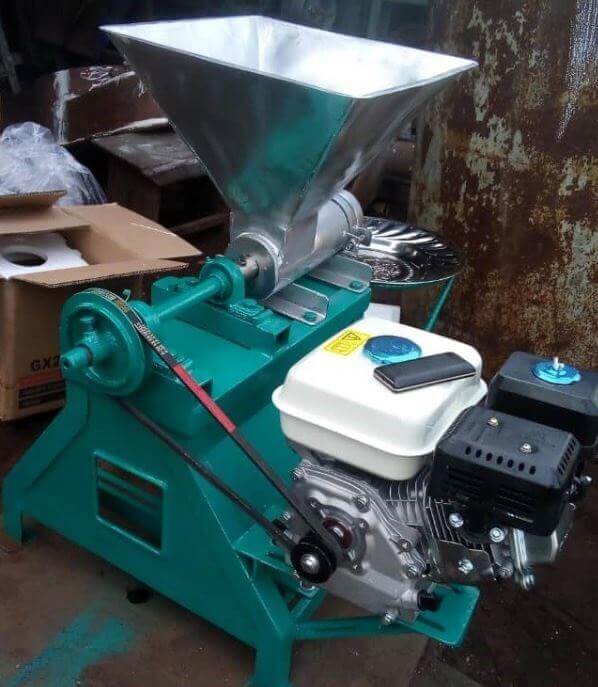
This fufu pounding machine, crafted by the Ghanaian company LM Machines, represents an innovative and electric solution for preparing fufu.
It ensures a consistently smooth fufu texture without any undesirable bumps, making it suitable for pairing with various soup options.
The convenience extends to its user-friendly design, featuring a three-prong power cable that effortlessly connects to standard wall power outlets, minimizing the risk of electrical shocks.
Operating on a standard 220V/50HZ electrical supply outlet, this machine aligns with common power standards.
Users are advised to plug the machine into its power outlet during operation.
The machine’s structure includes a fixed hat that guides raw cassava into the pounding mechanism, preventing contamination.
Additionally, the motor is shielded by a metal plate to prevent particles from causing damage.
Setting up the machine is straightforward, as it can be placed directly on the ground without the need for additional balancing.
This ensures ease of use at various locations without concerns.
Overall, the LM Machines fufu pounding machine offers a blend of functionality, safety, and convenience for users in Ghana.
Price Of Commercial Electric Fufu Machine
The Commercial Electric Fufu Machine is priced at GHS 2,350.00.
This machine, designed for commercial use, offers a robust electric solution for efficiently preparing fufu.
If you are considering an investment in a high-capacity fufu pounding machine for commercial purposes, the Commercial Electric Fufu Machine could be a suitable option, albeit at a higher price point.
Conclusion
These fufu machines offer a convenient solution for pounding cassava and yam, preparing your favorite fufu dish a more accessible task, especially for those busy Sundays when you might miss church.
These models are readily available throughout the Ghanaian market, allowing individuals to explore and purchase the one that best suits their needs.
It’s important to note that the last fufu machine discussed in this article is specifically designed for commercial use, distinguishing it from the models intended for home use.
The notable increase in price for the commercial electric fufu machine reflects its higher capacity and suitability for commercial operations.
While this model may be priced higher compared to those designed for home use, it offers enhanced capabilities and durability to meet the demands of commercial settings.
The discourse surrounding the integration of robots into our society has sparked a contentious debate, with opinions diverging on how these technological advancements will impact human lives in the years to come.
While some express concerns about potential harm, others contend that the widespread presence of robots will prove advantageous for humanity.
Robots, by definition, are machines designed to perform specific tasks based on their programmed functionalities.
Notably, the primary objective behind the creation of robots is to alleviate humans from arduous and labor-intensive tasks rather than displacing them in their workplaces.
In this article, our focus is on the affirmative aspects of robots in our society, recognizing the potential positive contributions they can make.
While acknowledging that the debate encompasses both positive and negative perspectives, we will explore how robots, when integrated thoughtfully, can enhance the lives of humans in various ways.
Reducing Workload
The widespread integration of robots into various facets of our society holds the promise of alleviating the workload on humans.
By assuming responsibility for specific tasks, robots can effectively reduce the burden on human labor, particularly in areas where the workload is substantial or physically demanding.
One notable advantage of employing robots is their ability to undertake tasks that may be considered too strenuous or repetitive for humans.
Tasks involving heavy lifting, monotonous assembly line work, or activities in hazardous environments can be efficiently managed by robots, minimizing the physical strain on human workers.
Moreover, robots can excel in handling tasks that are procedural and do not necessitate the nuanced intelligence and decision-making capabilities inherent to humans.
Functions such as coordinating schedules and managing correspondence, while integral to various operations, may be effectively delegated to robots, allowing human resources to focus on more complex and intellectually demanding aspects of their roles.
Cheap Goods
The integration of robots, particularly in manufacturing environments like factories, has the potential to significantly impact the cost of goods.
By automating certain tasks, the reliance on manual labor decreases, leading to a reduction in labor costs.
This cost-effectiveness can translate into lower production expenses, subsequently contributing to a decrease in the overall cost of goods.
As a result, the affordability of goods and services may increase, allowing a broader segment of the population to access products that were previously outside their budgetary constraints.
The economic advantage of leveraging robotic automation lies in its ability to streamline production processes, enhance efficiency, and ultimately contribute to a more competitive pricing structure.
Furthermore, in industries where certain tasks necessitate substantial physical strength, robots can offer a viable solution.
By deploying robots for physically demanding activities, not only is the well-being of human workers prioritized, but the increased productivity and efficiency can lead to cost savings in the production of finished goods.
Availability Of Goods And Services
The utilization of robots in manufacturing processes presents a substantial boost to production capacity, surpassing what can be achieved with human labor alone.
The efficiency gains facilitated by robots can result in the production of over ten times the quantity of goods achievable through manual labor.
This heightened production capacity plays a pivotal role in ensuring a consistent and ample supply of goods and services for consumers.
By significantly increasing output, the risk of market shortages is mitigated. The ability to meet and potentially exceed consumer demand is crucial in preventing disruptions in the availability of essential goods.
Additionally, a steady and abundant supply has a stabilizing effect on prices, as the increased production efficiency helps in controlling costs.
The positive consequence of this enhanced production capacity extends to the consumer base.
A stable supply and controlled pricing contribute to making goods and services more accessible and affordable to a broader spectrum of individuals.
This aligns with the principle of supply and demand, where increased supply, when managed effectively, can have a balancing effect on market prices.
Balance In Work And Personal Life
The integration of robots into our daily work routines has the potential to establish a more balanced equilibrium between professional responsibilities and personal life.
As automation processes evolve and certain jobs transition to a more automated framework, individuals who may face job displacement can seize the opportunity to acquire new skills.
This adaptability enables them to explore and secure positions in other areas, fostering career versatility and resilience.
The introduction of automation not only encourages continuous learning and skill development but also underscores the intrinsic value that human employees bring to the workforce.
As individuals adapt to evolving job landscapes, there is a heightened appreciation for the unique qualities, creativity, and nuanced decision-making abilities that humans contribute to the workplace.
The collaboration between humans and robots can enhance productivity and efficiency, with humans focusing on tasks that require emotional intelligence, creativity, and complex problem-solving.
Moreover, the shift toward a more automated workforce can prompt organizations to prioritize the well-being of their employees.
The realization that automation can handle certain tasks allows for a reevaluation of work structures, fostering an environment where individuals can achieve a healthier work-life balance.
This transformation in work dynamics emphasizes the importance of quality over quantity, with a focus on meaningful contributions and job satisfaction.
Helping The Household
The integration of robots into household tasks holds the potential to alleviate the burden on homeowners, who traditionally shoulder the responsibility of managing various chores.
By assigning certain household duties to robots, individuals can reclaim valuable time that can be redirected towards spending quality moments with their families or addressing more pressing and complex matters that robots may not handle.
The deployment of robots in household settings can be particularly impactful in streamlining routine chores, such as cleaning, organizing, and basic maintenance.
These tasks, often time-consuming and repetitive, can be efficiently managed by robots, allowing homeowners to focus on more fulfilling aspects of their lives.
Moreover, the assistance of robots in household responsibilities can contribute to a healthier work-life balance.
With the delegation of certain chores to robots, individuals can invest their time and energy in activities that are more meaningful and fulfilling, whether it’s engaging in family activities, pursuing personal interests, or dedicating attention to professional and educational endeavors.
Healthcare
In the healthcare sector, robots play a pivotal role in providing valuable assistance, extending far beyond their traditional application in operating rooms.
Their capabilities in conducting precise tests and diagnostics surpass human capabilities, contributing to more accurate and efficient healthcare outcomes.
The utilization of robots has expanded significantly, particularly in response to challenges such as the global coronavirus pandemic.
Robots have demonstrated their versatility and effectiveness in a wide range of tasks aimed at combating the virus.
One of the key advantages is that robots, being immune to infection, can be deployed on the frontlines, supporting healthcare professionals in their efforts to contain and eradicate the virus.
During the COVID-19 pandemic, robots have been employed for various critical tasks, including disinfection of healthcare facilities, delivery of medical supplies and food to patients, and even assisting in remote patient monitoring.
Their ability to operate in high-risk environments without risking infection has proven instrumental in enhancing safety protocols and mitigating the spread of the virus.
Beyond the pandemic response, the integration of robots in healthcare continues to evolve. From conducting intricate surgeries with precision to assisting in repetitive tasks, robots contribute to improved efficiency, reduced error rates, and enhanced overall patient care.
The collaboration between healthcare professionals and robotic technology exemplifies the potential for innovation to address complex challenges in the medical field, ultimately leading to better patient outcomes and healthcare delivery.
Conclusion
As you can see, there are many benefits that the existence of robots will have on the planet and their widespread usage will bring an even bigger benefit to humans.
The introduction of the mobile money system in Ghana has significantly streamlined money transfers among ordinary individuals, addressing the challenges faced by those who previously encountered difficulties in sending money to one another.
Understanding Mobile Money
Mobile money is a digital financial service that facilitates the seamless transfer, receipt, and storage of funds. This platform operates through a digital wallet that securely holds users’ money until they opt to send it to another individual, utilize it for purchases, or transfer it to a bank account.
An inherent advantage of the mobile money service is its accessibility, as users are not obligated to possess a traditional bank account for registration.
A valid identification card is the sole requirement for individuals to enroll in this service.
Ubiquity In Ghana
Ghanaians have embraced the convenience offered by mobile money, a service now ubiquitously provided by major telecom companies in the country.
MTN pioneered the introduction of the mobile money platform in Ghana in 2009, eliminating the need for individuals to have a bank account to engage in digital financial transactions.
Subsequently, other telecom giants such as Airteltigo and Vodafone have integrated mobile money into their services, recognizing the substantial impact it has on financial accessibility and inclusivity.
Industry Growth
The Central Bank of Ghana’s reported statistics indicate a noteworthy surge in mobile money transactions, witnessing a 20% increase in 2016, with a total value of $177.9 million.
This growth underscores the pivotal role that mobile money plays in the financial landscape of the country.
Despite Ghana’s robust economic standing in Africa, the urban-rural divide has positioned the nation as a prominent hub for domestic remittances, further accentuating the significance of mobile money in facilitating financial interactions across diverse geographical areas.
The evolution and widespread adoption of mobile money in Ghana reflect its transformative impact on the accessibility and efficiency of financial services, particularly benefiting those who were previously excluded from traditional banking systems.
Before the Mobile Money Service
Before the introduction of the mobile money service in Ghana, a substantial portion of the population, approximately 70%, was considered unbanked.
This denoted individuals without access to a bank account, rendering them incapable of engaging in fundamental financial activities such as sending, receiving, and saving money.
During that period, only about 35% of the population owned mobile phones. Notably, a significant portion of Ghanaians sought job opportunities in urban areas, leading to internal migration.
These individuals, upon securing employment, often needed to send money back to their families residing in rural villages.
The absence of a banking infrastructure in many remote locations meant that traditional banking systems were inaccessible.
The advent of the mobile money platform played a transformative role in this context. It provided a crucial avenue for unbanked individuals to conduct financial transactions, especially money transfers, which were vital for those who had relocated for employment.
This innovative solution facilitated financial inclusion by offering a means for individuals to send and receive money without the prerequisite of a traditional bank account, addressing a critical gap in the financial landscape and significantly impacting the lives of those previously excluded from formal banking channels.
How It Operates
When the service was initially launched, it operated similarly to the traditional money transfer businesses before it. However, the telecom companies later introduced mobile agents that were instructed to help users of the service transfer or receive money from the agent’s account.
As time went on and the mobile money platform became more popular and widely sought after, the telecom companies began to register users by giving the man accounts on their mobile phones. the platform also received some support from the country’s central bank, which helped it flourish.
The central bank saw the opportunity to get banking services to more people through the mobile money platform, thereby reducing the percentage of unbanked citizens in the country. A survey later revealed that access to financial services in the country could grow by 41%.
The number of stalls used by the MTN mobile money vendors in the country outnumbered bank branches by 2015. New e-money laws, which the central bank later introduced, brought some favorable changes to the mobile money platform, such as a simple registration method for users and simplified rules of operation on the business model.
After The Invention Of Mobile Money Service
Today, the mobile money platform is the most popular financial tool available, with millions of subscribers belonging to different services run by the telecom companies in Ghana. MTN Ghana still leads the mobile money market with a more significant market share than other telecom companies.
This is because MTN made the platform famous before the other telecom companies joined. By then, MTN had gained a sizable amount of users on the platform.
Ghana was also one of the first nations to make contactless NFC payments available through mobile money. This was made possible through AirtelTigo’s ‘tap and pay’ service.
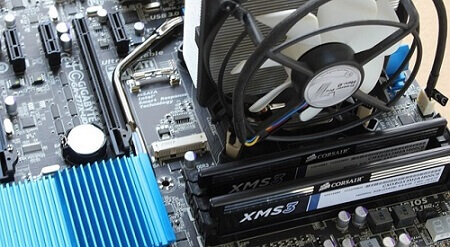
Selecting compatible RAM for your computer is a crucial aspect often overlooked by many.
Contrary to the assumption that any RAM can be arbitrarily chosen and slotted into a computer or laptop, ensuring compatibility is vital.
Whether you are building a gaming machine or contemplating a RAM upgrade for your existing laptop, choosing the right RAM is paramount for optimal performance.
Boosting your machine’s performance hinges on selecting the correct RAM modules.
This article will guide you through the essentials, enabling you to make informed choices when it comes to choosing RAM for your desktop computer or laptop.
For the purpose of this discussion, we will focus on DDR4, predating the emergence of DDR5, which will be covered in a subsequent article.
How Much Memory Do You Need?
With the Windows 10 operating system becoming the norm, a minimum RAM of 8GB is often recommended for smooth operation.
Many reasonably priced Windows 10 laptops now come equipped with 8GB of DRAM, suitable for tasks such as work, light gaming, and moderate multitasking.
It’s crucial to recognize that activities as seemingly light as internet browsing can quickly consume over 50% of available RAM.
While modern browsers are designed to be more memory-efficient, other programs running concurrently may demand significant memory resources.
When the available memory is insufficient, the computer tends to exhibit sluggishness, impacting overall performance.
To address this, modern computers should have a minimum RAM capacity of 16GB.
This provides ample resources for those who engage in light multitasking.
For users involved in gaming or running resource-intensive programs, a RAM capacity of 32GB is recommended.
Individuals who are well-versed in their computing needs, especially those requiring even larger memory capacities, are aware of their specific requirements.
Understanding the significance of adequate RAM ensures a smoother and more efficient computing experience.
How To Know Your Current Memory Of Your Computer
To ascertain the amount of memory (RAM) installed on your Windows 10 machine, follow these straightforward steps:
Open any folder on your computer.
Locate the ‘This PC’ icon, typically found on the left side of the folder.
Right-click on the ‘This PC’ icon.
Select ‘Properties’ from the context menu.
Upon doing so, a window will appear displaying essential information about your computer, including the currently installed RAM.
This quick and accessible method allows you to check your system’s memory configuration without the need for third-party applications or advanced procedures.
How to Know The Current Memory Of Your Computer Method 2
using the DirectX Diagnostic Tool (dxdiag) is another effective method to gather detailed information about your computer, including memory capacity and other specifications. To access this information, follow these steps:
Open the search bar on the taskbar.
Type “dxdiag” and press Enter.
The DirectX Diagnostic Tool window will appear, providing an array of information about your computer.
Navigate to the “System” tab to find details such as the total memory (RAM) installed on your computer.
This tool offers a comprehensive overview of your system’s specifications, making it a valuable resource for users seeking detailed information about their computer’s hardware and capabilities.
Upgrading
Upgrading RAM can significantly enhance a computer’s performance, but it’s essential to note that not all machines allow for RAM upgrades.
In cases where the RAM is soldered onto the motherboard, upgrading becomes impractical or impossible.
For systems where RAM is not soldered and can be upgraded, compatibility is crucial. Different generations of RAM, such as DDR3 and DDR4, are not interchangeable due to differences in keying and electrical requirements.
It’s important to ensure that the selected RAM aligns with the specific requirements of your computer.
Many sellers offer memory configurators, allowing buyers to make informed choices based on their system’s specifications.
By checking the manufacturer’s product page or using a memory configurator, users can identify the appropriate RAM format for their machines.
Choosing RAM that is compatible with your system contributes to improved performance and faster operation, providing a worthwhile upgrade for those seeking enhanced computing capabilities.
Conclusion
Selecting RAM for your machine is a more intricate process compared to choosing peripherals like keyboards or mice.
Unlike those peripherals, where compatibility is often less of an issue, RAM must be carefully chosen to ensure seamless integration with your system.
Choosing incompatible RAM can lead to various issues, including system instability, crashes, or even failure to boot.
Seeking the assistance of professionals or utilizing resources provided by the manufacturer, such as memory configurators, is a prudent approach.
Professionals can provide valuable guidance on selecting the right type, speed, and capacity of RAM that aligns with your computer’s specifications.
This approach helps guarantee that the chosen RAM is not only compatible but also optimally suited to enhance the performance of your machine.
When it comes to upgrading or replacing RAM, taking the time to make informed decisions ensures a smoother and more efficient computing experience.
For individuals who missed the mass registration exercise for the Ghana card two years ago, the National Identification Authority (NIA) has established several offices across the country to facilitate the registration process.
Those interested in registering for the Ghana card can visit these designated offices, typically located at the Ghana Revenue Authority (GRA) offices or the Registrar General Department offices.
These specific offices are chosen for registration purposes as the Ghana card is being integrated with the Tax Identification Number (TIN).
It’s important to note that this information is applicable to individuals who do not have the Ghana card at all and wish to register for it.
For those seeking card replacements due to loss or damage, the National Identification Authority will announce when regional and district offices are open for such services.
In the interim, individuals with missing cards should report the loss to the nearest police station, obtain an extract from the police, and then proceed to replace the missing card.
The replacement process incurs a cost of either GHS 20 or 30.
Furthermore, individuals who registered for the Ghana card in the Ayawaso West Wuogon municipality and have not received their cards can visit the NIA headquarters between Mondays and Fridays, from 8:30 am to 4:30 pm, to collect their cards.
NIA Offices For Ghana Card Across Ghana
Below are the offices of the NIA across the country.
Ghana Card Office
Location
Digital Address
Manhyia south in Adum
Adum, opposite Speedof Parcel Service
AK-037-6041
Obuasi municipality
Obuasi
AO-017-9991
Subin
Registrar General Office
AK-037-0633
Asokwa TSC 1
Old area council block
A2-0273-1539
Berekum East
Urban council, old assembly
BB-0022-5707
Sunyani West
Adjacent district assembly
BY-0007-9136
Sunyani TSC 1
GRA office
BS-0006-3004
Agona West
GRA office
C0-0037-3995
Awutu Senya East
GRA Kasoa Office
CG-1580-0850
Cape Coast TSC 1
GRA office
CC-095-0046
Kwahu West
Old municipal health directorate in Nkawkaw
EJ-0025-7499
Koforidua TSC 1
GRA office
EN-009-91941
Conclusion
These are the various offices across the country where you can apply for your Ghana card if you were not secure during the mass exercise that took place.
In today’s era, the ubiquity of smartphone cameras has transformed photography, making it a popular activity for many.
Capturing moments through pictures has become a significant way for people to immortalize memorable events in their lives.
However, the default photos app on some smartphones may lack certain advanced features that users desire.
Functions like slideshow movies, photo recovery, and the ability to label pictures with names may not be readily available in the default app.
To address these limitations, the Google Photos app comes into play. Offering a plethora of features, including the ones mentioned above, Google Photos serves as a robust solution for managing and enhancing your photo experience.
Some smartphones even come with the Google Photos app pre-installed as the default photo manager.
This article will explore some of the remarkable features that the Google Photos app brings to the table, providing users with an array of tools to manage and elevate their photo collection. Let’s delve into these features.
Using Dates To Locate Photos
A noteworthy feature offered by the Google Photos app is the ability to locate photos on your phone based on the date they were taken. This feature simplifies the search process, allowing you to retrieve photos efficiently.
To use this feature, simply input the month in which you took the photos. The app will then display all photos captured within that specified month, enabling you to easily find and select the desired image.
Moreover, when accessing the Google Photos app through a web browser, you can utilize a similar search method.
Look for the timeline of dates on the side, then input the specific date you are searching for to swiftly locate and access your photos.
Search For A Particular Photos With What Was Seen In Those Photos
If you’re on the hunt for pictures featuring specific elements, such as moments when you wore white shirts or stood behind cars, Google Photos simplifies the process.
By conducting searches using keywords like ‘cars’ or ‘red shirt,’ the app adeptly retrieves all related images from your gallery.
This powerful search functionality ensures that you can effortlessly locate and organize photos based on specific themes or attributes, enhancing your overall photo management experience.
Undelete Photos
Accidentally deleting cherished photos can be a distressing experience, especially if your default photos app does not provide an easy recovery option unless you have a backup. Fortunately, the Google Photos app offers a safeguard against such mishaps.
When you delete photos in the app, they are not immediately permanently removed. Instead, they are sent to the trash, where they stay for a month or 60 days.
This grace period allows users to retrieve deleted photos within that timeframe, providing a valuable safety net against unintentional deletions and offering a window for recovery.
To get the photos back,
just open the main google photos app menu
choose ‘trash’
select the photos you want to restore
Building Photo Book
Another remarkable feature of the Google Photos app is its capability to craft stunning photo books. Users can curate a selection of photos, arranging them in a desired order to create a visually appealing soft copy of the photo book within the app.
Following the arrangement, users have the option to order the photo book online, facilitating the process of transforming the digital compilation into a tangible and beautifully printed photo book.
This feature adds a delightful dimension to preserving and sharing cherished memories.
Creating Slideshow
At times, you may wish to enjoy a hands-free viewing experience of your photos on your phone without the need to manually swipe through them.
The Google Photos app offers a solution with its slideshow feature, allowing you to effortlessly create a dynamic slideshow movie using your chosen photos.
To initiate this process, navigate beyond the ‘assistant’ feature and locate the ‘movie’ feature. By tapping on it, you can craft an impressive movie slideshow that aligns with your preferences, providing a convenient and engaging way to relive and showcase your captured moments.
Label Pictures With Names
The Google Photos app offers a handy feature that allows you to label the photos of people with their names, especially useful for those who may struggle to remember names easily.
This cool feature adds a personalized touch to your pictures, making them more engaging.
To utilize this feature, click on the search bar and observe the faces that appear in smaller circles. Click on a specific face, then add the person’s name by typing it in.
This simple yet effective labeling system enables you to organize your photos and even create individual folders for each person, preventing the need to sift through numerous pictures to locate a specific image.
Conclusion
All these are great features that can give you the best out of your smartphone’s camera. The amazing thing is that, despite all these amazing features, the google photos app is free and can be downloaded for both android and IOS. So if just visit your play store today and download it.
This article aims to provide a comprehensive overview of all Android OS versions and their respective release years.
Android stands out as the most prevalent mobile operating system globally, powering the majority of smartphones.
Developed by Google, this mobile OS serves as the foundation for numerous devices, including Samsung smartphones.
Throughout this article, we will guide you through a chronological exploration of all Android versions released since the inception of the operating system, offering insights into the evolution of this widely used mobile platform.
Android 1.5 (Cupcake)
The inaugural Android operating system, released by Google in 2009, marked the beginning of a revolutionary era for mobile devices.
Packed with innovative features, this version introduced a crucial element—the on-screen keyboard. This development was particularly significant as smartphones were transitioning to touch screen interfaces, gradually phasing out physical keyboards.
Additionally, this version showcased an abundance of widgets, adding further functionality and customization options for users.
Android 1.6 (Donut)
Later in the year 2009, a subsequent version of the Android OS was released, introducing notable enhancements.
This iteration brought the capability to seamlessly operate on various screen sizes, a pivotal advancement for accommodating the diversity of devices.
Additionally, it included expanded support for networks such as Verizon, a factor that significantly contributed to the global recognition and adoption of the Android OS.
Android 2.0 (Éclair)
Merely six weeks after Android 1.6, Android 2.0, also known as Eclair, was released. This version marked a significant milestone, gaining widespread recognition largely attributed to Verizon’s impactful marketing campaign.
Eclair introduced several noteworthy features, including turn-by-turn navigation, live wallpapers, and the much-appreciated pinch-to-zoom functionality.
This phase is often regarded as the starting point of the competition between IOS and Android, setting the stage for the ongoing rivalry between the two operating systems.
Android 2.2 (Froyo)
A mere four months after the release of Android 2.1, Android 2.2 swiftly followed suit, introducing notable features such as a standard dock and voice commands.
One particularly significant addition was the support for Flash in the Android browser—a crucial enhancement given the widespread use of Flash across various platforms.
Notably, during this period, Apple remained steadfast in its decision to abstain from offering Flash support, highlighting the diverging approaches between Android and iOS.
Android 2.3 (Gingerbread)
The Gingerbread version of Android played a pivotal role in establishing the operating system’s distinctive visual identity.
During this phase, the color green became a prominent and integral element of the Android OS, despite having already adorned the Android mascot.
This marked a significant step in defining the recognizable visual characteristics that have become synonymous with the Android operating system.
Android 3.0-3.2 (Honeycomb)
In 2011, the Honeycomb version of Android was unveiled, initially designed exclusively for tablets and launched alongside the Motorola Xoom.
Noteworthy for its dramatic user interface (UI), this version departed from the Android trademark green, opting for a distinctive blue color scheme.
The Honeycomb release marked a strategic focus on optimizing the Android OS for tablet devices.
Android 4.0 (Ice Cream Sandwich)
The Android Ice Cream Sandwich, released in 2011, marked a pivotal moment for the Android operating system by ushering in a modern design.
This version departed from the holographic appearance introduced in Android Honeycomb. It also played a crucial role in unifying the user interface (UI) across both tablets and phones, establishing a cohesive vision for the OS.
An essential feature introduced with Ice Cream Sandwich was the prominence of swiping, which became an integral and interactive aspect of the new operating system.
This release showcased Android’s commitment to evolving its design and user experience.
Android 4.1 and 4.3 (Jelly Bean)
Certainly. Here’s a refined version of your passage:
Following Android Ice Cream Sandwich, versions 4.1 and 4.3, collectively known as Jelly Bean, were released in 2012 and 2013.
These releases brought a heightened sense of refinement and polish to the Android operating system.
Notably, Google Now made its debut on Android Jelly Bean, adding an advanced and intelligent personal assistant feature to the platform.
Android 4.4 (KitKat)
n late 2013, the Android KitKat was released, signaling the conclusion of the era characterized by the black-and-blue aesthetics of previous versions.
KitKat ushered in a visual shift with lighter backgrounds and a move towards neutral tones, departing from the previous black and blue color scheme.
Additionally, this version introduced the “Ok Google” feature, enhancing voice-based interactions with the Android operating system.
Android 5 (Lollipop)
Certainly. Here’s a refined version of your passage:
Released on November 4, 2014, Android Lollipop served as an upgrade over the preceding Android 4 versions.
Subsequent releases, including versions 5.1 and 5.1.1, further refined the Android Lollipop experience, introducing improvements and enhancements to the operating system.
Android 6 (Marshmallow)
On October 2, 2015, Android Marshmallow was unveiled, marking the 23rd iteration of the operating system since its inception in 2009.
This release introduced notable features and enhancements, significantly improving the usability of the Android OS.
A subsequent version, 6.0.1, was also released, further refining the Android Marshmallow experience.
Android 7 (Cheesecake)
Introduced in 2016, Android Cheesecake stands out as a version that most smartphone users are familiar with, as it played a crucial role in ushering in a more modern Android system.
This release set the stage for subsequent updates in the Android ecosystem. Furthermore, Android Cheesecake saw later versions, 7.1 and 7.1.2, released by Google, bringing additional refinements and improvements to the platform.
Android 8 (Oatmeal cookie)
Users of more recent smartphones are likely running the Android 8 OS on their devices. Released on August 21, 2017, by Google, Android 8 introduced several enhancements and features to the operating system.
A subsequent version, Android 8.1, was released in December 2017, offering further refinements and improvements to the Android experience.
Android 9 (Pie)
Android 9, released on August 6, 2018, has become a staple in many mid-range smartphones today.
Notably, Google did not release any subsequent versions for Android 9, solidifying its place as a reliable and enduring version in the Android ecosystem.
Android 10 (Queen cake)
Android 10, also known as Queen Cake, made its debut on September 7, 2019, and has become a standard feature on many high-end smartphones today.
Similar to its predecessor, there were no subsequent versions released for Android 10, solidifying its position as a prominent and enduring version in the Android lineup.
Android 11 (Red velvet cake)
Android 11 was officially released on September 8, 2020, making it the latest Android operating system at the moment.
As of now, Android 12 is yet to be released, keeping Android 11 as the current and up-to-date version in the Android lineup.
Android 12 (Snow Cone)
Android 12 stands as the latest Android OS, bringing a host of fixes, improvements, and new features. Released on October 4, 2021, this update has been made available to all eligible Android phones, ensuring a more enhanced and feature-rich experience for users.
Conclusion
These encompass all the Android OS versions released since the inception of the mobile operating system.
Android enthusiasts are eagerly anticipating the arrival of Android 12 from Google, anticipating the latest innovations and improvements it will bring to the Android ecosystem.
When was Android 4 released?
Android 4 was released in 2011
What is Android version 12 called?
And 12 was named Snow Cone and was released on February 18, 2021.
Which phone company will be the first to use Android 13?
Nothing Phone (1) will be the first phone company to use Android 13, the company has been testing the Android 13 build internally and it’s expected to be released to their phone users in mid-December or early January 2023.
This comprehensive article aims to provide you with all the essential information regarding multi-TV prices in Ghana, the installation process, and steps to access additional channels, ensuring you are well-informed before making a purchase decision.
After our recent coverage of StarTimes in Ghana, it’s only fitting that we delve into its competitor, Multi TV. This guide will walk you through key aspects you should be aware of when considering Multi TV.
Multi TV is a direct-to-home satellite TV station operating in Ghana, offering a diverse range of entertainment for the average viewer.
It features numerous award-winning channels, and notably, there are no monthly charges associated with its service.
However, it’s important to note that sports enthusiasts may find it lacking in terms of live match coverage.
To access Multi TV, you’ll need to purchase a Digibox and have it installed in your home. This straightforward process allows you to begin enjoying the Multi TV experience.
Before installation, it’s crucial to point the satellite dish in the eastward direction, as that is where the signal originates.
Following this, you can proceed with the installation and commence your Multi TV viewing.
How Much Is Multi TV HD+ Decoder In Ghana?
The cost of a Multi-TV HD+ Decoder in Ghana falls within the range of GHS 239 to GHS 300.
The price variation is influenced by factors such as the vendor you choose and whether you opt for additional assistance with the setup process.
Prices may differ based on the seller’s location and the specific services offered alongside the purchase of the decoder.
Installation
The initial step in the installation process is to set up the dish, ensuring it faces east. Utilizing the user manual provided with the equipment is crucial during this phase, offering guidance on assembling the dish components.
Exercise caution to avoid bending or turning the dish while mounting.
Align the bracket vertically to facilitate easier satellite location. Ensuring an unobstructed path in the eastward direction is essential—no objects should block the dish’s trajectory.
Once these steps are executed correctly, securely fasten the bolts to prevent the dish from being affected by winds, ensuring stability in its position.
Setting The Dish
Next, create a hole through which the cable can be threaded, whether it’s through a wall or window.
Pass the cable through the designated hole, leading it to the dish location. To ensure a secure connection, trim the tip of the cable and insert the F connector at the end that connects to the receiver.
Now, connect the cable to the LNB (Low Noise Block) input of the receiver. After completing this step, press the power button on the receiver to initiate the setup process and begin enjoying the Multi-TV experience.
Decoder Installation
After you are done connecting the dish, you will have to set up the decoder. Here is how to go about it.
Press the menu button
Choose ‘installation’ by pressing ok on it
Choose ‘manual search’
You will edit the frequency by pressing the green button
Select ‘modify’ and then press ok
Enter ‘12522 and then press ok
Choose ‘polarization’
Now press on the right button to change to vertical and then press ‘ok’
Select the symbol rate ‘27000’
And then press the blue button to save
Exit and start scanning by pressing ok
Strong Decoder Box Installation
If you are using a strong decoder box, then the process of setting it up will be a bit different from the above.
Press on the menu button
Press the right button
Input your password as 0000
Choose ‘manual scan’ and then press ‘ok’
Press the red button and choose transponder Astra 3a/3a
Press on the green button to add the TB list
Now input frequency 12522
At the symbol rate, enter 27000
Set the polarization to either v or h. the bars will change color to green
Press on ‘ok’ for the scanning to start
Now you can exit after the scanning has started
How Many Channels Does Multi TV Have?
As of now, Multi TV boasts an impressive count of 12,528 channels, with the number continuously growing.
This expansion is attributed to the facilitation provided by Multi TV, making it easy for both institutions and individuals to launch their television channels on the platform.
Who Brought Multi TV To Ghana?
Multi TV was established by Mr. Kwasi Twum, a Ghanaian entrepreneur who initiated the venture with a team of 12 employees.
What Does LNB Stand For?
LNB stands for Low-Noise-Block Down Converter. Its primary function is to receive signals collected by the satellite antenna and subsequently downconvert these signals, transmitting them back to the dish. This process enables viewers to enjoy the channels available on Multi TV.
Conclusion
As demonstrated, setting up these two decoders is a relatively straightforward process that can be easily accomplished.
By following the provided steps, you’ll be able to set up your Multi TV decoder and dish, allowing you to indulge in a wide array of entertainment.
One noteworthy advantage is that Multi TV does not impose any monthly charges on viewers.
This means you can enjoy the content without concerns about monthly payments, offering a hassle-free and enjoyable viewing experience.