Author: pro

  • All Playstation Game Console Models And Their Price In Ghana

    All Playstation Game Console Models And Their Price In Ghana

    This article will cover all PlayStation consoles available right now, their models, and almost every PlayStation model that has been launched.

    For video game enthusiasts out there, I am sure that all of you may know your game consoles very well—from the 1990s to the present generation consoles.

    We applaud you guys because knowing all the generations of video game consoles is something that only hardcore video game lovers will understand. 

    However, for those who became video game fans recently and would like to know a bit about some gaming history, we have it right here for you.

    If you own a version of the Playstation video game console, we are sure that it is probably a Playstation 4 or the newest edition, which is the PlayStation 5.

    So kindly join us as we take you down the road and help you get to know the predecessors of the Playstation line.

    Sony Entertainment created the PlayStation line of video game consoles, and they are the most popular video game consoles in the world. So now, let us take a look at the Playstation consoles and their specs.  

    PlayStation 1

    playstation 1

    The Playstation 1 was the first Playstation video game console made by Sony. It was initially released in America in 1995 and went on to sell more than 100 million units. Its best-selling video game was the Gran Turismo game.

    It had a factory price of $300 when it was introduced. It is now considered a classic in the video game industry, and one may be able to get their hands on a fairly used model if they want to go back in time and play some classic games, but that is even rare.

    Price Of Playstation 1 In Ghana

    Price: GHS 158.00

    Specs Of The PlayStation 1

    • CPU: 32-bit MIPS
    • System RAM: 2MB
    • Video RAM: 1MB
    • GPU: 32-bit
    • Resolution: 640×480
    • Media: CD 

    PlayStation 2

    playstation 2

    The PlayStation 2, also known as the PS2, was the second PlayStation video game console released by Sony Entertainment. It was released in America on October 26, 2000. It was much more prominent in size than the original PlayStation and had a rectangular shape.

    It is one of the best-selling video game consoles of all time, with over 158 million units sold since its release in 2000.

    Price Of Playstation 2 In Ghana

    Price: GHS 500.00

    Specs Of The PlayStation 2

    • CPU: 64-bit emotion engine
    • System RAM: 32MB
    • Video RAM: 4MB
    • GPU: graphics synthesizer
    • Resolution: 720×480
    • Media: DVD, dual-layer DVD

    PlayStation 3

    playstation 3

    This is the third installment in the PlayStation video game console series. This console came with a much sleeker design than the previous two.

    It was also the first to go with the wireless DualShock controls that had to be charged by connecting a USB cable from the console to the controller.

    It was released in America on November 11, 2006, and has sold more than 87 million units worldwide. 

    Price Of Playstation 3 In Ghana

    Price: GHS 999.00

    Specs Of The PlayStation 3

    • CPU: cell- 6-core
    • GPU: reality synthesizer
    • System RAM: 256MB XDR
    • Video RAM: 256MB GDDR3
    • Resolution: 720×480
    • Media: 25GB BD, 50GB dual-layer BD

    Playstation Portable (PSP)

    Playstation Portable

    The PlayStation Portable was also commonly known as the PSP. It was the handheld version of the TV video game consoles. It was released in America in 2004. It has sold more than 80 million units so far.

    Price Of Playstation Portable In Ghana

    Price: GHS 800.00

    Specs Of The PlayStation Portable

    • CPU: MIPS 1-core
    • GPU: 1-core
    • System RAM: 64MB
    • Video RAM: 2MB
    • Resolution: LCD 480×272
    • Media: 900MB UMD

    PlayStation Vita

    playstation vita

    The PlayStation Vita was the successor to the PlayStation Portable and was released in 2011. It has also sold between 10 to 15 million units since its release.

    Price Of Playstation Portable In Ghana

    Price: 900.00

    Specs Of The PlayStation Vita

    • CPU: ARM quad-core
    • GPU: quad-core 5XT
    • System RAM: 512MB
    • Video RAM: 128MB
    • Resolution: OLED 960×544
    • Media: 4GB cartridge

    PlayStation 4

    playstation 4

    The PlayStation 4 was the 4th major installment of the console line. It had a sleeker and more square-ish design compared to the PlayStation 3. It was released on November 15 in 2013. The video game console has sold over 88 million units since the time of its release.

    Price Of Playstation 4 In Ghana

    Price: GHS 3,300

    Specs Of The Playstation 4

    • CPU: the quad-core steamroller
    • GPU: AMD HD 7670
    • System RAM: 8GB
    • Video RAM: 1GB
    • Resolution: 1080p
    • Media: 50GB BD

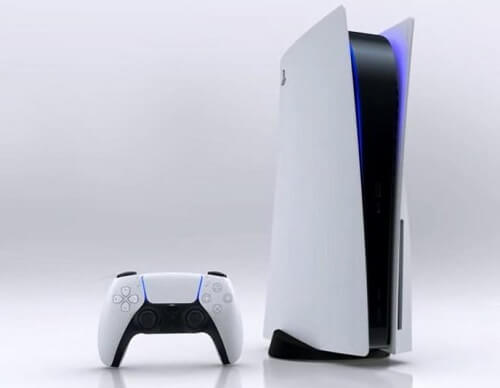
    Playstation 5 

    playstation

    The PlayStation 5 is the PlayStation series’s latest video game console from Sony Entertainment. It was released on November 12, 2020. The analyst expects it to sell well over 17 million units by the end of 2021.

    Price Of Playstation 5 In Ghana

    Price: GHS 8,500

    Specs Of The PlayStation 5

    • CPU: 8-core AMD Zen
    • GPU: AMD RDNA 22
    • RAM: 16GB GDDR6
    • Resolution: 120FPS, 4K

    FAQS

    How many PlayStations are there?

    Currently, 7 gaming consoles have been released so far by PlayStation.

    When was the first PlayStation released?

    The first PlayStatuion was released in 1994.

    What is a PSP console?


    The PSP console is a handheld gaming console that was developed by Sony Entertainment. This gaming console was first released in 2004 in Japan.

    Conclusion

    So these are all the PlayStation video game consoles out there since their introduction in 1995. But then again, we are pretty sure you know all of them since PlayStation is the most popular video game console line in the world.

  • How To Purchase Treasury Bills Through MTN Mobile Money

    How To Purchase Treasury Bills Through MTN Mobile Money

    There are treasury bills that are sold by the government of Ghana to the general public. Anyone can purchase a treasury bill from the government for as low as GHS 5.

    The purchase of treasury bills is one of the investments that most people usually invest in, although their returns are not that high compared to investment vehicles.

    Before we get started, we need to know what a treasury bill is first.

    What Is A Treasury Bill? 

    A treasury bill is a short-term investment product backed by the Bank of Ghana for the government of Ghana.

    The government pays back the money it borrowed from the buyer of the treasury bills and the interest after it has matured at the given time.

    So a treasury bill means that the government borrows money from the person who buys the bills, with an agreement to pay the money together with interest.

    The government used the funds used for purchasing treasury bills since it is one way the government earns money as an alternative to taxes. 

    Treasury Bill VS. Fixed Deposit

    Both treasury bills and the fixed deposit are essential investment vehicles. However, one of them is more profitable than the other.

    The government offers treasury bills, while a bank is providing a fixed deposit. The treasury is better than the fixed deposit.

    Most banks offer an interest of 5% or lower on a fixed deposit. However, the treasury bills rate for the year 2018 was 6.65% for a year. 

    Treasury Bills VS. Company Shares

    In simple terms, treasury bills are considered safer than company shares. When you buy treasury bills, your profit is fixed depending on the length of the investment after which, you are to be paid back.

    With the company shares, your investment typically earns your profit according to what the company makes in that particular month.

    So sometimes you can earn more than what someone will make on treasury bills, and you can sometimes earn less than what that person will make on treasury bills.

    The company’s profit depends on how high your investment is, while the treasury bills are fixed on several days you choose. 

    Purchasing Treasury Bills Through MTN Mobile Money

    If you are thinking about getting into investments (this is a tech site, so we will not go too deep in assets, lol) and purchasing treasury bills but do not know how to go about it, we can help you with that.

    Few people know that MTN makes it possible for you to purchase treasury bills from the comfort of your home.

    We will show you how to buy treasury bills through MTN from the comfort of your home using their mobile money platform. 

    Follow the steps below to do just that.

    Registration

    First, you will need to register for the treasury account.

    1. Dial *170#
    2. Select 5, financial services
    3. Select 4, pensions and investment
    4. Select 2, treasury bills
    5. Select 1, register
    6. Input your name in full, press send
    7. Input the name of your next of kin
    8. Enter the number of your next kin

    Buying Treasury Bills

    After you have completed the registration, you can now buy the treasury bills that you want. Follow the steps below.

    1. Dial *770#
    2. Select option 2, Tbill4all
    3. Follow the steps to complete the purchase

    Conclusion

    You can purchase treasury bills from as low as GHS 5 to as much as you can afford. You can choose for the maturity of the accounts you buy to run for just 91 days or for a full year. Leaving it to run for a length of an entire year carries the highest interest rate.

    This is all that you need to know about the treasury bills in Ghana. We hope this information is ideal for your investment thoughts. 

    Check out our recent articles:

  • Best Online Shopping Websites In Ghana

    Best Online Shopping Websites In Ghana

    The internet has been a blessing for many people in various areas of their life. The technological advancement that swept over the world has brought solutions to many problems that people were facing.

    Emails came to replace letters that generally took weeks to arrive at their destinations. Vehicles came to replace the use of horses and carts.

    Airplanes made it possible to choose a different mood of transport apart from the ship.

    One of the areas where technology has improved is the shopping life of people. Through the internet, people can now shop for whatever they want without having to go there in person.

    We have compiled a list of some of the known online shopping malls that operate in Ghana. 

    Below are some of the online shopping malls that have made shopping easier from the comfort of people’s homes.

    Jumia Ghana 

    jumia

    Jumia is one of the biggest and most well-known online shopping malls operating in Ghana.

    The online store has a lot of products that people can shop from when they visit the website.

    Jumia also has branches in several African countries such as Morocco, Kenya, Nigeria, Cameroun, and Ivory Coast.

    Apart from shopping for clothes and other electronic gadgets, Jumia also offers Jumia travel, allowing users to book hotels.

    People can also order food through Jumia with the jumia food service. F

    oods collected through this service are delivered to your homes.

    Melcom Ghana 

    melcom ghana

    Melcom is one of the newest players in the online shopping business, although it has decades of experience in physical retail supermarket shopping.

    When one visits the Melcom shopping website, they will be able to purchase all the things they can physically at the various Melcom shops branches across the country.

    Furniture, electronics, clothing, and many others are available to order from the website. The products will then be delivered right to your doorstep.

    Deus.com.gh

    Deus.com.gh

    Although Dues is not popular in Ghana yet, it is one of the most influential and reliable online shopping centers operating in Ghana.

    The online retail shop delivers some of the best printers and toners to get straight to their doorstep at lower prices than any open competition.

    The company initially started operating in 2018 as the number-one distributor of printers, ink cartridges, and toners in Ghana.

    It has overgrown over the years to usurp its competitors by selling quality goods at affordable prices to win over customers.

    The company has the most extensive catalog of printers, scanners, photocopiers, ink cartridges, and toner cartridges through its business principle of specialization.

    Through this, the company sells products from some of the world’s best manufacturers such as Samsung, HP, Canon, Epson, Lexmark, and Ricoh.

    When you purchase from Deus, the company gives you a seven-day free return policy, and they can also deliver the product to you on the same day.

    Payments can also be made through any of the mobile money platforms in the country.

    Alibaba

    alibaba

    Alibaba is one of the giants in the e-commerce business all over the world. People in different countries order products from online shopping giants all the time.

    The company, which has its roots in China, has branches in several countries globally, including Ghana.

    Their website sees millions of online shoppers in a day. The company branch in Ghana also sees more business transactions than any other e-commerce in the country.

    It has a secure payment for customers who shop with them. Amounts are given to sellers only after the buyers have approved that they have received the items they ordered.

    If a seller fails to ship the product to the buyer, the buyer is refunded by the e-commerce company     

    Conclusion

    If you like to shop for various things from the comfort of your home, then we are sure that this article has offered some insight into some of the country’s online shopping centers in the country for you.

    These online malls are some of the best you can shop at in peace, knowing that you will get precisely what you asked for at such affordable pricing.

  • Best PC Gaming Machines For Gamers

    Best PC Gaming Machines For Gamers

    When computers first came out, they were mainly used for work-related purposes like storing files and sending emails, etc. However, they are now used for far more things today.

    Personal computers are also used for entertainment aside from carrying out work. People use their computers to watch movies and videos, listen to music, and play video games.

    And because video games have now become a massive part of young people’s lives with their industry, computer manufacturers have created computers specifically for playing games.

    These machines come with powerful graphics that allow users to play some of the most demanding video games on them.

    Such high challenging video games were normally only played on video game consoles made explicitly for playing games, although they can use their newest versions for watching videos.

    In today’s article, we will be looking at some of the best gaming machines available. If you are thinking about getting yourself a gaming machine, then this article would be of much help to you.

    It is essential to get your hands on the best gaming machine if you want to enjoy your video games smoothly.

    Alienware Aurora Ryzen Edition R10

    This gaming machine is one of the most powerful ones you can get at an affordable price and comes with the brute strength you would expect of a quality gaming machine.

    They are also inexpensive, so people who do not have huge budgets for just gaming can also join the gaming experience. Its following gen configurations come with advanced RTX3090, which is suitable for 8K resolution games.

    Features Of The Alienware Aurora Ryzen Edition R10

    MSI Trident 3 10th

    If you want a gaming machine that can fit almost anywhere, then the MSI Trident is possibly what you are looking for. Although it is not very small, it is not all that big either.

    It is also one of the most affordable gaming PCs that you can get your hands on compared to other machines.

    However, the specs inside do not match its affordable pricing as this machine can hold up to its own. If you do not think about upgrades, you would be okay with this machine.

    Features

    • Has great performance
    • Small size factor
    • Has ample front ports
    • can run on a hard drive
    • It cannot be serviced efficiently by the user   

    HP Omen Obelisk

    The name of this machine suits it very well. It has a rectangular shape and comes with a lot of power for all your gaming pleasures. Can also upgrade the machine to offer even higher performance, and people with the money to spend can get it in its higher configurations.

    Some devices cost much more than the HP Omen with the same specs. Budget-minded people, however, will surely be satisfied with the medium gameplay settings. If you are on a budget shopping, then this HP is worth your attention before you proceed.

    Features

    • It comes with a lot of power
    • Beautiful tool-less design
    • It can be highly upgraded

    Corsair One a100

    You may end up underestimating this gaming machine due to its small size but make no mistake; it packs a lot of power in that small frame. It comes with an AMD Ryzen 9 3950X. It also has 32GB of RAM and enough storage space to install all your favorite games.

    If you are in the market for something small that plays all the best games out there and you have the money to spend, then the Corsair One a100 is your ideal choice.

    Features

    • Very powerful for its small size
    • Has beautiful look
    • Uses liquid cooling
    • A little hard to service it
    • Expensive

    Corsair Vengeance i4200

    Yet another Corsair model on this list. With its sleek-looking design and LED lighting controls, the Corsair Vengeance means business when it comes to gaming. Its lower configuration is certainly no slouch as well.

    However, if we offered you a piece of advice, we would say to go for the more powerful configuration. Hardcore gamers should undoubtedly choose a machine like this if they want to keep some change after purchase.

    Features

    • It has a sleek design
    • Great gaming performance
    • It is expensive
    • Storage capacity is low

    Conclusion

    So these are some of the gaming machines out there that you can purchase without crippling your bank if you are really into gaming full time. After reading through this article, we are sure that you now know the kind of machine you would choose the next time you go shopping for gaming machines.          

  • Tips To Consider When Buying The Best Keyboard

    Tips To Consider When Buying The Best Keyboard

    Whenever you go out to buy a new computer, there are normally some other things or accessories that you end up buying as well. It can even be frustrating when you get home and realize that you came with a brand-new computer that had an awkward keyboard.

    At this point, you will need to get a new keyboard, especially if the one that came with the new computer does not allow you to be productive or you simply do not like the layout of it. Several keyboards could suit your needs. 

    One of the best ways to choose a good keyboard is to buy one based on what you already know. For example, a previous model that you were using and you were very comfortable with. It would be best to get a similar model again since you will be able to use it well like the previous one.  

    It is normally best to purchase the one that is similar to the previous one that you are used to in terms of features and layout. However, before you splash your hard-earned money on anything, it is always best to make that that particular thing will be serving its purpose effectively. Here are a few questions that you try asking yourself before you make that purchase.

    • What kind of keyboard are you comfortable with?
    • What kind of task will you be using it for?
    • Will the keyboard be compatible with your current computer?
    • Are there any features that you will want the keyboard to have?
    • What is your budget for purchasing the keyboard?

    After you have found some answers to the above questions, then you can take a look at different types of keyboards to see the one that best fits the answers that you gave to the above questions.

    Note, the questions are not a must. However, you should try answering them if you are going to need a keyboard that will be in use most of the time. This normally goes for people who use their computers to handle tasks all the time, such as computer programmers, writers, and gamers.

    You will need a keyboard with a design that will help you to do what you do comfortably. If you can get your hands on some reviews of the potential keyboards, that would also very much help you in making a better decision. 

    What Is The Best Keyboard For Large Displays?

    For people who have projected their computers onto large screen displays like TVs, using a wireless keyboard is the best option for you since you will be able to sit at a good distance while typing. Remember, sitting right in front of such a large screen is not good for your vision. So a wireless keyboard is the best for such large screens.

    You can also use a Bluetooth keyboard which also works similarly to that of a wireless keyboard. They all give you freedom while you work as you can sit anywhere as long as you can see what is going on the screen.     

    Conclusion

    So when you decide to buy a new keyboard for your computer, you should be able to know exactly what it is that you are using the keyboard for. If you want a flashy keyboard that will give you the ‘wow’ actor when your friends come around, then I think a backlit keyboard would do the trick just fine.

    If you are an avid gamer who is ready to spend a bit more on your passion, then a gaming keyboard is the ideal keyboard to get. If you are someone who does not do any sort of task with your computer aside from the normal things like watching movies and occasional gaming and word processing tasks, then a qwerty keyboard will probably be more than enough for your needs.

    Whatever it is that you do, you need to make sure that you get the keyboard that will be suitable for the tasks that you will be using it for so that you can be productive with it.  

  • Top 5 Best Computer Browsers To Choose From

    Top 5 Best Computer Browsers To Choose From

    The invention of the internet came along with a lot of necessities. One of those necessities was the browser. The internet browser is the software that allows you to use the internet.

    With a browser, you can’t say that you are using the internet because the only things you will be able to access will be the apps you have installed on your devices. The internet browser allows you to search all over the internet for whatever you are looking for.

    Due to this, it is only general that anyone who has access to the internet should also know the many types of browsers we have. Note that all browsers are not the same, even though they all perform the primary function of allowing you to surf the net and download. Some browsers even allow you to access social media sites like Facebook and Instagram if you do not have the apps on your device already.

    Let us now look at some of the best browsers you can get for your computer.

    What Is A Browser

     Simply put, a browser is software that allows a user to access the World Wide Web or the Internet.

    Top 5 Best Computer Browsers To Choose From

    Google Chrome

    google chrome illustration

    The google chrome browser is the most popular in the world at the moment. It loads pages quickly and has an attractive yet designed interface. Many websites now target the Google Chrome browser, and these have reduced compatibility issues that you would find with some other browsers.

    It also leads other browsers in terms regards to HTML5. It is also one of the most secure browsers out there.

    Mozilla Firefox

    mozilla firefox

    The Mozilla Firefox is an open-source browser that Mozilla Foundation, a nonprofit organization, created. It is one of the few browsers that can boast many web capabilities.

    The creator of this browser is one of those who believe in online privacy, which means that security is topnotch with the Mozilla Firefox browser.

    Mozilla also allows users to add a lot of extensions, and you can even use multiple account logins all at the same time with the multi-account container extension.

    Apple Safari

    Safari

    This is the default browser on all IOS and Mac devices because it was created by Apple. This browser was the first to offer a reading mode that removed all unnecessary stuff from a webpage with an article you wanted to read.

    Most browsers now have this feature, except for the Google Chrome browser. The browser also now has fingerprint protection ability. It is also able to prevent web trackers from being able to identify you, and it also supports Apple Pay. It is also a lot easier to integrate between an iPhone and a Mac device.

    Microsoft Edge

    microsoft edge

    Microsoft Edge is a web browser created by Microsoft, and it’s based on the same Chromium code as Google Chrome. It’s normally the default browser in the majority of devices that run the Windows operating system. It can even run on Mac OS and some earlier versions of Windows.

    It is already found on the Windows 10 operating system. Microsoft also took privacy more seriously during the creation of the Microsoft Edge browser, and it also comes with the ability to customize the start page.

    The browser also has another feature known as the ‘immersive reader mode,’ which allows you to read articles on web pages without distraction from ads and other things on the page. You can also listen to the text being read aloud to you by a neural voice if you prefer to listen instead of reading.

    Opera

    Opera is one of the pioneer browsers that brought browser tools like tabs, search boxes, and CSS. Although it still has its headquarters in Norway and trades on the NASDAQ, a Chinese company purchased Opera.

    Opera has a built-in VPN that works very quickly and reroutes traffic away from Opera. It also uses a Chromium page-rendering engine to ensure that users do not have any compatibility issues while browsing. It also has a speed dial feature that allows users to open web pages that they frequently visit quickly.

    Conclusion

    All of these web browsers are unique in their ways. However, the fact cannot deny that some browsers offer a much better experience than others. If you use any of the browsers mentioned above, then kindly let us know your opinion of the browser.

  • Webpage Not Loading? Try These Tips

    Webpage Not Loading? Try These Tips

    It can be very frustrating when you load a webpage and realize that the page cannot load. There are several reasons why a webpage may fail when you load it.

    These problems can be related to corrupted files or issues with the database. Below are some solutions to try when you open a webpage, and it does not load.

    What Causes The Page Not Loading Error?

    Cache

    Another reason why the web page may not be loading could be that your browser’s cache has stored another version of the browser that you are trying to open, preventing the current version from loading.

    If this happens to be the problem, you can solve it by clearing your browser’s cache as well as cookies.

    DNS Error

    DNS problem could be with the DNS. In this case, you will have to make sure that the name servers and DNS are set correctly and that enough time has been given to propagate.

    The propagation can take up to 48 hours to complete. You can check the propagation status by visiting whatsmydns.net

    Also, flushing the DNS cache sometimes solves the problem by troubleshooting the connection issues between the PC and the website you are trying to load.

    Add-ons

    The plugin could also be the reason why the webpage is failing to load. Try disabling all the plugins and extensions that you have added to the browser. Doing this may be able to solve the problem.

    HTTP Or PHP Error

    Getting a blank screen or an error could be related to HTTP or PHP. These could be related to several problems, such as 500 internal server errors, error 403 forbidden, PHP memory errors, 404 error page, HTTP error codes, and cannot modify header information. 

    Now let us look at some of the ways through which we can troubleshoot a problem like this.

    Browser errors

    Searching for error messages can be a great way of knowing what is wrong with the browser. By looking for the error messages, you can then fix the problem since you now know what was wrong.

    Here Are Some Of The Browser Error Messages And What They Mean

    • 403 forbidden

    You cannot open the page or web address you are trying to access. It would be best if you tried checking the address and then try loading again.

    • 404 page not found

    The page you want to open does not exist any longer and can not be connected or accessed. Sometimes, this could mean that the webmaster has moved the page.

    • 500 internal server error

    500 error could mean that the server has a problem with the site’s host. 

    How To Solve Webpage Not Loading Error

    Check Your Internet Connection

    Whenever you see that a web page fails to load, the first thing you should try doing is check your internet connection to know if you have a stable relationship.

    No internet connection is usually the most common reason why a webpage fails to load. Try loading the Google homepage and see.

    If it takes longer to connect to the Google homepage, then it means that your connection is not stable since Google’s homepage loads faster than almost any other homepage out there.

    Also, check to make sure that your device is not in aeroplane mode. Try restarting your router or modem as well and see if it works.

    Check If There Is A Software On Your Device Causing That Problem

    The software can also be blocking a page from loading. Ad-blockers usually prevent some pages from loading.

    If you have installed some of these extensions in your browser, you should try to disable them before you try loading the page again.

    If the webpage happens to open after this, it will be better to add the page to the ad-blocker’s whitelist to prevent it from blocking the site the next time you load it. 

    Some security software such as antivirus, firewalls, and anti-malware can also prevent specific web pages from loading by interfering with your computer’s connection. Disable any of these applications and then try loading the site again.

    The Type of Browser You Are Using

    The problem could also be with the browser you are using, as some websites do not like to load on specific browsers, especially budget browsers.

    In this case, making some settings or changing to a different browser could solve the problem. That is why it is an excellent idea to have more than two browsers installed on your machine. You can read this article covering things to look out for when choosing a good browser.

    Restart the computer Or Device That Your Are Using

    Restarting the computer could solve the problems since the computer refreshes itself. It also resets the network connection.

    Conclusion

    The above are some of the ways you can solve a web page not loading. You also have to note that sometimes, some web pages will refuse to load. When this happens, all you have to do will be to wait for a while and then try loading it again.

    My advice to you is that, as we continue to use our devices in our day to day activities, we might run into a problem, there are so many errors that may occur to your device when you encounter one, all you have to do is get to know what caused the problem and then learn how to fix it. If you have run into a Microsoft .NET Framework error, then we have an article taking you through how it happens and how to solve that error.

    We hope the article has answered some questions you may have been pondering over. 

  • Types of computer keyboard And Their Uses

    Types of computer keyboard And Their Uses

    Like we have several different types of computers around, we also have other computer keyboards.

    However, you can only group them into two main categories. These categories are ‘basic’ or ‘extended.’

    Under these two categories, we find several types of computer keyboards available. These keyboards are made of different technology, which enables them to meet the needs of other computer users. We will be looking at all the different types of computer keyboards, but first, let us clarify what a keyboard is.

    What Is A Keyboard?

    A keyboard is an input device that is used for entering commands into the computer for processing. Now, let us look at the different kinds of keyboards that we have.

    Types Of Computer Keyboard

    Below are all the most popular computer keyboards,

    Qwerty Keyboard

    This keyboard was designed to look like the old typewriters of the past. They are the most common keyboards around at the moment. Some students learn how to type by using the Qwerty keyboard layout.

    This keyboard is suitable for people used to it since they may have been using it since they were small. And most children also learn how to type by the use of this keyboard.

    Wired Keyboard

    These keyboards are affordable and accessible for people who want to get a keyboard that will go with their style and needs.

    These keyboards use USB cables to connect to the computer very easily. They are also less latent, unlike wireless keyboards.

    If you do not mind having a peripheral connected to one of your UBS ports for a long time, you could make good use of a wired keyboard for better command input into the computer.

    Numeric Keyboard

    Some computers do not come with keyboards that have numbers on them. Due to this, anyone who wants a keyboard with numbers on it will have to check out the numeric keyboard, which has numbers on it.

    They bridge the gap between minimalist keyboards and keyboards that have almost everything that a keyboard should have.

    If you are using a keyboard that does not have the numbers and you need one with the numbers and the mathematical functions, you should get yourself a numeric keyboard.

    Ergonomic Keyboard

    These types of keyboards are designed to help reduce the strain that the body suffers while typing. They usually are laid out so the user can rest their hands comfortably and naturally while they order.

    They are a great choice of a keyboard for people who usually strain while they type since they are designed to reduce the strain associated with typing.

    It is ideal for people who are concerned about typing positions. If you do not mind spending more than average on a keyboard that will help reduce strain as you work, then you should consider getting yourself an ergonomic keyboard.

    Wireless Keyboard

    These keyboards make use of a radiofrequency antenna or infrared to connect to the computer.

    They offer the user freedom since they can sit almost anywhere in the room and type, as long as he can see what he is doing.

    This keyboard is ideal for people who have connected their computers to large TV screens. They can be taken on the go since they are free of wires. So if you are ready to spend a bit more on a keyboard that gives you freedom, get yourself a wireless keyboard.

    Bluetooth Keyboard

    These keyboards are a bit more expensive than the other keyboards. They connect to your computer with Bluetooth connectivity.

    These keyboards are versatile and also offer some freedom during use. 

    You can also connect it to your computer without the aid of any additional equipment.

    Magic Keyboards

    The magic keyboards are made by Apple and come with a polished look. They make use of rechargeable batteries for power, and they can connect to Mac computers automatically.

    However, just like any other Apple product out there, the magic keyboard is one of the most expensive keyboards money can buy.  

    Backlit Keyboard 

    These keyboards glow while being used, which helps the user see what they are typing, especially in a low lighting environment. They come in both wireless and wired styles and can even add a ‘wow’ factor to your computer setup. 

    Gaming Keyboard

    These keyboards are designed for people who play computer video games daily. They are more durable to withstand the constant pressing and also offer a quick response to inputs. They are can also be used for long periods.

    Flexible Keyboard

    A flexible keyboard is a keyboard that comes with a soft silicone material known to be potable, and it gets connected to the computer through a serial port or USB port.

    multimedia Keyboard

    Multimedia keyboards are the type of keyboards that comes with extra keys for playing and controlling media.

    These keyboards come with a play, pause, stop and rewind, volume up and down buttons attached to the regular keyboard keys we have.

    Also, if you are in the middle of something and find out your keyboard is not responding, you can use your virtual keyboard to continue with whatever you were doing.

    How To Access The Virtual Keyboard On Your Computer?

    1. Click on the Start button and search for ‘On-screen keyboard,’ and launch it
    2. now use your mouse to click on any letters or words you wanted to type

    We hope this article was very insightful to you if you wondered about the various types of keyboards we have.   

    Conclusion

    So these are of the various keyboard types that we have available. Each keyboard has been designed to suit the needs of a particular user. Depending on what they do the most with their machines.

  • Types Of Computer Mouse [Top 11 + Pictures]

    Types Of Computer Mouse [Top 11 + Pictures]

    If you have read some of our previous articles, you will see that we talked about the different kinds of computer keyboards and monitors.

    So it is only right that we should talk about the different kinds of computer mouse as well, so at the end of this article, you are going to know all the types of mouse. 

    What Is A Computer Mouse?

    A computer mouse is known to be a small input device controlled by hand used to control what is seen on the computer screen.

    A mouse is the arrow icon that is seen on any computer screen. As you know, the arrow moves when you move the mouse. This leads us to why you are here, the various types of the computer mouse.

    The mouse is used for doing anything such as clicking on an icon, closing software, and many more.

    There are several types of computer mouse available on the market. However, just like I stated in our previous articles, you don’t just have to get up and take any mouse just because you are looking to buy.

    It would be best if you chose a mouse that will suit the purpose of what you will be using it to do.

    How will you be able to choose the best mouse that is suitable for you? Before you can choose the best mouse for you, you will need to be conversant with the different types of mouse before you can make a selection among them. And that is what this article is all about. 

    Types Of The Computer Mouse

    The first-generation computer mouse had very little function as compared to the mouse being used today. So now, let us take a look at the various types of computer mouse.

    Wireless Mouse

    wireless mouse

    A wireless mouse uses radio frequency to transmit signals to a receiver that is connected to your computer. The computer will then use the signals received to decode where the mouse was moved and then move the cursor on the screen in the same direction.

    It also does the same with the buttons that you click on the mouse. The wireless mouse also offers users some amount of freedom while using them. However, they can sometimes be unresponsive due to the decoding process that wireless mouse use.

    It can be very frustrating, especially for gamers, who need mouse with very quick responses. However, some wireless mouse have been designed specifically for gaming purposes that address the issues with lag.

    Wireless mouse comes in two types, the one with batteries and the ones that use electricity, so in other to use these types of mouse, it need to be plugged into charging.

    What Are The Types Of Wireless Mouse?

    There are two types of computer wireless model mouse, and they are

    • Radiofrequency mouse
    • Bluetooth frequency mouse

    Wired Mouse 

    wired mouse

    This kind of mouse is connected directly to the computer by using a USB port. The information needed by the computer is transmitted to it from the mouse through the connection cord.

    Wired mouse have fast response times since the data needed by the computer is sent directly to them.

    Wired mouse are also very accurate compared to wireless mouse. Due to this, wired mouse are the best for people who play video games or do some other work that requires a good mouse.

    Bluetooth Mouse

    bluetooth mouse

    A Bluetooth mouse is very similar to a wireless mouse since they do not need a cord to transmit information. Although some wireless mouse uses a dongle connected to the computer to operate, Bluetooth mouse use the Bluetooth connection of the computer to connect the mouse.

    If your computer does not have Bluetooth capability, you will not be able to use a Bluetooth mouse. However, you may still be able to use a Bluetooth mouse with a computer without an internal Bluetooth connection if you can get a UBS cord to connect the mouse to the computer. 

    Trackball Mouse

    trackball mouse

    The trackball mouse, also known as the mechanical mouse, is a kind of mouse that appears to look like it has been turned upside down due to the big ball on top of it.

    The ball on top of it has sensory capabilities that move the cursor on the computer when one moves the ball with their finger.

    They do not require much effort to operate and allow for easier scrolling as well. However, they are not ideal for gaming if you generally use your mouse to do. 

    Optical Mouse

    optical mouse

    Almost all mouse are optical. However, this is the true optical mouse that uses a red or infrared LED light projected onto the surface the monitor the movements of the mouse and sends that information to the computer.

    The light projected by the mouse bounces off the surface to a sensor which then converts the light particles into an electric current.

    Optical mouse normally have smooth movement and accuracy. They do not need a mouse pad and can even be used on a glass surface.

    Laser Mouse

    laser mouse

    The laser mouse is very similar to the optical mouse in both wired and wireless forms. The laser mouse, however, uses an LED and does not show off any light at all. They also tend to have better accuracy than optical mouse.  

    Magic Mouse

    magic mouse

    Apple created this mouse for use with Apple computers only. This mouse has a multi-touch technology that allows the user to swipe and scroll by moving his hand over the mouse’s surface.

    They can make regular work more efficient due to the ease of use. You can use the magic mouse with windows machines by installing the relevant drivers. 

    Vertical Mouse

    vertical mouse

    A vertical mouse has an ergonomic design that makes users hold it in a ‘handshake’ position. Through this position, the pressure that normally builds on the underside of the wrist reduces. Doing this helps to reduce strain-related conditions.

    USB Mouse

    usb mouse

    A USB mouse is one of the most well-known mouse models in the world since the initial use of the USB standard in 1996. They come in two forms wired and wireless mouse. They are fairly easy to use for all PC-related tasks. 

    Gaming Mouse

    gaming mouse

    You can purchase the gaming mouse in both wired and wireless forms. They normally include additional features because it is mainly made for playing computer games, although you can use them for all the normal tasks that other mouse on this list are used to doing.

    Gaming mouse offer a more ergonomic design together with less latency and higher accuracy. Also feature more buttons than the other mouse models.

    Conclusion

    So these are the various types of mouse that we have available. I am sure that you will find the kind of mouse that you need now that you have seen the different kinds of the available mouse. Mouse are fairly cheaper than their keyboard counterparts.  

  • All Samsung Galaxy S Models (Brief Intro)

    All Samsung Galaxy S Models (Brief Intro)

    Samsung is regarded by many as one of the best smartphone manufacturers in the world. The giant technology company does not make smartphones alone.

    They are also into the creation of a large variety of electrical household appliances and even weapons.

    However, they are more commonly known for the smartphones they produce. The Samsung smartphones are the main competitor to the Apple iPhones.

    However, Samsung has a long line of smartphone models than that of Apple. We will be taking a brief tour of the Samsung Galaxy S models in today’s article.

    The Galaxy S line of smartphones is one of the companies’ flagship devices. They come with the newest tech available as well as innovative designs and an easy-to-use interface that people who have used a model of the phone before can testify to.  

    Samsung Galaxy S

    This was the first Galaxy S model and it was released in June 2010. It was the predecessor to the subsequent line of galaxy S models that followed it. 

    • It had a super AMOLED display with a single-core processor and 500MB of RAM and 8GB storage.
    • It had a 1500mAh battery.
    • Its rear camera was 5MP with a 0.3MP inner camera.
    • The user interface was fairly easy to customize to your liking 

    Galaxy S2

    The next Samsung Galaxy s model was released the next year in 2011.

    The refreshed smartphone had a similar screen size to the previous one. However, it came with a dual-core processor, 1.2GHz, and 750MB of RAM with 16GB storage space.

    • It had an 8MP rear camera with a 2MP inner camera for selfie needs. 
    • It had a 1650mAh battery.
    • This was also the first Galaxy S model to feature widgets in it.

    Galaxy S3

    The Samsung Galaxy S3 was released the following year in 2012. It was the first smartphone in the S series to come with an HD screen. It has a resolution of 1280 x 720, which was a big deal at the time of its release.

    • It had a 1.4GHz quad-core processor and 1GB of RAM when it was unveiled to the public. Storage was from 16GB to 64 GB. 
    • The rear camera was the same 8MP and the inner camera with the same 2MP
    • Power was provided by a 2100mAh battery.

    Galaxy S4

    The Galaxy S4 was released to the public in 2013 with a 5” full HD display. It also had a higher processing output of 1.9GHz quad-core.

    • RAM was raised to 2GB with storage starting from 16GB.
    • It had a 13MP camera.
    • Battery power was rated at 2600mAh.

    Galaxy S5

    This smartphone came out in April 2014 with a full HD screen that was a little bigger than the one on the S4.

    • It came with a 2.5GHz quad-core processor and 2GB of RAM with internal storage starting from 16GB.
    • The camera was a good 16MP.
    • It also had a bigger 2800mAh battery.

    Galaxy S6

    The Galaxy S6 was released in 2016 and it was the first model to come with two phones, the normal S and the Edge variant. 

    • The normal S6 came with a 5.1” quad HD super AMOLED display. The S6 Edge had curved edges.
    • It came running the Samsung octa-core processor and had 3GB of RAM with a storage space of 32GB.
    • It had a 16MP camera which had ultra HD footage and a 5MP inner camera.

    Galaxy S7

    Announced in 2016, the S7 came with a similar 5.1” QHD display. It also came with two smartphones, the normal S7, and the S7 Edge.

    • It came with a 12MP camera and a much faster octa-core processor. It also had the Samsung pay feature.
    • The S7 Edge had a bigger 5.5” QHD display.

    Galaxy S8     

    The Galaxy S8 came with an Infinity Display, which was the first in the Galaxy S series. Its fingerprint scanner was located at the back of the phone. The S8 had curved Edges.

    There was also a bigger version known as the S8+

    Galaxy S9

    The S9 was introduced in 2017 with a 5.8” OLED display that was waterproof.

    It could be a 3D avatar of your face by scanning it to make an emoji for you. The emojis could then be used in social media apps when chatting.

    There was also the S9+ which was introduced alongside the S9.

    Galaxy S10

    The S10 together with the S10+ and a more affordable S10e were both released in 2019. These had an ultrasonic fingerprint sensor and triple-camera system with wireless charging capability. It also came with a punch-hole display for the inner camera.

    Galaxy S20

    These came in several variants and were released in 2022. The variants are the base S20, S20+, and S20 Ultra, which is the most expensive among the three.

    They came with screen sizes of 6.2” and 6.7” for the S20 and S20+ respectively. They also came with an in-display fingerprint scanner.

    However, the biggest feature was the 120GHz processing speed they came with.

    They also had 5G capability along with the 4G capability.

    Conclusion

    So that’s a brief intro to all the Samsung Galaxy models that have been released since their inception in 2010. If you didn’t know about all the galaxy models out there, well now you do. You can also check out our recent Galaxy A series article.