Author: pro

  • Everything You Need To Know About China Mall

    Everything You Need To Know About China Mall

    People who shop today are normally looking for more than just the stuff that they want to buy.

    They want to purchase from places where they are treated and served with all the best care available.

    That is why most of these people go to shopping malls to purchase what they want because what they seek cannot be found at the normal markets in town.

    Some of these people even like to be entertained while they are waiting for their goods to be processed for them.

    If you are part of such people who want to shop at a place where you can be guaranteed the best attention to detail as well as the best customer care service available, then we think China Mall is the venue you seek.

    This is one place where you can enjoy the environment without even shopping. If this is your first time hearing about China Mall, then do not worry.

    Follow us in this article as we give you a brief tour of what to expect when you finally do visit there.

    China Mall is a physical shopping mall in Ghana which locations in several places in the country.

    And a new outlet of the mall was opened in 2019 in Kumasi, which came along with several job opportunities in the region.

    China Mall Locations

    If you are thinking of visiting China Mall to have a feel of their excellent customer services and products, we can show you several of their locations in the country.

    One outlet of the mall can be found on Spintex Road in Accra.

    Another outlet can also be found at the Zeetech Light industrial area in the city of Tema.

    Another China mall outlet can also be found in the garden city of Kumasi, in Ahinsan, opposite the Coca-Cola bottling company on Atonsu road. 

    China Mall Products

    China Mall has some amazing products that can be purchased at all their outlets in the country. These products are of high quality. There are several categories of items that one can purchase when they visit any of the outlets of the mall. Some of these products are:

    • Carpets and rugs
    • Curtains
    • Fashion
    • Travel bags
    • Bedding
    • Kitchen utensils
    • Electronic home appliances such as fridges, washing machines, television sets, and fans.
    • Different variety of beverages
    • Shoes
    • phones
    • Vehicle accessories
    • Living room furniture
    • Books

    These are some of the best high-quality products that one can purchase when they visit any branch of the china mall.

    If for some reason you find yourself being unable to visit the outlet physically, you could be able to call them and place an order for whatever it is that you want to buy.

    Reasons Why You Should Consider Shopping At China Mall

    You may be wondering why we are telling you to try shopping at China Mall. And no, we are not running an ad for them.

    If this was an ad, we would be brought right onto your face. Shopping at China Mall comes with a whole lot of experience aside from the quality products that you get at the end of the day. We will give you a few reasons why you should shop at China Mall.

    The products sold at China Mall are all reasonably priced (everybody like cheap things)

    You are sure to get all that you are looking for there. China Mall also stores some unique items.

    The above reasons are enough to compel you to make that shopping move now. It does not matter if you are actually shopping or you are just looking around, you can visit any branch of the mall and see a whole lot of quality goods available for purchase.

    China Mall Contact Details

    In case you want to contact China Mall for some assistance or to get more information from them concerning what they do, here is their contact.

    Phone- +233 509058888

    So whenever you think of doing some shopping, try shopping at the China Mall Ghana and thank us later.

  • How To Borrow Money From MTN Mobile Money

    How To Borrow Money From MTN Mobile Money

    MTN Ghana unveiled its mobile money service to customers some years ago. The service is arguably now the most used form of mobile money service in Ghana.

    The MTN mobile money service is used in almost all parts of the country. Subscribers of the telecommunications company can

    no matter their location.

    MTN then later introduced a service that allowed their customers to take some loans from the service and then pay them back later.

    This service is known as the MYN QwikLoan. For today’s article, we will be walking you through the steps that you can take to request a loan from the MTN mobile money service.

    There are a lot of people who are normally in need of money and in most cases, their only hope of securing any is to try and get a loan.

    There are a lot of money lending firms that have sniffed this and have started giving out loans to such people which comes with interest.

    One such is the MTN QwikLoan that we will be looking at today. We are helping to go get that loan but it doesn’t matter since you already need it 

    To get a QwikLoan from MTN, one must have used the mobile money service for a considerable amount of time over a certain period before they could qualify for the loan service. 

    MTN QwikLoan

    The QwikLoan service is a faster and easier way through which customers of the MTN Ghana network can access small loans through their mobile money accounts.

    They do not have to go through the hustle of collaterals and signing of lots of papers. One can get a loan at any time provided that they qualify for it.

    Subscribers can a loan of up to GHS 1.000, depending on how much he or she qualifies.

    Requirements Needed To Qualify For MTN QwikLoan

    • One must be over 18 years old
    • One must be a subscriber of MTN Ghana for more than 90 days
    • One must also be registered for the MTN mobile money service. The service must also be in use actively by the subscriber for some time

    If you have passed all the above and have used or collected a loan before, the loan must have been paid on the appointed time before you can be considered.

    Low usage of the service will render you unqualified to borrow from the service.

    How To Get MTN QwikLoan

    So if you tick all the qualification boxes above, then it is time to try and see if you can get a loan approved. Follow the steps below to apply for the loan.  

    • Dial *170#
    • Select option 5 for financial services
    • Select option 3 for loans
    • Select option 1 for QwikLoan
    • Select option 1 for request loan
    • Enter the amount of loan you want
    • Agree to the appointed repayment date
    • Enter your MoMo PIN to confirm
    • You will receive a notification alerting you of the success of the loan. Note that MTN will charge you an interest of 6.9%.

    Repaying MTN QwikLoan

    In case you have got your money from wherever it was coming from and now you want to repay the loan that you took from MTN. here are the steps to get that done.

    You will need to deposit the amount of money you wish to pay into your mobile money account

    You then dial *170# on your phone and go to the QwikLoan option. You will see an option for repaying the loan

    Note that if the due date for paying the loan has already expired, MTN will automatically take whatever money you put in your account until the full amount of the loan has been paid off.

    Using the MTN QwikLoan can be very helpful, especially in times of need. However, you should make sure to pay your loans on time so you can qualify for another and to avoid the situation of MTN taking money that someone has sent to you for something else because you have not paid them their loan back. 

    You can also check out how to borrow airtime from all networks in Ghana.

  • Vodafone SIM Number. Here Is How To Check For It

    Vodafone SIM Number. Here Is How To Check For It

    One of the things that has always been a very top priority for all society is communication.

    From the very beginning of the world to modern times, we have seen a massive change in the way that communication has been carried out.

    The current world we live in now has already defied all borders. A person can now sit in one place and talk with another person hundreds of miles away.

    Before all these, there used to be a huge challenge in the delivery of communication in the world.

    One of the technological advancements that have made this possible is the use of mobile SIM which comes with a unique that one calls to connect and communicate with a specific person.

    This came about after communications companies all over the world came up with the telecommunication network that allowed people to have a unique telecommunication line that allowed other people to reach them when they needed them.

    This made it easy for people to communicate. This unique communication network was easily identified and served as a channel through which people could be reached whenever they were needed no matter the distance.

    Buying a SIM card from a telecommunication company immediately adds you to this large growing network of millions of people all around the world.

    And once you get the SIM card, you will have to be able to remember the number that comes with it since that will be your network address through which people will be able to get to you.

    Some people however tend to make a habit of not being able to remember their numbers. This can sometimes be annoying when you suddenly have to give a number to that potential business partner but you end up asking if you can collect theirs instead. 

    In today’s article, we will be looking at the ways through which you can look for your Vodafone number if you do not know it or you have forgotten it.  

    Here Is To Check For Your Vodafone Number

    Vodafone is one of the biggest telecommunication networks in Ghana right now. One of the things that the company is known for is the quality of its internet services and the overall call experience one enjoys on the Vodafone Ghana network.

    There are several ways through which you can check for your Vodafone SIM number. You may have forgotten the number or you may have recently purchased the SIM card and so you are not familiar with the mobile number that is on the SIM card.

    We understand this because we know that trying to memorize the number of your new SIM can be a very tiring job to do.

    There is no need to worry. Almost all network providers have made it possible for their subscribers to check their mobile numbers through a short code, and Vodafone Ghana is no different.

    With the shortcodes provided by the telecom company, you will be able to access your SIM card’s mobile number in no time at all.

    If you have somehow forgotten your Vodafone Ghana number, use the shortcode below to retrieve it.

    To check your Vodafone number simply Dial *100# After dialing the shortcode, patiently wait for a moment.

    You will see that the details of your phone will appear on the screen and that includes the mobile number of your SIM card as well.

    There is also another shortcode you can use especially if you are in Ghana. For those of you who want to check for the number on a smartphone, kindly dial *127# and then press ok.

    Your phone number will then pop up on the screen for you to see in less than a minute. This process has made it easy for people to check their Vodafone mobile numbers since it is way much easier than that of the other networks.

    Vodafone Ghana makes it simple to access your phone number. You could even memorize the codes for checking the phone number if the number is too long for you to memorize.

    We hope this article was really helpful as all our articles are.

    Check out our recent articles:

  • Top 3 Places To Request For A Loan In Ghana

    Top 3 Places To Request For A Loan In Ghana

    The mobile money platform is now operated by almost all the telecommunication companies in Ghana.

    The platform has become very popular among ordinary people who otherwise had a hard time with the sending and receiving of money between themselves and their business partners.

    And now, some mobile money platforms allow their subscribers to borrow some amount of money which is later paid at an agreed date with the agreed interest included. Failure to pay on the agreed date only increases the interest percentage.

    MTN has the QwikLoan service, which gives loans to subscribers of the network company and later receives it back.

    This is more popular than any other loan service due to the popularity of the MTN mobile money service. However, there are other mobile money loaners out there that also give loans to subscribers.

    In this article, we will shed some light on Vodafone cash loan services.

    The loan system on Vodafone is similar to the MTN mobile money loan service. There are some things that you will need to adhere to first if you want to acquire a loan from Vodafone cash loan.

    You must make sure that the Vodafone SIM card you are trying to use to access the loan is valid and has been registered

    You must also be registered on the Vodafone cash service

    You can then get a loan from any of the following loan lenders into your Vodafone cash account.

    CashXpress

    This loan is an emergency one that is provided by Blue Financial Services GH LTD to Vodafone cash users.

    Vodafone cash users can apply for this loan if they need an emergency fund to take care of something.

    The loans taken from CashXpress are easily sent to the mobile money wallets of the loan applicants.

    They are also very affordable. Applicants of this loan are given 30, 60, or 90 days to pay back the loan.

    They can pay back the loan either through post-dated cheques or through a mobile money transfer.

    You should also try visiting http://bluefs.com.gh if you want to find more information about the CashXpress loan services.

    FIDO Loan

    FIDO loan lending institution is one of the simplest ways to acquire a loan from Vodafone Cash.

    They are located in Dworwulu in Accra. The loan lending institution provides fast and instant loans to loan seekers who use the mobile money service.

    People who are on the Vodafone network can get a bigger loan by using their Vodafone cash wallet.

    All one needs to do to be able to acquire a loan from there is to download the FIDO loan lending mobile app from the play store and have It installed on their devices.

    You will then have to register on the app and then you can begin your request of seeking a loan.  It may take one day or two to finally receive the loan that you requested.

    You must enter your Vodafone cash wallet number during the loan application process. Below is the process through which you can get a loan from the FIDO loan lending service.

    • Download the FIDO app from the play store and install it
    • Enter the relevant details needed into the form 
    • Apply for the loan and receive the money instantly in your Vodafone cash wallet.     

    Afb Smart Cash Mobile Loan

    This loan is provided by Afb Bank and it comes collateral-free. Afb Bank is also credited with the start of the MTN QwikLoan service.

    This loan service gives applicants loans that must be repaid in 30 days. You can access this loan by visiting the website of Afb Bank.

    So if you are looking to get a loan from the Vodafone cash mobile money service, these are the ways to get the loan.

    Vodafone Cash itself does not directly provide a loan for its subscribers as MTN mobile money does.

    We hope this article has cleared some confusion that you might have been dealing with about the Vodafone cash loan system.

    You can also check out how to borrow money from MTN mobile money, all Vodafone broadband packages, and how to check your sim number registration details.

  • Tecno Camon Models And Their Main Specs

    Tecno Camon Models And Their Main Specs

    Technology has made it possible for us to now communicate with our loved ones no matter the distance that may be between us.

    Mobile phones have transformed over the years. There was the table phone at the beginning which had a round dialer.

    During this era, one always had to be in the house if one wanted to make or receive a phone call.

    However, through the advancement of technology, phones are now portable. Almost everyone carries a phone with them when they go out.

    They can also receive phone calls anywhere they may be. Phones today can now even do video calls so that one can see the other without having to travel a long distance of miles to see them.

    We recently did an article on all iPhone models as well as a section of the models in the vast Samsung lineup.

    Today, we will be looking at Tecno, which is one of the fastest-growing mobile smartphone brands in Ghana at the moment.

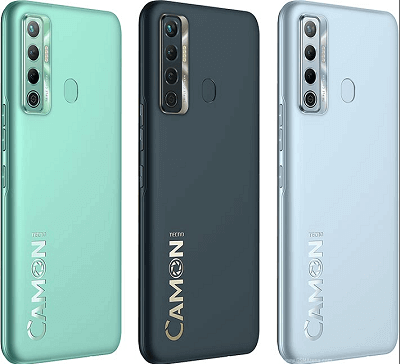
    Tecno has several models of smartphones out on the market that is selling fairly well. For today, we will be looking at the Camon 16 line of smartphones.   

    The Tecno Camon 16 is one of the best within the Tecno brand. There are about 4 versions of the smartphone and each person can buy the one which suits him best according to the features that come with the phone.

    Tecno Camon 16

    The Tecno Camon 16 was in October 2020. It came with a big 6.8” screen.

    It came with a RAM of 4GB while the internal storage ranges from 64GB to 128GB. A memory card can also be added to increase the storage size further, for those who love to keep a lot of things on their smartphones.

    It has a big 64Mp rear camera and a 16MP front camera. Your photo worries are certainly over.

    • It runs on Android 10 with a HIOS 6.0.
    • Power is derived from a 5000mAh battery.

    Tecno Camon 16 Premier

    The Tecno Camon 16 Premier came out in September 2020. It also came with a large 6.8” screen for all your viewing pleasure.

    The internal storage capacity is 128GB while the RAM is 8GB.

    The rear camera consists of 64MP with a dual 48MP front camera which is surely enough to snap something for Instagram.

    Power is provided by a large 4500mAh battery. It also runs on Android 10 with HIOS 6.0.

    Tecno Camon 16 Pro

    The Tecno Camon 16 Pro was also unveiled to the world in September 2020. With a big 6.8” IPS LCD screen, you will surely enjoy all the movies that you will watch on it.

    RAM is 4GB to 6GB and it has a storage capacity of 128GB.

    It also runs on the Android 10 platform with HIOS 7.0.

    The camera is a huge 64MP for the rear and a dual 16MP front camera. This is surely enough to take all those high-quality photos that you have been yearning to shoot.

    Power comes from a 5000mAh battery that will require you to leave your charger behind when you go out.

    Tecno Camon 16 S

    Unveiled in November of 2020, the Tecno Camon 16 S came with a 6.6” screen.

    The internal consisted of 6GB of RAM and 128GB of storage capacity.

    The camera is equipped with a 48MP rear camera and an 8MP inner camera for all your quality photography shoots.

    • Battery power is made up of 5000mAh.
    • It also runs on Android 10 with a HIOS 6.2.

    These are the Tecno Camon models out on the Ghanaian market at the moment. All these smartphones can be purchased in Ghana at any phone shop in the country.

    The Tecno Camon line also has some of the best features that will make any use of the phone applaud its performance.

    Apart from the great features of the Camon line, the phones are also beautifully and ergonomically designed.

    If you are in the market for a new smartphone that can hold up to its own among the big boys on the market, we suggest you give the Tecno Camon a try and see how you fall in love with it.

    You can also check out Tecno Spark 10 Pro price in Ghana and the latest Tecno Spark 10 and the Spark 10 Pro price in Ghana.

    For other phones too, you can check out all the iPhone models and the cheapest smartphones to buy in Ghana.

  • How To Check Your SIM Number For Glo And Airtel Networks In Ghana

    How To Check Your SIM Number For Glo And Airtel Networks In Ghana

    Every SIM card in the world has a special number that comes with it. Each SIM card has its unique number.

    This is the number that allows you to be able to call someone on their mobile phone. In Ghana, this is normally a 10-digit number.

    The number lets you know exactly who you are calling as no two SIM cards have the same number in operation at the same time.

    This makes the number on the SIM card a very important one that needs to be recorded to memory.

    However, some people cannot memorize the number of their SIM cards or they do not even know the number at all.

    This is mostly the case when the SIM was recently purchased. Because of this, we will be laying out the various ways through which one can check the number on the SIM card in Ghana. We have covered the main telecommunications players in the country.

    Glo

    Glo is one of the network operators in Ghana. Its coverage in the country is a good one since they have a good number of subscribers on their network.

    Here are the steps to check your number in case you are in the Glo network.

    Dial the shortcode *777# to get the number of your SIM displayed on your screen. The number may appear with ‘234’ in front of it.

    All you have to do is to remove the ‘234’ and put a ‘0’ to get your number just like it would be written in Ghana.

    There is also another shortcode that can be used to get the SIM number of the Glo network. Dial *135*8#. The number will then appear on your screen in the long format. You can get your number simply by removing the ‘234’ and putting a *0’ there to get your number.

    You can also get your SIM number if you contact the Glo customer care centers on their hotlines.

    Call their customer care by calling 0230010100 or 0230010200. Follow the prompts and then ask for your number from the agent that will come on the line

    You can also the Glo mobile app to get your number if you are having the app installed on your phone. After you have the app up with your details, your number will be available to see.

    AirtelTigo

    You can find the number of your Airtel SIM if you still have the SIM card plate that came with it when you first bought it.

    The number is written on the plate along with the default PUK and PIN codes of the SIM.

    You can also visit an Airtel shop to get your number if you have the time to do so. You can also call Airtel customer care and request them to send you a message with your SIM number. They can also read the number to you right there on the phone if you prefer it that way.

    You can also dial these shortcodes to view your AirtelTigo number

    *703#

    *121*93#

    *1#

    *140*1600#

    If you are a Glo or AirtelTigo subscriber, then the various ways shown above will come in handy when you need to get the number of your SIM one day.

    Whenever you forget your number, all you need to do is to refer to this article and choose the most relevant method for you and then get your number right away. We sincerely hope that this article was really helpful.

  • Tips For Buying A Good Laptop (Read This Guide)

    Tips For Buying A Good Laptop (Read This Guide)

    So let’s say you have decided to get yourself a new computer because you want to be able to do work at different places quickly as your new job demands.

    In this case, you will need to get a laptop computer since that is the kind of computer that can be carried around and used in the quickest of time to work.

    However, you should make sure not to immediately buy the first laptop that you set your eyes on.

    It is important to make sure that the laptop computer you are choosing will suit whatever you have in mind for its usage very well.

    We will be sharing some tips that will help you to choose a better laptop than what you would have originally chosen before reading this article.

    First, let us look at them in terms of prices or status.

    Entry-Level

    If you are looking for a cheap laptop that will be used for just some small tasks, then an entry-level one will be a good choice for you if you do not care about the battery life, weight, or performance of the machine as well.

    You will be able to get some for less than GHS 2.000 (we are talking about a brand-new machine here).

    Laptops that are low cost are normally low-powered as well but they can still be used for any normal task such as searching the internet, sending emails, and word processing.

    Midrange

    For people that always want to have their machines with them wherever they go, you will need to have a machine that is thin, light, and portable.

    Midrange laptops are made for people who use their machines a lot. These machines can be used to play some games, although they may have a hard time with high-end video games and other media that make use of fast graphics processing.

    High-End

    However, if you want a machine that can handle almost any task including playing demanding video games and other media stuff, then a high-end machine is what you should get.

    These machines normally come with powerful graphic cards and are normally made for serious computer users.

    Things To Look Out For When Buying A New Laptop

    CPU

    This can be termed as the brain of the computer system. Without it, the machine cannot work.

    You should check the number of cores of the machine you are considering as well as its processing power and the price to see if it fits with your budget.

    You should look at models from both Intel and AMD. However, you should be a bit careful when comparing them.

    RAM

    The RAM normally determines how fast or slow your computer will be when you are running multiple programs at the same time or using high-end apps.

    A 4GB RAM is mostly sufficient. However, you should consider going for 8GB or 16GB RAM or even higher if your budget can support it.

    This is very important since you may not be able to upgrade the RAM after you start using the machine

    Screen

    Screens are also important when choosing a new laptop. Bigger screens are normally better since they can support higher graphics and are also good for playing games as well as watching movies.

    Lower-cost laptops with smaller screens normally have a lower resolution. Choose a larger screen if you will be using your laptop to watch videos and movies a lot.

    Storage

    Some people normally underestimate the storage size they will need until they have started using the machine.

    You can choose a smaller screen size if you are going to store all your files in the cloud. If not, then you will need to get a machine with ample storage capacity.

    Cooling

    It is also very important to take a machine with a good cooling system. Let them power the machine on for a while and feel the underside with your palm for heat.

    If it is too hot, then it likely doesn’t have a good cooling system, which means you should not be buying it. You should the vents around the laptop as well.

    Battery Life

    You should choose a machine that has a good battery that can last longer when it is in use. Since most laptops are meant for moving around, having a longer battery life is an essential feature it should possess. 

    Wifi

    It should be able to access wifi with good speed. It would be great to find a laptop that has wifi that supports the current wifi standard wifi 5.

    Conclusion

    Although you cannot everything you want, you should try to choose a machine that has the features that will be most important to you or that can cope with your budget.

    Choosing a laptop is very important because this is not something you can throw away after a month and buy another. Else we would not be talking about the budget here.

    Check out our laptop-related articles:

  • All Broadband Packages Of Vodafone Ghana

    All Broadband Packages Of Vodafone Ghana

    Vodafone Ghana, one of the best telecommunication companies in Ghana, has a wide range of broadband bundles suited to every category of person in the country.

    Two types of broadband packages are offered by Vodafone. There are also some options available that serve that can be chosen by subscribers as well.

    Let us take a look at the various broadband packages that are offered by Vodafone.

    Standard Package

    The standard broadband package falls into a further 5 sub-packages under it. Each of the five packages has its prices and is tailored to meet the expectations of subscribers. Let us look at each of the five packages.

    Browser Package

    This package is made for customers who are always surfing the internet by making use of their emails and other social media platforms.

    It has a price tag of GHS 90 and customers who purchase it will get 26GB of data. Customers will also get unlimited calls for the evenings and weekends on any landline.

    Streamer Package

    The streamer package is made for people who love to stream videos on various internet websites such as YouTube and any other apps that allow its users to stream videos.

    With just as little as GHS140, customers are credited with 52GB worth of data to stream all the videos that they want. Customers will also get unlimited evening and weekend calls on any landline.

    Webmaster Package

    This package is designed for people who are social workers, networkers as well communicators.

    For those that tend to do more than just leisurely browsing on the internet, this package can be purchased for GHS 200 which will grant the customer 14GB worth of data.

    This package also comes with the same bonuses as the earlier two packages mentioned above.

    Downloader Package

    The downloader package is specially made for people who are always downloading movies, music, and any other large-size files from the internet.

    Customers are given 259GB worth of data which is purchased for GHS 285. The data given to the customer could be able to last him or her for over a month as they download all the movies and music videos that they would want to download.

    Office Package

    This is the standard package that is designed for business people who make great use of the Internet to run their various business activities.

    If you are one of such people who use the internet in almost every aspect of running your company or work, then we are sure that you would gladly find no issue with purchasing 621GB worth of data for just GHS 450. 

    One family Package

    The one-family package is designed for the family members this package provides broadband data that is accessible to every family member no matter where they may be. The one-family package is also divided into further three sub-packages.

    The first one which is known as small is sold at GHS 120 and comes with 47GB worth of data.

    The second one which is known as the medium is the priced at GHS 220 and comes with 207GB for the whole family to use.

    The third one which is the most expensive costs GHS 350 and fetches an ample 466GB worth of data.

    Unlimited Package

    There are also some unlimited offers that subscribers can get their hands on.

    Dial *900#-7-1 to get an unlimited weekend data plan that will cost you only GHS 20. The data given will be valid from 1 am on Saturday to midnight on Sunday.

    You can also dial *900#-7-2 to get the monthly version of this package.

    So that was all that there is to know about the various Vodafone Ghana broadband packages available in the country.

    With these broadband data packages, you will be able to do all those browsing, streaming, and downloading that you have always wanted to do at fair rates.

    You will be able to access all the internet-related things you wanted without worrying about your data bundle getting finished.

    You might want to check out our recent article covering how to buy waec scratch card using mobile money.

  • All iPhone Models So Far

    All iPhone Models So Far

    It has been a long journey for the Apple iconic iPhone since its first introduction in 2007. Unlike other smartphones in the world market, Apple only makes the iPhone line of smartphones.

    This has made it easier for people to know exactly which iPhone they want when they decide to get one.

    The same cannot be said about Apple’s main rival Samsung, which has models scattered over all available price points to the extent that, most people do not even know of some Samsung models until they are told.

    In this article, we will be taking a brief look at all the Apple iPhone models from the beginning of 2007 to the current generation phones.

    Most of you surely know the majority of the models in the lineup but only a few people know of the earlier models.

    So here we go.

    iPhone

    The model in the lineup of the iPhone was simply known as the ‘iPhone’. It was released in the year 2007 and came with storage capacities ranging from 4GB to 16 GB.

    It had the model number A1203, which was written at the back of the case. The first iPhone had a rounded-edge display.

    Specs

    • 3.6” rounded edge display
    • 4GB to 16GB storage space
    • 2MP camera

    iPhone 3G

    In 2008, the iPhone 3G made its debut with a plastic housing, lacking a highly glossy back imprint. Notably, the SIM tray was positioned on the side of the phone.

    Specs

    • 8GB to 16GB storage space
    • 3.5” screen
    • 2MP camera

    iPhone 3GS

    The 3GS came out in 2009 with a little bit more features than the previous one. It came in two colors, white and black. Its back was made of plastic.

    Specs

    • 3.5” display
    • 8GB to 16GB storage space
    • 3.15MP camera
    • 256MB of RAM
    • 1219mAh battery

    iPhone 4

    Released in 2010, the iPhone 4 was the first iPhone with a flat back with stainless steel around its edges. It also came in white and black. It also had the volume buttons with the +and – sign on it.

    Specs

    • 3.5” screen
    • 512MB of RAM
    • 8GB to 32GB storage space
    • 5MP camera
    • 1420mAh battery

    iPhone 4s

    The iPhone 4s was released in the following year 2011. It was also offered in white and black as the previous models. It had a front and was made of glass and also had stainless steel around the edges.

    Specs

    • 3.5” screen
    • 8GB to 64GB storage space
    • 512MB of RAM
    • 8MP camera
    • 1432mAh battery

    iPhone 5

    The following year saw the release of the iPhone 5. Again, this phone was also offered in white and black. It also had a front and back made of glass.

    Specs

    • 4” display
    • 8GB to 64GB storage space
    • 1GB of RAM
    • 8MP camera, 1.2MP inner camera
    • 1449mAh battery

    iPhone 5S

    the 5s was introduced in 2013 by Apple. This model had more color options than its predecessors.

    Buyers could choose from space gray, silver, and gold colors. It had a flat front made of glass while the back was anodized aluminum.

    The home button also had a touch ID capability. It also had a true-tone LED flash at the back.

    Specs

    • 4” screen
    • 8GB to 64GB of storage space
    • 1GB of RAM
    • 8MP rear camera, 1.2MP inner camera
    • 1560mAh battery

    iPhone SE

    the first generation iPhone SE was unveiled in 2016 with a host of good-looking color options. Buy now the choice of choosing either space gray, silver, gold, or rose gold.

    Specs

    • 4” screen
    • 16GB to 128GB of storage space
    • 2GB of RAM
    • 12MP camera with 1.2MP inner camera
    • 1624mAH battery

    iPhone 6

    The iPhone 6 was then released in the following year. Space gray, silver, and gold were the available color options.

    Specs

    • 4,7” screen
    • 1GB of RAM
    • 8GB to 128GB of storage
    • 8MP camera with 1.2MP inner camera
    • 1810mAh battery

    There was also the 6plus which had a 5.5” screen and 2915mAh battery as the only higher specs over the smaller 6.

    iPhone 6S

    the iPhone 6s was released in 2015 and came with the same color option as the iPhone SE.

    specs

    • 4.7” screen
    • 8GB to 128GB storage
    • 2GB of RAM
    • 12MP camera with 5MP inner camera
    • 1716mAh battery
    • There was also the 6s plus which had a bigger 5.5” screen and 2750mAh battery as its stronger points over the smaller 6s.

    iPhone 7

    The iPhone 7 was unveiled to the public in 2016. It came with different color options to choose from compared to the previous models.

    Buyers could choose from black, jet black, rose gold, gold, silver, and a special edition red. It had a glass front with curved edges and an anodized aluminum back.

    Its sleep/wake button could be found on the right side of the phone. It also had a touch ID.

    Specs

    • 4.7” screen
    • 32GB to 128GB storage space
    • 2GB of RAM
    • 12MP rear camera with 7MP front camera
    • 1960mAh battery
    • There was also the higher version iPhone 7 Plus which had a 5.5” screen with a 2900mAh battery.

    iPhone 8

    in 2018, the iPhone 8 was made available to Apple buyers. It also came with more color options with buyers having to choose between gold, silver, space gray, and a special edition red.

    It also had a curved glass front as well as the back with an anodized band around its frame. It also so had a solid-state home button.

    Specs

    • 4.7” screen
    • 64GB to 256GB storage
    • 2GB of RAM
    • 12MP rear camera and 7MP inner camera
    • 1821mAh battery
    • The higher version which is the iPhone 8 plus came with a 5.5” screen and a bigger 2691mAh battery.

    iPhone X

    The popular iPhone X was released in 2017 and came with only two color options, silver space gray. It had a glass back with stainless steel around the frame.

    Specs

    • 5.8” screen super retina display
    • 64GB to 256GB storage options
    • 3GB of RAM
    • Dual 12MP rear camera and 7MP front camera
    • 2716mAh battery

    iPhone XR

    Released two years after the iPhone X, the XR came in white, black, yellow, coral, and a special edition red. It also had an anodized band around its frame.

    Specs

    • 6.1” liquid retina display
    • 64GB to 256GB storage
    • 3GB of RAM
    • 12MP camera with 7MP inner camera
    • 2942mAh battery

    iPhone XS

    iPhone XS was released in 2018. It had color options of silver, space gray, and gold.

    Specs

    • 5.8” screen
    • 64GB to 512GB storage
    • 3GB of RAM
    • Dual 12MP rear camera and 7MP inner camera
    • 2658mAh battery
    • There is also the bigger iPhone XS Max which had a bigger 6.5” display with 4GB RAM and a bigger 3174mAh battery.

    iPhone 11

    the iPhone 11 was introduced in 2019 with purple, green-yellow, black, white, and red colors.

    Specs

    • 6.1” screen
    • 64Gb to 256GB storage
    • 4GB RAM
    • 12MP camera with 12MP inner camera
    • 3110mAh battery

    iPhone 11 Pro

    This was also released alongside the iPhone 11 and came with silver, space gray, gold, and midnight green color options.

    Specs

    • 5.8” super retina display
    • 64GB to 512GB storage
    • 4GB RAM
    • Triple 12MP rear cameras with 12MP inner camera
    • 3046mAh battery
    • There is also the bigger 11 Pro Max which had a 6.5” screen and a 3969mAh battery.

    iPhone SE Second Generation

    the second-generation iPhone SE was released in 2020 with white and black color options.

    Specs

    • 4.7” screen
    • 64GB to 256GB storage
    • 3GB RAM
    • 12MP camera and 12MP inner camera
    • 1821mAh battery

    iPhone 12

    the iPhone 12 was also unveiled in 2020 with black, white, green, and blue color options.0

    Specs

    • 6.1” super retina XDR screen
    • 128GB to 512GB storage
    • 6GB RAM
    • 12MP camera and 12MP inner camera

    iPhone 12 Pro

    also released in 2020, the 12 Pro came in silver, graphite, gold, and pacific blue color options.

    Specs

    • 6.1” display
    • 128GB to 512GB storage
    • 6GB RAM
    • 12MP camera with 12MP inner camera

    iPhone 13

    The iPhone 13 is the standard model of the 13th generation of iPhones. It was released in September 2021 and features a 6.1-inch OLED display, a powerful A15 Bionic chip, a dual-lens rear camera system with 12-megapixel wide and ultrawide sensors, and a 12-megapixel TrueDepth front camera. The iPhone 13 also supports 5G connectivity, MagSafe wireless charging, and iOS 15.

    iPhone 13 Specs

    • 6.1-inch OLED display
    • A15 Bionic chip
    • Dual-lens rear camera system (12-megapixel wide and 12-megapixel ultrawide)
    • 12-megapixel front-facing TrueDepth camera
    • 5G connectivity
    • MagSafe wireless charging
    • iOS 15
    • Starting price: $799

    iPhone 13 mini

    The iPhone 13 mini is a smaller version of the iPhone 13, with a 5.4-inch OLED display. It shares all of the same features as the iPhone 13 but in a more compact form factor.

    iPhone 13 mini Specs

    • 5.4-inch OLED display
    • A15 Bionic chip
    • Dual-lens rear camera system (12-megapixel wide and 12-megapixel ultrawide)
    • 12-megapixel front-facing TrueDepth camera
    • 5G connectivity
    • MagSafe wireless charging
    • iOS 15
    • Starting price: $699

    iPhone 13 Pro

    The iPhone 13 Pro is the high-end model of the 13th generation of iPhones. It was released in September 2021 and features a 6.7-inch OLED display, a powerful A15 Bionic chip, a triple-lens rear camera system with 12-megapixel wide, ultrawide, and telephoto sensors, and a 12-megapixel TrueDepth front camera. The iPhone 13 Pro also supports 5G connectivity, MagSafe wireless charging, and iOS 15.

    iPhone 13 Pro Specs

    • 6.7-inch OLED display
    • A15 Bionic chip
    • Triple-lens rear camera system (12-megapixel wide, 12-megapixel ultrawide, and 12-megapixel telephoto)
    • 12-megapixel front-facing TrueDepth camera
    • 5G connectivity
    • MagSafe wireless charging
    • iOS 15
    • Starting price: $999

    iPhone 13 Pro Max

    The iPhone 13 Pro Max is the largest iPhone ever made, with a 6.7-inch OLED display. It shares all of the same features as the iPhone 13 Pro but with a larger display and a slightly larger battery.

    iPhone 13 Pro Max Specs

    • 6.7-inch OLED display
    • A15 Bionic chip
    • Triple-lens rear camera system (12-megapixel wide, 12-megapixel ultrawide, and 12-megapixel telephoto)
    • 12-megapixel front-facing TrueDepth camera
    • 5G connectivity
    • MagSafe wireless charging
    • iOS 15
    • Starting price: $1,099

    iPhone SE (3rd generation)

    The iPhone SE (3rd generation) is the latest version of Apple’s budget-friendly iPhone. It was released in March 2022 and features a 4.7-inch Retina display, an A15 Bionic chip, a 12-megapixel rear camera, and a 7-megapixel front camera.

    The iPhone SE (3rd generation) also supports 5G connectivity, Touch ID, and iOS 15.

    iPhone SE (3rd generation) Specs

    • 4.7-inch Retina display
    • A15 Bionic chip
    • Single-lens rear camera (12-megapixel wide)
    • 7-megapixel front-facing camera
    • 5G connectivity
    • No MagSafe wireless charging
    • iOS 15
    • Starting price: $429

    iPhone 14

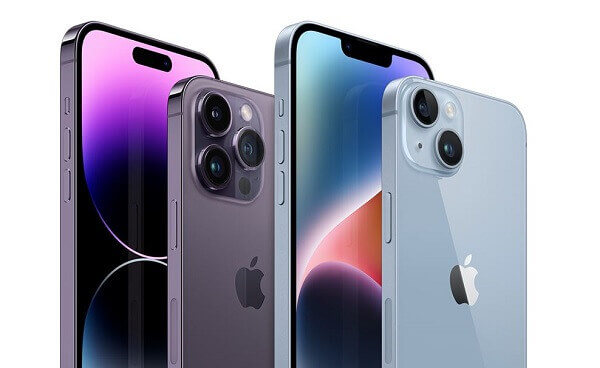
    The iPhone 14 is the standard model of the 14th generation of iPhones. It was released in September 2022 and features a 6.1-inch OLED display, a powerful A16 Bionic chip, a dual-lens rear camera system with 12-megapixel wide and ultrawide sensors, and a 12-megapixel TrueDepth front camera. The iPhone 14 also supports 5G connectivity, MagSafe wireless charging, and iOS 16.

    iPhone 14 Specs

    • 6.1-inch OLED display
    • A16 Bionic chip
    • Dual-lens rear camera system (12-megapixel wide and 12-megapixel ultrawide)
    • 12-megapixel front-facing TrueDepth camera
    • 5G connectivity
    • MagSafe wireless charging
    • iOS 16
    • Starting price: $799

    iPhone 14 Plus

    The iPhone 14 Plus presents a larger variant of the iPhone 14, boasting a spacious 6.7-inch OLED display. While maintaining all the features of the iPhone 14, it offers them in a more compact and sizeable design.

    iPhone 14 Plus Specs

    • 6.7-inch OLED display
    • A16 Bionic chip
    • Dual-lens rear camera system (12-megapixel wide and 12-megapixel ultrawide)
    • 12-megapixel front-facing TrueDepth camera
    • 5G connectivity
    • MagSafe wireless charging
    • iOS 16
    • Starting price: $899

    iPhone 14 Pro

    The iPhone 14 Pro is the high-end model of the 14th generation of iPhones. It was released in September 2022 and features a 6.7-inch OLED display, a powerful A16 Bionic chip, a triple-lens rear camera system with 12-megapixel wide, ultrawide, and telephoto sensors, and a 12-megapixel TrueDepth front camera.

    The iPhone 14 Pro also supports 5G connectivity, MagSafe wireless charging, and iOS 16.

    iPhone 14 Pro Specs

    • 6.7-inch OLED display
    • A16 Bionic chip
    • Triple-lens rear camera system (12-megapixel wide, 12-megapixel ultrawide, and 12-megapixel telephoto)
    • 12-megapixel front-facing TrueDepth camera
    • 5G connectivity
    • MagSafe wireless charging
    • iOS 16
    • Starting price: $1,099

    iPhone 14 Pro Max

    The iPhone 14 Pro Max is the largest iPhone ever made, with a 6.7-inch OLED display. It shares all of the same features as the iPhone 14 Pro but with a larger display and a slightly larger battery.

    There was also the bigger 12 Pro Max which had a 6.7” screen with the rest of its features being similar to the 12 Pro.

    So here are all the iPhone models released by Apple so since 2007. We hope this article is insightful.

    iPhone 14 Pro Max Specs

    • 6.7-inch OLED display
    • A16 Bionic chip
    • Triple-lens rear camera system (12-megapixel wide, 12-megapixel ultrawide, and 12-megapixel telephoto)
    • 12-megapixel front-facing TrueDepth camera
    • 5G connectivity
    • MagSafe wireless charging
    • iOS 16
    • Starting price: $1,199

    Check out our iPhone-related articles:

  • How To Buy WAEC Scratch Card With Mobile Money

    How To Buy WAEC Scratch Card With Mobile Money

    Whenever students complete their senior secondary school, they have to wait a while before getting their results.

    However, some students can check their results on the internet before they get it physically.

    Before you can check the results on the internet, you will first need to purchase a scratch card that will enable you to do that.

    Most internet cafes in the country would even handle the whole process for you. All you will have to do is to pay for the scratch card and provide the relevant information like your index number and name. you may have to pay GHS 18 or 20 for the scratch card.

    You should also be careful because there are scammers who may try to sell you a fake card that will not work when you try to use it later.

    You can also purchase a scratch card with mobile money. We are going to show you how you can go about this method.

    You will need to send the fee for the card to the number, 0550107980

    You then send the name on the mobile money account that you used for sending the money to the same number on WhatsApp.

    You have to send only the name and then you wait patiently. You should not add anything else to the name and you should not try to call the number that you have sent the name to on WhatsApp. Calling the number just ends up piling pressure on the system.

    You will then receive a serial and PIN that will enable you to check your WAEC results as soon as the payment has been confirmed.

    It could take maybe 5 minutes for you to get the card after you have made the payment. However, there is a possibility of delays on some occasions as a result of pressure that has piled up on the system.

    How To Check Your Wassce Results Online

    To do this, you will need to have a stable internet connection on a computer or a good smartphone.

    We advise that you do not use opera mini for this operation. Just follow the instructions below on how to check your results online without the use of a scratch card.

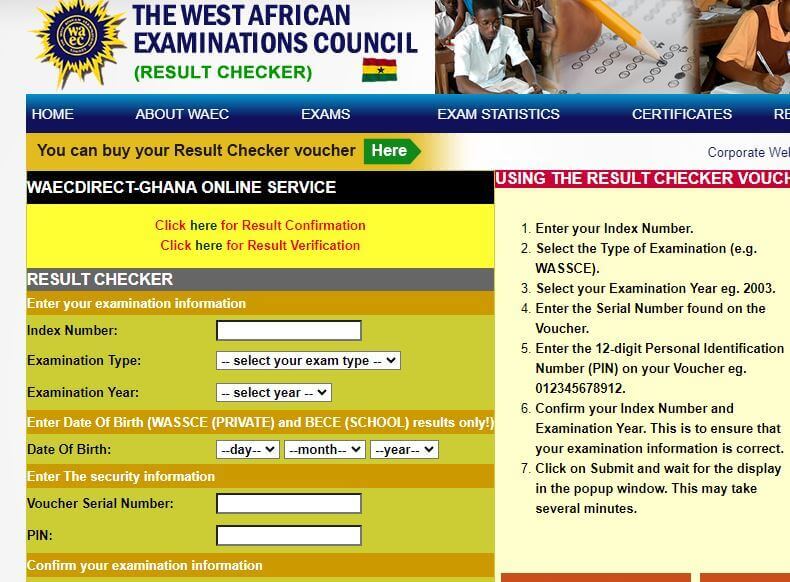
    1. Use a good internet browser and then visit Ghana.waecdirect.org
    2. Enter your index number on the screen that appears
    3. You will also have to enter the year you took the waec exam
    4. Enter the category of the exam that you wrote, Eg, WASSCE or BECE
    5. You will then enter your 10 digit secret pin
    6. You will then have to submit your personal information in the next step and wait for the results that will be shown
    7. You will then have to confirm the selections that you have made.
    8. Your results will then appear on the next screen that comes
    9. Also, if you already possess a scratch card and would like to use that instead of the pin method. Here is how to go about it.
    10. Visit the waec online portal which is http://ghana.waecdirect.orgInput your index number
    11. Choose the examination type that you sat for
    12. Select the year in which you took the examination
    13. Input the number on the serial card which can be found on the reverse side of the card
    14. Enter your identification number which is a 12 digit one
    15. Confirm the index number you gave as well as the examination year
    16. Click on the ‘submit’ and then wait for it to load up

    You can also visit the waec head office in Accra in case you will need some physical help from them.

    Behind the Ridge Hospital

    P.O. Box 917, Accra

    +233 302 208201-9

    info@waecgh.org

    so you now know the various ways through which you can check your results on the internet as well as through the use of mobile money. So next time you need to check the results. You can go with them.