Blog

  • WhatsApp New Update: You Can Now Set A Wallpaper For Each Contact; Here Is How To Do It

    WhatsApp New Update: You Can Now Set A Wallpaper For Each Contact; Here Is How To Do It

    This article is going to take you through how to set WhatsApp wallpaper for each contact on both iPhone and Android.

    Aside from this tutorial, you will also find how to change WhatsApp wallpaper for individual contact on iPhone and Android, and how to keep wallpaper in WhatsApp (that is if you don’t want to lose that wallpaper).

    You will also read about how to change WhatsApp wallpaper for one contact

    Despite everything that is happening between WhatsApp’s new privacy policy and its users, the app continues to be the world’s most popular messaging app as they keep on bringing new updates.

    WhatsApp has been in the news this whole year because of the new privacy policy they rolled out.

    The new policy was asking users to either agree with WhatsApp to share its data with Facebook. Or close their accounts.

    When this privacy rolled out; we saw many WhatsApp users migrating to other secure private messaging apps such as Signal and Telegram.

    Although WhatsApp has extended the deadline for its users to accept this new policy, users can’t use their WhatsApp accounts again when the given deadline is over.

    However, users can open the messaging app, see messages and receive calls but can’t pick up these calls or reply to these messages.

    And when you try to do it, WhatsApp will ask you to agree to the terms before you can reply or receive calls.

    When this happens to your account, WhatsApp will add your WhatsApp account to the inactive WhatsApp accounts, and inactive WhatsApp accounts also have 120 days to make changes, or else WhatsApp will delete their accounts.
    Now is the time to know what to do next or migrate from the app to Signal or Telegram.

    If you plan on staying on WhatsApp, then the messaging app has introduced a new feature you will love.

    This new feature allows you to set a wallpaper for specific contact or all contacts.
    With this new feature, you can set a wallpaper for each individual you chat with, and you can set a wallpaper of your mom on a chat between your mom and you.

    The same applies to your partner. Aside from chatting with him or her, you can also be seeing this picture of yourself with him or her when chatting.

    How To Set A Wallpaper For Individual Contact On Android

    1. Open the contact you want to change the chat wallpaper.
    2. Tap on the three-dot on the top right and select Wallpaper.
    3. Now choose your preferred Wallpaper and select SET WALLPAPER.
    4. Whatsapp will prompt you to choose to set the Wallpaper for that specific contact or all your contacts. Choose ‘For This Contact’ and press Ok.
    5. Now follow the same steps for each contact you want to change the chat wallpaper.

    How To Set A Wallpaper For Individual Contact On iPhone

    The settings to change WhatsApp wallpaper for each contact is different on iPhone so here is how to change WhatsApp’s wallpaper for individual contact on iPhone:

    1. Open your WhatsApp and click on the contact you want to change his or her chat wallpaper
    2. On the chat screen, click on the contact
    3. Click on Wallpapers And Sound
    4. Tap on Choose A New Wallpapers
    5. Select the WhatsApp wallpaper you want, you can choose from WhatsApp wallpapers or choose from your Photos
    6. after selecting your preferred wallpaper tap on Set

    How To Change WhatsApp Wallpaper For One Contact On iPhone And Android

    So let’s say you have changed the chat wallpaper in WhatsApp for individual contact and now want to change the wallpaper again, follow these steps:

    How To Change WhatsApp Wallpaper For All Chats On Android

    Maybe you want to set one WhatsApp wallpaper for all your contacts, to do this follow these steps:

    1. Launch WhatsApp
    2. Hit on the three vertical lines
    3. Select Settings
    4. Choose Chats
    5. Click on Wallpaper
    6. Now click on Change
    7. Select from the WhatsApp library or your Photos
    8. After selecting your preferred photo, click on Confirm or Ok

    Conclusion

    Whatsapp will continue to do its best to get people to stay on the app. The first step they had to take was to set the status for everybody to see, explaining what the new privacy policy is about and debunking some rumors about it.

    And they have just rolled out this new feature.

    In this article, we covered how to change the chat wallpaper in WhatsApp for an individual contact on both android and iPhone.

    Now it is possible to know who you are chatting with since you can now use the person you are chatting with as your chat wallpaper and it will only stay in the chat between you and that person.

    Let’s see what is going to follow next, be sure to be visiting us as we will be bringing you all the latest updates.

    You might want to check out how to know if someone has saved your number because, with this trick, we use WhatsApp in finding out if your number is actually stored on someone’s phone.

    And yes, it is now possible to hide the archived box from your WhatsApp chat screen, read this article to know how to hide the archived box from the chat screen.

    Frequently Asked Questions When It Comes To How to set WhatsApp wallpaper for one contact.

  • MTN Airtime: How To Share Airtime On MTN

    MTN Airtime: How To Share Airtime On MTN

    One of the biggest telecommunication networks in Ghana at the moment is MTN Ghana.

    Due to it being one of the biggest in the country, there are a lot of subscribers on the network in every part of the nation.

    MTN Ghana has also rolled out a lot of services and goodies that make the usage of their network enjoyable to their subscribers.

    There may be a time that you may feel like dashing some airtime to some people or a loved one.

    However, you may be having a lot of airtime on your smartphone but no money in your MTN mobile money account.

    And you may end up not sending the airtime to that special person because you think that the airtime can only be sent by using mobile money to purchase.

    We are here to bring you the good news that airtime is not sent be sent by mobile money alone.

    You can transfer airtime to someone else right from your airtime account. In this article, we will be taking you through the steps through which you can send airtime to people from your MTN airtime account.

    MTN Ghana rolled out a service dubbed ‘Me2U’ that allows subscribers to send airtime right from their smartphones to whoever they want to send the airtime to.

    To start using this amazing service from MTN Ghana, you will first have to register for the service. There are a few steps to go about the registration. And they are down here below.

    How To Register For MTN M2U

    1. Dial *198#
    2. Select ‘1’
    3. Enter a 4 digit code as your password
    4. Re-enter the 4 digit code to confirm it
    5. You will then a message telling you that the registration has been successful.

    Now that you have registered for the Me2U service, you will be able to send airtime to anyone to whom you want to send it.

    Below are the steps which can be used when you want to send airtime to your family, loved ones, or friends.

    How To Send MTN Airtime To Another MTN User

    1. Dial *198#
    2. Choose 2
    3. Enter the number of the person you are sending the airtime to and then press enter
    4. Enter the amount that you want to send to the person. This amount must be entered in whole. For example, if you want to send 20.50 cedi worth of airtime to the person, you are required to enter only 20.
    5. You will now need to enter the decimal value of the amount you are sending. You should write the decimal without adding the dot. This is because adding the dot will cause the network to give you notice of error. So the decimal value should be written alone. For example, 50.
    6. Now enter the 4-digit passcode you entered when you were registering for the Me2U service.
    7. Select the ‘1’ option to confirm the airtime transaction.
    8. You will then receive a message to alert you that the airtime has been sent to the number successfully.

    Wrapping Up

    So this was about the ways through which you can send airtime from your smartphone to another person without the use of mobile money.

    You must note that the transaction can be possible only between MTN numbers. This means that you cannot send airtime from your MTN number to another number that is not on the MTN network.

    All airtime transactions that you make must be from an MTN number to another MTN number.

    The Me2U service cannot be used to send data bundles to another number. It is strictly for the use of sharing airtime only.

    So that was all that you needed to know about the MTN airtime sharing service which is known as the Me2U service.

    We hope you will now be able to share airtime between you and your friends now that you know how to share airtime from your account.

    Start sharing that airtime now. For more MTN-related articles, you can check out:

  • Technology Use In The Covid-19 Pandemic

    Technology Use In The Covid-19 Pandemic

    The world has been dealing with the coronavirus pandemic for a year now. The virus has infected many people in several nations, with a death toll that has passed the 1 million mark.

    Several hospitals in some African countries have reached their highest total capacity while others are now filling up.

    As with any global event, there will inevitably be some false information that circulates online and makes people freak out. Such cyber deception, however, has been countered by technological advancements.

    We have compiled in this article some of the ways through which technology has aided in the fight against the coronavirus pandemic.

    Misinformation

    Misinformation during the era of a pandemic or an epidemic can cause a lot of people to panic and even fearfully do things they should not do, such as widespread chaos, panic buying, hoarding, discrimination against those who have been infected, rise in the price of essential commodities, violence, conspiracy theories and a whole lot more.

    However, technology can help us fight such dangerous misinformation that tends to spread around on the internet.

    Social media sites like Google and Facebook, where such misinformation is commonly peddled around, also counter such misinformation by working tirelessly to educate people by providing them with the correct, verifiable information from approved healthcare organizations.

    These are done by creating a transparent scenario where people can be informed about the right things to do in a pandemic, such as the various safety protocols and what to do when one thinks that the virus has infected them.

    Medicine

    Anytime a new pandemic raises its head in the world, one of the first questions that people immediately ask is whether there is already a drug that can be used to cure or prevent the virus that is causing the pandemic.

    It has been no different with the coronavirus pandemic since its outbreak over a year ago. Nations are desperately looking for ways through which the coronavirus can be slowed and then killed off.

    Technology has offered us ways through which healthcare professionals can find the cure for the virus much faster.

    AIs have been known to suggest components that can be used to make a vaccine by understanding viral protein structures.

    It has also been helping researchers through tons of medical research papers relevant to the job at hand at a much faster pace than they could have done manually.

    Google Deepmind has even introduced the AlphaFold, a cutting-edge system that can predict the 3D structure of a protein through its genetic sequence.

    Traceability And Data Sharing

    Getting clear messages to the people during a pandemic is very important to make sure that they are informed of what is happening and to make sure that no one gets ahead to feed them with misinformation.

    Due to this fact, an interactive Covid-19 map that helps to provide news on the disease was launched by Microsoft Bing.

    Sixfold has also launched a live map of border crossings for truck drivers so that all of Europe could know what is going on when there happen to be delays in the supply of shipments.

    Social media app TikTok has also partnered with the World Health Organization to provide knowledgeable information on the coronavirus pandemic for their users and the correct facts and live streams from the WHO.

    Their users will be able to ask various questions about the pandemic and receive answers.
    Temperature

    The introduction of wireless thermometer guns and other infrared scanners is now essential in detecting infected persons at various checkpoints, offices, airports, hotels, hospitals, shops, and train stations, and with the help of coronavirus test kits, you can also use lateral flow tests for home to check your status.

    These technological devices are used in measuring the temperature of the human body while helping to keep a distance between the person being inspected and the person holding the device.

    Tracking People

    Big data analytics can help in tracking infected people through the use of facial recognition. This also helps health officials track the people who may have come into contact with the person the virus has infected.

    Some of these technologies can even help identify people even when they are wearing a mask that has covered their faces. These technologies also allow monitoring of the movements of people who health professionals have quarantined.

    It is clear from what we have seen that the world was not adequately prepared for the attack of another pandemic.

    The only thing that seems to have gone our way is that this pandemic does not seem to be very dangerous in terms of the rate at which it infects and brings down its victims. Will the world be prepared should another pandemic happen after this?

    It is up to us to make use of the technological expertise and its advancement to our advantage in fighting this and any other pandemic that may come about again.

    From what we see, technology has to be instrumental in the fight against the coronavirus pandemic through the various ways in which it has been applied.

  • Kikuu Ghana: How To Order, Delivery Branches, Contact, And More

    Kikuu Ghana: How To Order, Delivery Branches, Contact, And More

    Kikuu is an e-commerce company in Ghana that was founded in 2015. When you shop with Kikuu, you do not have to worry about getting duped or scammed since the company has a secure payment system through which customers can pay for the stuff that they order.

    When you visit the Kikuu website, you will be amazed at the number of things that you can purchase in various categories.

    Some of these categories are electronics, home appliances, mobile phones, computers, vehicle accessories, kids’ toys, jewelry and watches, and clothing.

    The main aim of the Kikuu e-commerce trading site is to connect Ghana and China since the majority of the goods being sold on the site are of Chinese origins.

    The goods available on Kikuu are all very affordable and this is something that people will agree with.

    When you order goods on Kikuu, you do not need to worry about the shipping fees involved as they are very affordable.

    Sometimes, you will not have to pay any shipping fees at all depending on the products that you purchased.

    With Kikuu, you are assured of great customer service. The company has set up good customer service in every nation they operate in.

    The company also states that its goods are always supplied by makers of high-quality products only.

    When it comes to Africa, Kikuu has a very strong presence on the continent. They are operational in several African nations such as Ghana, Senegal, Rwanda, Ivory Coast, Congo, Cameroun, Uganda, Nigeria, Ethiopia, and Tanzania.

    Once you have decided to do some shopping with Kikuu, there are a few steps to follow to get that done.

    How To Order An Item From Kikuu

    1. First, you will have to download the Kikuu app from your play store.
    2. You then register on the app after installing it on your smartphone. You can register with either your email or your mobile number.
    3. Now enter your name and your password. Enter the password again to confirm it.
    4. Depending on what you used to register, you will then have to visit either your email or you’re your SMS to confirm a code that will be sent to you by Kikuu.
    5. You can now go back to the app and search for the item that you wanted to purchase. After you find what you like, click on ‘buy’ and you will be sent to the shipping page where you will have to give your shipping address, contact, mobile, city as well as street address.
    6. You can have the package delivered to your doorstep or you can choose to pick it up yourself. After you are done with providing all the necessary shipping details, you then click on the ‘ship to this address.
    7. You will now complete your payment by choosing your payment method and then proceeding to pay. The item will then be delivered to you.

    Kikuu Delivery Branches

    There are several Kikuu delivery branches in the country. You can find Kikuu branch in one of the following places.

    • Accra
    • Kumasi
    • Madina
    • Cape Coast
    • Tamale
    • Ashaiman
    • Obuasi
    • Tema
    • Teshie
    • Takoradi

    You can also contact Kikuu on mobile at 020 83701062

    Email them at service@kikuu.com

    Their physical address is however based in China and it is the 2nd floor, the first building, Village Committee, The industrial plaza, Taicheng Village, Renhe Town, Baiyun District (airport Baiyun), Guangzhou City, China.

    If you are thinking about getting yourself some quality-made Chinese products from China itself, then your best bet will be to get on the Kikuu platform and start shopping.

    There are a lot of amazing and quality products available on the Kikuu site that you can get your hands on for an affordable price.

    Whatever you purchase will also be delivered to you in the briefest of times without having to worry.

    There is an excellent tracking system that allows you to track your package to its destination, which can be at your doorstep or the pickup branch.

    We encourage you to purchase quality Chinese products from Kikuu.  You can also check out one Kikuu competitor, which is Kaymu shopping mall.

  • Surfline Communications Vs Busy Ghana, Which Is The Best

    Surfline Communications Vs Busy Ghana, Which Is The Best

    There are currently two 4G LTE players in Ghana at the moment. These are Surfline Communications and Busy Ghana.

    A third 4G provider known as Blu Telecoms, also exists. However, it cannot match the earlier two mentioned in terms of coverage area.

    So today’s comparison will be between Surfline and Busy Ghana. So let’s get started already.

    In this comparison between the two 4G giants, we will be looking at coverage, Wi-Fi devices, prices, data bundles, service quality, and value.

    Coverage

    Both Surfline and Busy are seen to be having coverage over all over the capital of Accra with a few dark spots at some locations, on paper.

    So we can say that in terms of coverage, both Surfline and Busy are evenly matched.

    Devices

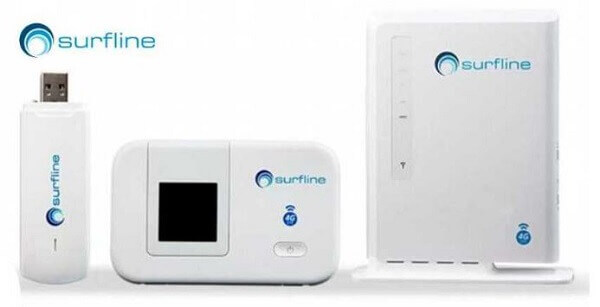
    Surfline currently has four devices available and these are modem, router, wingle, and three MI-fi devices.

    Busy on the other hand has only two devices available and these are Mifi and router.

    The modem sold by Surfline can be used by only one person and it costs GHC99 and free data of 1GB.

    The Mifi sold by Busy can be used by 14 people and also just the same GHC99 and comes with 500MB.

    Surfline’s Mifi and wingle can connect up to 14 people and cost GHC199 with 1GB free data. There are two other Surfline Mifi devices that GHC209 and GHC289 respectively.

    There is another that is sold by Busy that can connect up to 14 people and costs GHC139 with free data of 5GB.

    The router sold by both Surfline and Busy sells for GHC399. However, you will get only 1GB of free data from Surfline while Busy gives you a much larger 10GB.

    Data Bundles

    The bundles sold by Busy are all valid for 30 days, except for the 50GB bundle, which stays valid for 60 days.

    Busy’s data bundles come in the form of free data for Facebook, YouTube, Whatsapp as well as a free night.

    The bundles sold by Surfline on the other hand like the 20GB data lasts for 60 days while the 50GB data lasts for 90 days. And they come depending on the data package chosen as free data.

    Data Prices

    Busy sells bundles that can be bought for GHC3 for 100MB and GHC7 for 250MB. Surfline does not sell any such bundles.

    If you want 500MB data, you will have to pay GHC12 for Busy’s own and GHC9.9 for Surfline’s own.

    For 1GB data, you will pay GHC17 and GHC19 for Busy and GHC25 for Surfline.

    Busy sells 2GB data for GHC35. Surfline does not sell any such data.

    For 5GB at Busy, it will cost you GHC65 while Surfline sells the same amount for GHC75.

    Busy sells 10GB for GHC120. You will need to pay Surfline GHC125 or GHC129 for the same amount.

    You can also purchase 20GB of data from Surfline for GHC205 or GHC239. Buys sells 25GB of data for GHC225.

    There is 50GB data at Busy for GHC400 while you can have the same amount at Surfline for GHC445 or GHC 499.

    Quality Of Service

    In terms of the quality of service between the two companies, there is no significant difference.

    Both of them are known to go off at times when they are in use. And they work fine when they are on.

    In terms of optimization, both of them are gradually getting there. (Please draw your conclusion in this regard after using them and not take our views personal, since this is coming from the writer’s experience)

    Value

    Our readers will have to decide for themselves the company that is offering better value for their money.

    Looking at the above comparisons, you will see that you can do more with less at Busy while Surfline is not so ‘cheap’ in either the prices of the devices or data bundles.

    Those who love freebies like free night data, WhatsApp, etc, will possibly side with Busy while those who like their additional data will side with Surfline.

    Surfline also seems to give users more time on some specific data bundles compared to Busy. And you can also roll over unused data within 5 days after it expires.

    We hope that our cherished readers will be able to decide between Surfline and Busy if they plan to go in for 4G.

    Please note not to take our review of both companies at face value but use it as a basis to draw your conclusions after you have personally tried each of them.

    We hope this article was very helpful. Make to visit this site for more tech knowledge.  You can also check out some of the internet service providers in Ghana.

  • Melcom Ghana, Branches, Contact, Products, Work Opportunites And More

    Melcom Ghana, Branches, Contact, Products, Work Opportunites And More

    Melcom Ghana is one of the biggest shopping malls in Ghana at the moment. The company has a lot of branches all over the country that employs a good number of people in the country.

    Almost everyone in the country knows about the shopping mall franchise and it is one of the best-selling shopping malls in the country.

    It is also the largest retail and wholesale dealer in Ghana. The shopping franchise is also popular due to the affordable prices and quality of its goods.

    They are also one of the leaders in excellent customer care in the country. Melcom is a place where one can get almost anything that he or she may be looking to buy.

    The company was first established in 1989 by an Indian businessman known as Bhagwan Khubchandani.

    About Melcom Online Shopping

    Although the company has a branch in almost every region in Ghana, it knows that some customers may not be able to get up and visit a branch due to one or more reasons.

    If you have visited any Melcom branch in the country before, you will see that it can get thick with crowds and queues.

    Due to this, the company has an online shopping option where customers can place orders for their preferred goods and have them delivered to them.

    And in today’s world, the majority of people purchase their stuff mostly online instead of going to join queues at smalls before they can get what they want.

    This may also be one of the reasons that caused the company to offer the online shopping option.

    You can shop online on Melcom by visiting Melcomonline.com and signing up with an account.    

    Melcom Products

    Melcom Ghana sells almost anything that you can think of. From home appliances like fridges, TV sets, and irons to food items like cornflakes, cereals, and a whole lot more.

    Once you can think of what you are looking for, Melcom Ghana may be having it for you to purchase. You can purchase things like

    Electronics such as mobile phones, computers, tablets, and other electronics

    Air conditions, washing machines, kitchen appliances, and many more.

    You can also purchase furniture and home decoration materials from Melcom Ghana. Fitness types of equipment can also be gotten there as well as baby products, anything related to food and others.

    Melcom Promotions

    Like almost every other company that deals in wholesale and retail, Melcom Ghana sometimes offers and organizes some promo deals for their customers.

    They sometimes offer their customers massive discounts and promotions on some of their most expensive items so that customers can purchase such items without having to break the bank.

    The company normally organizes these promotions several times during the year so be sure to keep your eyes and ears peeled whenever you go shopping at any of their branches nationwide so that you do not miss out on any great deal that you may be waiting for.

    Melcom Branches

    With more than 49 branches scattered across the country, Melcom Ghana has a branch of their company in almost every region in Ghana.

    Below are the various towns in which you can find a Melcom Ghana branch. They are:

    • Nkawkaw
    • Koforidua
    • Aflao
    • Hohoe
    • Ho
    • Takoradi
    • Tarkwa
    • Kumasi Hene
    • Kumasi Adum
    • Kumasi Tanoso
    • Obuasi
    • Swedru
    • Kosoa
    • Assin
    • Accra
    • Accra Central
    • Lapaz
    • kaneshie
    • Weija
    • Kissieman
    • Madina
    • Ashongman
    • Adabraka
    • Dansoman
    • Achimota
    • Teshie
    • Ashaiman
    • Tema
    • Brong Ahahfo
    • Techiman
    • Sunyani
    • Bolgatanga
    • Wa

    Melcom Job Opportunities

    Melcom Ghana employs a lot of people in its various branches all over the country. The company trains individuals who are eligible to work there before employing them.

    The company has also contributed significantly to reducing the number of unemployed in the country over the years.

    There are several posts made available at the company such as internships, secondments, and shelf workers that people can apply for.

    Melcom Working Days And Hours

    Knowing the working days and hours of a business is essential for any customers so that you do not show up when the business has been closed.

    Melcom Ghana opens its doors to customers from Monday to Saturday, from 9 in the morning to 6 in the evening.

    However, they close at 2 in the afternoon on Saturdays. Online shoppers can however shop online at any time of the day and their orders will be delivered to them during the working hours of the company.

    Melcom Address And Contact Information

    You can contact Melcom Ghana on the following.

    • Address: 2nd palace link road, off Dadeban road, North Kaneshie Area
    • Telephone: +233 56 111 2777 
    • Post address: P.O. Box 3920, Accra Ghana.
    • Email: infor@melcomgroup.com
    • Facebook: Melcom Ghana.
    • Twitter: Melcom Group

    This article was all you need to know about Melcom shopping center, the biggest supermarket in Ghana at the moment. We hope you found this article helpful. You can check out other popular shopping services called Kikuu Ghana and Kaymu shopping mall.

  • IPMC Ghana: Courses, Fees, Contact, And More

    IPMC Ghana: Courses, Fees, Contact, And More

    When we are talking about some of the most prestigious tertiary educational institutions in Ghana, then you are sure to hear the name IPMC Ghana.

    IPMC is one of the leading ICT training tertiary institutions in Ghana. The name IPMC stands for Intercom Programming and Manufacturing Company Limited.

    IPMC is the place to be if you are looking to upgrade your knowledge in IT, programming, and other related programs.

    It is the biggest IT company in Ghana as well as West Africa. Although there are other ICT schools out there that you can enroll at, IMPC is probably where you will be able to reach your fullest potential and also acquire a better certification that is well respected everywhere you will take it.

    The kind of education and certification offered at IPMC is at the level that one needs to be able to acquire work with any prestigious institution or computer-related company.

    In this article, we will be taking a look at IPMC so that you can know all that there is to know about one of the biggest IT educational institutions in Ghana.

    They have 26 offices in different locations in about 7 countries worldwide.

    The IT company was founded in the year 1992 to offer the best tuition to people in the fields of software engineering, system engineering, graphics design, web design, cybersecurity, and many others in West Africa.

    And through this aim, IPMC has helped over 2 million students who enrolled in their institutions to achieve their IT aims of being one of the best when it comes to IT-related issues in the past 28 years of its operation. 

    Courses

    The courses offered at IPMC are divided into 3 major categories. These courses are corporate courses professional courses and undergraduate courses. Let us take a brief look at these courses.

    Corporate Courses

    These are courses that have been designed for workers who think that they need to upgrade their IT skills so that they will be relevant in their places of work.

    In the corporate courses, IPMC teaches the following:

    • Artificial intelligence and machine learning course
    • Big data course
    • Cybersecurity course
    • Project management course
    • Professional courses

    These courses are designed in partnership with other international IT institutions to award certificates to people who already possess qualifications or some sort of expertise in certain areas of IT and are seeking to acquire a globally recognized professional credential in that field.

    These professional courses also come in 3 segments and they are:

    • Certificate Courses
    • Diploma courses
    • Short courses     

    Undergraduate Courses

    These are Bachelor’s degree courses that are designed to equip the students with practical and theoretical skills that are designed to turn them into IT experts so that they can be better prepared for the IT-related job market.

    These courses are offered by Universities based in the United Kingdom through IPMC. Through undergraduate courses, students can also travel outside the country to study abroad.

    The undergraduate courses offered by the UK universities through IPMC are:

    • Level 3 diploma in computing
    • Level 4 diploma in business
    • Level 4 diploma in business information technology
    • Level 4 diploma in computing
    • Level 5 diploma in business
    • Level 5 diploma in business information technology
    • Level 5 diploma in computing
    • BSc (Hons) in computing
    • BSc (Hons) in business computing and information systems.

    Locations

    If you are looking to visit any of the IPMC offices in the country but do not where they are located, we got you covered right here. Below are the locations of IPMC offices in Ghana together with their addresses.

    Dansoman Branch

    • Location: Near the Dansoman station at Exhibition.
    • Telephone: 026 5504181
    • Email: Dansoman@ipmcghana.com

    Main Center

    • Location: Kwame Nkrumah Circle- near Vienna City
    • Telephone: 024 358 5802
    • Email: Ringroad@Ipmcghana.com

    Tesano Branch

    • Location: ACP junction- Adjacent to the total filling station at Abeka
    • Telephone: 024 601 6191
    • Email: Tesano@ipmcghana.com

    North Legon Branch

    • Location: House number 1, Kofi Annan Avenue
    • Telephone: 026 433 8570
    • Email: northlegon@ipmcghana.com

    Shashie Branch

    • Location: Obuakon Avenue, East Legon
    • Telephone: 054 6741651
    • Email: eastlegon@ipmcghana.com

    Spintex Branch

    • Location: Plot No 127b, Century Complex, Spintex Road
    • Telephone: 0542 594 075
    • Email: spintex@ipmcghana.com

    Tema Branch

    • Location: 11/12 Obetsebi Lamptey St. Community 6
    • Telephone: 0202 012431
    • Email: tema@ipmcghana.com

    Takoradi Branch

    • Location: Library Building, 53 Paa Grant Blvd, Amanful
    • Telephone: 026 2017975
    • Email: takoradi@ipmc.com

    College Branch

    • Location: Technology Center, Kwame Nkrumah Circle, Acra
    • Telephone: 0243 511080
    • Email: nccedub@ipmcghana.com

    Wrapping Up

    If you love IT or want to work in the IT field, then I recommend enrolling in IPMC for your training, trust me, after completion, you will come out with so many skills that are highly on demand.

    In this article, we covered everything you need to know about IPMC, its courses, location, and their job opportunities.

  • Surfline Ghana Mifi Prices, Where To Buy, Contact, And More

    Surfline Ghana Mifi Prices, Where To Buy, Contact, And More

    Surfline is a 4G Mi-Fi service provider in the Ghanaian cities of Accra, Tema, and Takoradi that was launched in August in the year 2014.

    Surfline is one of the pioneers of 4g internet provision in Ghana. Their device is known for its internet speed and is regarded as one of the best when talking to people about 4g internet in Ghana.

    The data bundles of Surfline are some of the best that you can get for a 4g internet connection.

    They have two categories of data bundles one can buy and these are personal bundles and business bundles.

    You can also purchase a 4G Surfline SIM card that can be used on a 4 G-enabled smartphone or if you do not have a 4 G-enabled phone, you can just go with the MiFi.

    Surfline MiFi Price

    If you are thinking about getting yourself a Surfline MiFi, then the guide here can help you plan accordingly.

    There are two Surfline Mifi devices and a router on their online store as far as we know at the moment. They are the Surfline Maasela MiFi and the Surfline MiFi HTS

    Surfline Maasela Mifi Price

    This MiFi comes with a free SIM card and 15gig of data that stays valid for 3o days. It has a price tag of GHC 220.

    • It can connect up to 10 devices such as phones and computers.
    • It has a strong battery that can last for about 8 hours from a full charge and 12 hours while on standby. It also comes with an extra battery as well as a USB cable for charging.
    • Can connect a micro SD card.
    • It is a 4G-enabled device.

    Surfline Mi-Fi HTS Price

    This device also comes with a free 4G SIM card and 15 gigs of free data. It has a price tag of GHC 275.

    •  It has a 150MB download speed.
    • A micro SD slot.
    • It also has a good battery that lasts up to 10 hours from a full charge and a standby time of 15 hours.
    • It can also connect up to 10 devices.

    Surfline Router Price

    The Surfline router is the most expensive one here with a price tag of GHC 499 and it is also a 4G-enabled device that can connect a lot of devices.

    • It can connect 32 devices and comes with 15gig of free data
    • Also comes with a  free SIM card and 4 LAN ports with LED indicators.
    • Has an internal antenna that helps to catch strong signals
    • It supports WE, WPA, and WPA2 WiFi security.

    Where To Buy Surfline

    You can purchase a Surfline MiFi or router at all Surfline shops as well as their authorized distributors.

    How To Login

    After getting your Surfline device, you will need to login into your device dashboard. There is a guide on the package you buy that will guide you on how to login into your device with all the relevant information.

    You can also call Surfline customer care if you want to unlock your device to make it a universal one.

    Buying Data And Credit On Surfline

    There are ranges of data that can be purchased by Surfline users which are limited and unlimited.

    They also have night bundles and bundle for people that use the internet to do business. Here is how to top up your Surfline data.

    1. Dial *718*77# on either AirtelTgio, Vodafone, or MTN networks to bring up the USSD menu.
    2. Select 3 to purchase data.
    3. Enter your Surfline SIM number with 025 at the front.
    4. Select the data bundle category that you prefer. You can also enter 00 to see the remaining data bundles.
    5. A message will then be sent to you confirming the purchase of the data after you exit the application.
    6. You can also purchase data by using mobile money. Here is how to go about it.
    7. Dial *389*7# to use mobile money to purchase the data bundles
    8. You can also purchase data online.
    9. Go to SlydePay Payment Platform
    10. Navigate to internet and data and then select Surfline data
    11. Enter your Surfline number with 025 at the front
    12. You will see a pop-up with some details showing up. Click on Confirm
    13. Choose the data bundle you want
    14. Choose your payment method
    15. Input your wallet number and then click on the pay
    16. Wait patiently for the purchase confirmation

    Checking Your Surfline Data Balance

    You can check the balance of your data by using the Surfline Self-Care Portal. You can also use your mobile phone to check your data balance by following the steps below. Please note that this has been tried on MTN, Vodafone, and AirtelTigo networks.

    1. Dial *718*77# on any of the above-mentioned networks.
    2. Enter the number of your Surfline SIM with 025 at the front of it.
    3. Select option1
    4. A message will then be sent to you showing the balance of your Surfline data.       

    Surfline Locations

    You can locate Surfline at any of these branches.

    • Accra Shopping Mall
    • Mama’s inn along BA Opoku Street in Dansoman
    • 1st floor of American house in East Legon
    • Rainbow bus stop opposite the Fasti body and hair care on Spintex road
    • In Tema, Community 1, opposite the Obunu FM
    • No.5 Paa Grant road, near the Cape Coast station in Takoradi

    Surfline Contact

    You can contact Surfline Ghana if you need any assistance from them

    • Telephone- 030 2745777
    • Email- info@surflinegh.com
    • Website- www.surflinegh.com

    You can also check out Surfline versus Busy Ghana to know which one to buy.

  • All You Need To Know About Kwese TV

    All You Need To Know About Kwese TV

    For everyone who enjoys watching television, Kwese TV is an excellent choice. Some find great pleasure in watching television whenever the mood strikes them, be it during prime time or any other time of day.

    If you are one of such people, then we would recommend Kwese TV to you. Kwese TV has a lot of amazing TV channels that will surely keep you glued to your seat once you sit in front of it.

    The channels offer a lot of entertainment as well as informative programs all day long. If you like the idea of having entertainment all day, then all you need to do is purchase the Kwese TV.

    You will have to have it installed so that you can have access to all the entertainment and information that you will like.

    This page will provide you with all the information you need to know about Kwese TV in Ghana, including its channels, bundles, and pricing. Let’s get started, then.

    About Kwese TV

    Kwese TV can be found in several African countries including Ghana where the use of digital satellite TV is allowed to operate.

    Some of those countries include Zambia, Rwanda, Swaziland, Botswana, Uganda, Kenya, Lesotho, and others. The number of countries keeps increasing with each passing day.

    The digital TV industry has long since cornered the Ghanaian market. Kwese TV is available to anyone who wants it by decoder or satellite.

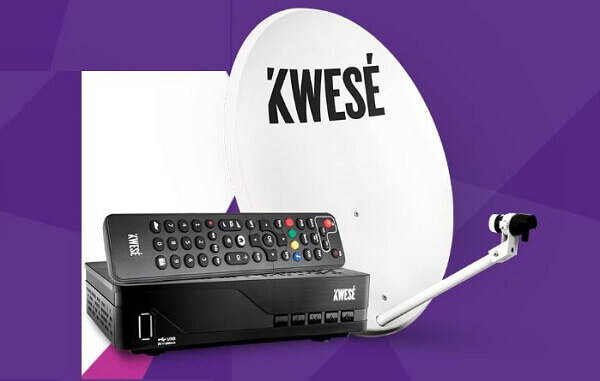
    Both of them are widely available at digital TV stores across the nation. Depending on whether you also purchase a satellite dish from Kwese TV, you can have a Kwese TV agent handle the installation of your decoder, or you can do it yourself.

    You may also have a satellite dish that will be compatible with the Kwese TV decoder. In this case, you will just need to buy the decoder and save yourself some money in the process.

    It is also possible to purchase the decoder in conjunction with the satellite dish and arrange for its installation. This is the choice we advise.

    The Kwese TV dish, Samsat, Startsat, DStv Africa W4/W7, and Space HD single LNB satellites are just a few of the options available.

    In Ghana, a Kwese TV digital decoder costs GHC 76 when purchased independently and GHC 145 when purchased with a satellite dish and installation.

    Channels

    Kwese TV boasts an amazing portfolio of channels that is stocked with unprecedented top-shelf content that will certainly catch your attention.

    There are categories through which you can find the channel that best suits you and these are sports, faith, kids, factual and lifestyle, music, news, and movies.

    The list can also be shown on live TV depending on the package one has purchased.

    Faith

    One can watch various full sermons on this channel category on channels such as Dove TV, EWTN, Hillsong, Inspire, and Ezekiel TV.

    Sports

    Kwese TV viewers can get access to sports channels such as rugby, NBA, cricket, ESL motorsport, and soccer. These are further grouped into Kwese Sports 1, Kwese sports2, Kwese Free Sports Africa, as well as other sports streaming channels.

    Kwese TV Guide

    This guide provides the schedule of a viewer’s favorite programs. Although some programs run concurrently, you can still view your best channels by making use of the guide.

    You can watch Kwese TV in Ghana by watching it on your TV with the use of the decoder which can be used to record live TV so you can watch it later.

    Or you can watch it on the go using their mobile app. You will need to download the app from the play store.

    You can also watch Kwese TV online if you are connected to a stable supply of internet. You will be able to view Kwese TV on their website.

    Kwese TV Packages

    You can choose between any of these three depending on how best they suit you.

    Here are the packages one can subscribe to on the Kwese TV channels.

    • GHS 15 for 3 days
    • GHS 25 for7 days
    • GHS 110 for 30 days

    You can contact Kwese TV for any assistance at 030 7010888

    Kwese TV is without a doubt one of the best digital TV operators in Ghana at the moment.

    If you are thinking about getting yourself a digital TV for your entertainment needs, then we would like to recommend Kwese TV to you right this minute.     

    You can check out multi Tv prices and DStv packages.

  • Jumia Ghana Return Policy And How To Return A Delivered Product

    Jumia Ghana Return Policy And How To Return A Delivered Product

    Jumia Ghana is an online shopping mall in Ghana that has changed the face of shopping in the country.

    Instead of getting up and driving to the supermarket to buy what you need, all you have to do is to get a smartphone with an internet connection and order what you need right in the comfort of your home.

    However, there could be a situation whereby the product that was delivered to you is not what exactly what you ordered for.

    And since you probably cannot use a product you didn’t order, the only logical thing to do will be to return it.

    That is why Jumia Ghana has a return policy that allows customers to return a product for various accepted reasons.

     In this article, we will be showing you some ways through which you can return a product that has been delivered to you from Jumia.

    You will have to open a package as soon as you receive it so that you will know if the package is exactly what you ordered for or if they are not.

    Opening them quickly will also help you to initiate the return process if they are not what you ordered since there is a deadline on the number of days in which an item will be accepted back.

    So Here Are the Ways Through Which You Can Return an Item To Jumia Ghana

    You will first have to inform Jumia customer care that you wish to return a product. You can call Jumia customer care on 030 274 0630.

    You could also send the man email if you cannot make a phone for some reason. You could send Jumia customer care an email at customerservice@jumia.com.gh

    You will then have to fill a form that came with the product which is meant for returning the product in case it was not what you ordered.

    You will need to fill in with your order number as well as the reason behind the return of the product. Do not forget to fill in all the important details.

    You can also inform Jumia that you want to return a product by logging into your Jumia account and then going to ‘orders’ and clicking on ‘return product’.

    This will inform Jumia that you wish to return the product you just took delivery of. 

    Now, repackage the product and then send it to the drop-off point or where you went to pick it up when it was delivered.

    Make sure to add the return form that you just filled to the package. The product must be repackaged in the same box that it came in and the product must be repackaged the same way it came.

    There should be harm or scratches on the product. Everything that came with the product must be intact in it before it can be returned.

    Even if there was any gift included, you will have to include it in the returning product. All other accessories must also be included.  

    You will then have two options as to how you will be able to return the product to Jumia.

    The first option is the Jumia team picking the product up from you themselves after they call you and make arrangement for it.

    The second option is you dropping the product at any Jumia pickup point that will be agreed upon between you and the agent you will speak with concerning the return of the product.

    The good side is that you will not have to pay any charges for returning the product.

    Conditions For Product Return

    You can only return the product within 7 days after it had been delivered to you.

    There must not be any signs that the product has been used. It must be returned with all the things that it came with. Absolutely everything, you can’t keep the gifts either.

    So this article was about how one can return a product to Jumia without any difficulties. Remember, you have to return the product within 7 days after receiving it. On some occasions, your only option may be to choose a different product to swap with the one you are returning.

    We hope this article was really helpful. You can read more about Jumia pay and more about Melcom Ghana