Blog

  • How To Transfer Vodafone Credit To Another Vodafone Number In Ghana

    How To Transfer Vodafone Credit To Another Vodafone Number In Ghana

    We all have that special person we love and would mostly do anything for them, including trying to get them airtime at midnight.

    We talk to them almost daily and because of that, we are always ready to do anything that they may want for them.

    There could be times that they call us on the phone and we end up talking about the house. After talking for hours, the person finally tells you that he or she has run out of airtime so even though you want to continue the call.

    The only way will be to replenish the airtime account of the person so that they can call you for the call to continue

    However, there is no way to get airtime for someone unless you are going outside and it is not likely to meet the airtime vendors at such an hour.

    But there is still one way through which you can send airtime to someone if you are on the Vodafone network.

    You can send the airtime to anyone you want from your smartphone. The only catch is that the person must also be on the Vodafone network for this hack to work.

    You can transfer some of your airtime or data to the person if you find yourself having more than you can use.

    In this article, we will be showing you how to share some of your airtime or data with a friend who is also on the Vodafone network.

    How To Transfer Vodafone Credit To Another Vodafone Number

    To be able to send credit to another Vodafone user, you will have to use the shortcut responsible for that action.

    And the shortcut for performing that action is *516*. So to transfer airtime to the person, you will have to dial *516* followed by the number of the person you are sending the airtime to, followed by the amount of airtime you want to send, which will be followed by your password.

    So your dialer will be looking something like this: *516*recipient number*amount of airtime*password#.

    Let me give you a clear example right here. In case I want to send 30 cedis airtime to Delilah, this is how I will be dialing in my dialer.

    *516*0203652894*30*2222#

    This method is for when you want to send airtime to someone in cedis value

    Always remember that Vodafone charges 0.05 for this service so you must make sure that you have enough airtime for such transaction whenever you carry one out. 

    Now if you want to send airtime to another Vodafone user in the pesewas value. It is a bit similar to above one shown above.

    Please follow the following steps if you want to send airtime to another Vodafone user. Dial *516*number of recipients* amount of the airtime in pesewas*password#.

    So for example, he will be my dialer for sending airtime in pesewas to another person on the Vodafone network. *516*0203652894*0*60*1443#.

    How To Transfer Vodafone Data To Another Vodafone Number

    You can also transfer data to a friend who is also on the Vodafone network. To do so, please follow the steps listed below.

    1. Dial *700#
    2. Dial-in 4
    3. Select the kind of data that you want to send to that person
    4. Choose the payment mode. You can use either your airtime to pay or you can pay from your Vodafone cash account.
    5. Enter the number of the person you are sending the data to.
    6. Now type in your PIN code to confirm the transaction. You should always remember that your PIN will be 1234 if you have never tempered with it too.
    7. Now press ‘1’ to the airtime purchase.

    Through the steps listed above, you will be able to share airtime as well as the internet with people you want without much hassle.

    We also showed you how to be able to send credit and data to people through the steps we have shown above.

    Some other networks offer00 this amazing service and we will be looking at the ways through which you can send a transfer to others from your mobile smartphone.

  • How To Block Pop-Up Ads On Android Phones [Infinix, Tecno, And Samsung]

    How To Block Pop-Up Ads On Android Phones [Infinix, Tecno, And Samsung]

    Pop-up ads are one of the most annoying things one can encounter on their smartphones, and I believe if you are seeing some on your android smartphone right now, you might be looking for ways to block them.

    They distort the incredible experience of a mobile browser when they keep popping up with annoying ads and notifications whiles you are browsing. There have been lots of users who usually complain about these ads.

    These complaints usually come from people who are using mobile devices from Infinix and Tecno.

    These two smartphones come with so many ads and sometimes instant apps that most people get frustrated when using.

    Although the companies who manufacture these phones pledged to do something about the frequent adverts popping up because it mostly comes with the android mobile operating system, that solution has not arrived yet.

    And the sad thing about this is that the phone apps that display ads on your phone without your consent make money from the ads shown to you.

    It is up to the users themselves to find ways to block the pop-up ads from interfering with the usage of their mobile phones.

    Because of this, we have compiled together some ways through which you will be able to block the pop-up ads from your mobile phones.

    Since we know that you can find pop-up ads on almost every phone, we have also added some ways to block pop-up ads on your Samsung mobile devices. Read through the steps below and see these solutions for yourself.

    Note that some may work while others will not since the source of the pop-up ads is from apps as installed well.

    How To Block Ads On Android

    There is also another way to block the ads apart from updating your launcher by using third-party apps.

    One such app is called ‘AdBlocker Android’ this app can prevent ads from popping up on your device when you are busily using it.

    AdBlocker is an app android app. It allows you to block tracking and disable all ads that would have appeared on your mobile while busy using it.

    It also allows you to select the search engine you prefer, and the app is free for all to download on the google play store.

    How To Block Ads On Infinix And Tecno Phones

    The pop-up ads generally found on these devices are usually from the phone itself due to the Hi-launcher and the XOS launcher that these devices use.

    You will be able to hide the ads that come from these operating systems.

    1. First, you will need to install an update to the launchers. You will be able to get the latest versions of the launchers on the Google Play Store. Install the update and then return to the home screen.
    2. Now you open the HiOS menu scroll down to ‘other setting’ and click on it.
    3. Now look for ‘application recommendation’ and then switch it off. After this, you will get rid of the annoying pop-up ads on your Infinix phone.

    How To Disable Pop Up Ads On Samsung

    Samsung mobile devices do not have launchers that come with pop ads. The only way you will see pop-up ads on your device is through an app that you have installed.

    In this case, you will have to find the app that allows ads to pop up on the phone and either disable it or delete it together. 

    How To Disable Pop-Up Ads On Chrome

    You can also disable the pop ads that are displayed on your mobile device via Google Chrome. You can do so by disabling the ads through the settings in the browser.

    1. Open the Google Chrome app.
    2. Click on the settings
    3. Scroll down to the site settings’ and click on it
    4.  Look through for the pop ads and turn them off

    How To Block Ads Via Background Data

    Some apps may use the background data to show ads on the device. To stop these ads, you will have to restrict the background data.

    1. Display the apps on your mobile
    2. Look for the app that may be causing the ads to show
    3. Tap on it and then tap on ‘mobile data.’
    4. Now select ‘background data.’
    5. Tap on the ‘allow background data’ option

    Conclusion

    seeing pop-up ads on your phones can be pretty annoying because almost everybody hates pop ads.

    It slows down your operating system and makes it difficult for you to use the phone the way you want it.

    In this article, we went through how to block pop-up ads on your Android phone, whether it is an Infinix phone, Tecno phone, or Samsung Smartphone.

    We also talked about blocking ads on your Chrome browser to enjoy browsing without any ads interruption.

  • Applying For A Driver’s License In Ghana: Everything You Need To Know

    Applying For A Driver’s License In Ghana: Everything You Need To Know

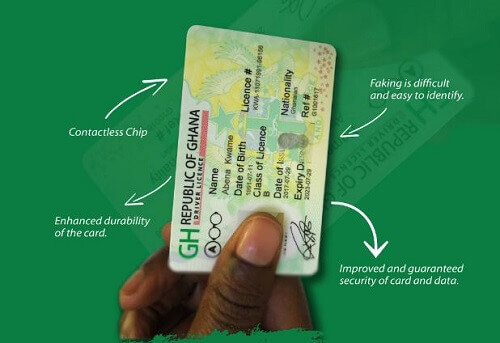
    Just like every country in the world that you visit, you must have a driver’s license before you can drive in Ghana.

    We will be looking at how one can acquire a driving permit from the relevant authority in Ghana.

    If it is your first time applying for a driving permit, you will need to visit the office of the Driver and Vehicle Licensing Authority.

    Below Are The Steps To Get Your Driving Permit For The First Time.

    Visit the office of the Driver and Vehicle Licensing Authority

    You will then need to make some payments to obtain the forms needed for the application. The fees for the forms are as follows;

    • GHC 2.50 for form F
    • GHC 12.50 for form F1
    • GHC 5.00 for an eye test

    After acquiring the forms, you will then have to fill out form F and form F1 thoroughly and then submit them. You will also need to attach some documents to the forms before you submit them back to the DVLA. The documents needed along with the forms are;

    The national identification card will give proof that you are of legal age which should be 18 years or above.

    An education certificate will also be required such as BECE or an adult education certificate.

    You will then be provided with the code and syllabus for the highway for learning and study.

    You will now have to undergo an eye test and a physical test after you finish filling and submitting the forms which will be conducted by the DVLA for you.

    After passing the eye test and the physical test, you will make some payments after which the authority will issue you with a driver’s permit, L-plate for a car, syllabus as well as the highway code. The things issued to the driver normally are;

    • A learner’s license
    • Highway code
    • A learner’s license booklet
    • A learner’s L-plate

    Acquiring A GhanaianDriving License Fees

    There will be fees to be paid before one will be issued with all these things. The fees for the respective items are as follows;

    • Learner’s plate- GHC23.00
    • Syllabus for the learner- GHC5.00
    • Highway code- GHC5.00
    • Learner’s license booklet- GHC2.50

    After all these, the applicant will now be required to enroll in a two-day course with a driving school that has been accredited by the Driver and Vehicle Licensing Authority.

    People who have an expired driver’s license will rather undergo a written exam in which they should be able to score 70% or above to be able to pass.

    You will then have to revisit the DVLA to undertake a written test which will cost you another GHC 5.00.

    The authority will also take your biometric information during this test, another GHC 4.00 will have to be paid again.   

    You will then undertake another computer-based test. After this, the applicant will be required to take another test which will be traffic-based.

    This will be used to explain various road signs and others to the applicant and will cost the applicant another GHC 4.00.

    After passing this test, the applicant will undergo one last test before completion with an instructor from the DVLA. Passing this test without any errors will grant the applicant a cover note.  

    After the applicant has completed all the various tests, he will now pay for a temporary driver’s license that will be issued to him.

    He will then return to the DVLA. The DVLA will then take the information needed for making your driver’s license and the applicant will have to pay GHC 5.00 for a temporal license photo and another GHC 5.00 for a temporal license.

     The applicant will then return later with the cover note that was given to him. He will then exchange that for his driving license and will be issued a P-plate as well.

    Registering Your Drivers License Online

    To apply for a driver’s license online, please follow the below steps.

    1. You will create an account with the DVLA by visiting their internet site.
    2. You will then register by filling in some forms with the relevant information needed such as full name, nationality, ID number, gender, and place of birth.
    3. You will then fill in your contact details and then verify the account you just created through your email address.
    4. After verifying the account, you will then log back into the online portal to send your application.
    5. You will click on the ‘apply for driver service’ and then choose ‘’new driver license’
    6. You will then fill in the permit information such as the license class A, B,E, AB,AE,BE,ABE.
    7.  You will then have to make payment through an online platform with a credit card for the license class that you will choose. The license class and their fees are shown below.
    • A-  GHC 190
    • B- GHC 160
    • E- GHC 134
    • AB- GHC 210
    • AE- GHC 190
    • ABE- GHC 210

    The applicant will then visit the DVLA offices after applying online to continue with the physical aspects of the application. The applicant will then go through all the tests as an applicant who applied directly at the DVLA office from the beginning. 

    So these are the ways through which people can apply for their driver’s license in Ghana and the fees involved.

    Please note that the fees could be slightly higher or lower when one goes to the DVLA office since increments can take place at any time.

    We hope this article was very helpful to anyone that has been looking at how he or she could apply for a license before actually going ahead with it. 

  • How To Transfer Credit From AirtelTigo To AirtelTigo

    How To Transfer Credit From AirtelTigo To AirtelTigo

    AirtelTigo Ghana is one of the biggest telecommunication networks in Ghana at the moment.

    The company has introduced a lot of services that have made it much easier for its customers to use the network.

    One of the services that allow AirtelTigo customers to share airtime with their friends and loved ones and that service is known as ‘Me2U’.

    One of the good things about this service is that customers can access it anytime they want.

    It does not matter whether it is in the day or the night. They will be able to send airtime to their friends and loved ones.

    Customers can send any amount of airtime they like to their friends, family and loved ones as long as the airtime being transferred does not exceed GHC10.00.

    That is the limit to the amount that can be transferred on a given day. There are set procedures to follow if you want to send airtime from your account to a loved one.

    Here Is How To Send Airtime To Family, Friends, And Loved Ones On AirtelTigo Using Their App

    1. Open the AirtelTigo menu on your mobile device and select Me2U
    2. Select ‘send airtime’
    3. Enter the amount of airtime that you wish to send to the person
    4. Now enter the number of the recipient. You can choose the number of the recipient from your contact list
    5. Now you will have to confirm the transaction by entering your password
    6. Press send
    7. A notification message will be sent to you confirming the transfer of the airtime. The recipient of the airtime will also receive a notification message.

    How To Change Your AirtelTigo Me2U Password

    In case you may want to change the password on your Me2U service, there is an easy way to go about that.

    1. Open the AirtelTigo money again and select the Me2U option.
    2. Select ‘change password’
    3. Enter the current password you using
    4. Now enter the new password
    5. Now confirm the new password that you have input
    6. Now press send

    Some rules governing the Me2U service by AirtelTigo that all customers who wish to use the service need to be familiar with.

    Below are the rules that you need to be familiar with before you can start using the AirtelTigo Me2U airtime-sharing service.

    • You cannot transfer airtime from the AirtelTigo network to another number that is not on the AirtelTigo network.
    • The airtime you are sending to someone cannot be more than the airtime available on your phone.
    • You can send any amount of airtime to people, ranging from 20p airtime to GHC10.00.
    • The highest that can be transferred is GHC10.00.
    • And the lowest that can be transferred to others is 0.20p.
    • GHC10.00 is also the maximum amount of airtime that can be transferred in a day.
    • It is expected to change the default password on the service from 1234 to any other password that you can easily remember. It must be a4 digit password.
    • There are no charges for changing the 4-digit PIN or any inquiry SMSs. Transactions that fail will also not be charged.
    • Once airtime has been transferred to someone, it cannot be reversed. So please be sure that you want to send the airtime to that particular person before you go ahead and do so.
    • The airtime that is transferred is deducted from the account of the sender after the transaction has been completed.
    • The charge for transferring airtime from your account to someone else is 0.4p for any transaction that gets completed.

    Now you know how to be able to transfer airtime to your family, friends, and loved ones whenever they request it from you.

    Remember, the person you are sending the airtime to must be a subscriber of the AirtelTigo network.

    And you cannot reverse a transaction once it is completed. And always made sure to do more than the amount you intend to send out to people.

    The transaction will not go through if the amount that is being sent is higher than the amount that is in your account.

    Thank you for taking the time to go through this article. Start to send airtime now.

    You can also check out how to transfer Vodafone data and MTN data to another user.

  • Jumia Ghana: Branches, Contact, Products, Work Opportunites, And More

    Jumia Ghana: Branches, Contact, Products, Work Opportunites, And More

    Jumia Ghana is one of the leading names in Ghana in terms of online shopping. Jumia Ghana is an online shopping mall that was established in 2014 and has since grown its way to becoming one of the leading shopping places in the country.

    Online shopping has almost everything that one may be looking to purchase. From home electronics, dresses, furniture, and other things, you are sure to find them at Jumia online shopping mall.

    Jumia also normally offers its buyers great discounts on most of its products on the website.

    The online shopping mall has made it very fun to shop online with them. One can order whatever they may require and have it delivered to them without a problem.

    Due to the popularity of the online shopping mall, Jumia can now be found in countries such as Nigeria, Senegal, Kenya, and many other African countries.

    In this article, we will be laying out all you need to know about Jumia online shopping before you start your online shopping adventure with them.

    The head office of Jumia Ghana can be found in Accra, along the Boundary road in the Evita building.

    The Evita building can be located opposite the American house. The head office of Jumia operates from Mondays to Fridays and their official working time is from 8:30 am to 5:30 pm.

    Jumia is an online store and so there is no physical store. All one has to do is log onto their website and browse through the numerous product that is on sale.

    The purchased items will then be delivered to you no matter where you are in the country.

    Tracking Order On Jumia

    Once you order a product on Jumia, you may want to keep track of its delivery to you. You will receive an order confirmation email.

    There will be a link in the email sent to you labeled ‘track your order’ this allows you to keep track of your order to know the time it will be delivered.

    You can also track your order through the product order number.

    Branches

    Jumia Ghana does not have a physical store since it is an online shopping mall. However, their various pickup points across the country that people go to pick up their products after it has been delivered.

    People can also get jobs at Jumia Ghana since its growth over the years has made it necessary to add more manpower to its operations.

    People can also list their products on Jumia to sell to buyers and earn income. Anyone who wants to sell on Jumia will have to register by creating an account with them.

    Registering As A Seller On Jumia

    The registration is free to undertake. However, you will be charged a commission for each delivery you make as well as a shipping fee contribution.

    Once a person places an order for your product, you will have to have the product ready for delivery within 24 hours.

    It will be delivered either via the VDO stations or express service. You will then receive payment for the purchase into either your MoMo or bank account.

    Cancellation Of Orders

    Maybe you have ordered something like matching necklaces for you and your girlfriend to wear.

    However, you just found out that she has been cheating on you the whole time and since no sensible man would purchase matching necklaces to wear with such a woman, your most logical thought will be to cancel the order right away.

    With Jumia, you will be able to cancel the order without much hassle. First of all, you will need to make ready all the important details concerning the order you place.

    After that, you will then call the Jumia line where you will be able to talk with a Jumia agent who will then assist you to cancel the order.

    The details needed will normally include your invoice number, the destination the package was intended for, and your verification details.

    Even if the package has left the warehouse on its way to you, the agent will still be able to do something about it.

    You can also cancel an order by way of email. You can also carry out the cancellation of an order through the Jumia Ghana Facebook page.

    You can also cancel the order by filling out a form on the Jumia Ghana website and then waiting for them to respond to you.

    However, this may not be fast enough for you and so the best option will be to call them and speak to an agent to cancel the order.

    Jumia Ghana Return Policy

    Like most companies where people buy from, Jumia Ghana also has a return policy on their products.

    One can return a product purchased from Jumia Ghana by either filling out a form or calling their hotline for assistance.

    You will then have to schedule a pickup once the return of the product has been approved by Jumia.

    You will need to return the product with its original packaging else it will be refused. You will then get a return slip as evidence that you have returned the product you purchased.

    You will receive a refund of your money through either a bank transfer or a voucher.

    Jumia Contact Information

    You can call Jumia Ghana from Mondays through to Fridays from 8:30 am to 5:30 pm and speak to an agent with all your inquiries. You can contact Jumia Ghana on,

    • Telephone: 030 274 0630
    • Email: customerservice@jumia.com.gh or affliateprogram@jumia.com.gh

    Online shopping has now become one of the biggest ways to purchase goods and services. Jumia Ghana is one of the leading online shopping malls in the country at moment and they are changing the way through which the online shopping industry is going. We hope that this article was very helpful to you all.  

    You can also read more about Jumia pay and one jumia competitor, which is melcom Ghana.

  • Technology and Robots In Today’s World

    Technology and Robots In Today’s World

    The technological advancements of the last decade can be seen today in almost every corner of the world. Technology is being used to run over 80% of businesses worldwide.

    We have seen a dramatic improvement in the delivery of healthcare such as the ability of emergency workers to respond to an emergency quickly and accurately with help of technological tools.

    Technology has also changed the face of education and how schools are conducted. Students can now learn much better through educational materials on the internet. Students in different countries can also enroll in universities in other countries by taking online courses that are offered by that university.

    Technology has also changed the mode of sports. It has made sports more entertaining and appealing to the fan who watch them on their TVs. Agriculture has also seen its fair share of the technological overhaul.

    Machines used for farming have now made it possible for farmers to take better care of their farms and produce a bigger yield.

    And through technology, we now have robots that are used to perform a whole lot of tasks. The field of robotics is very sophisticated as a lot of technicians are needed to design, program, and maintain the robots and their systems.

    Five areas of robotics are concerned with how robots are made and maintained. These areas are; operator interface, mobility and locomotion, manipulations and effectors, programming, and sensing and perception.

    The production of robots in today’s world is an easy feat. We will now take a look at each of the areas listed above one by one.

    Operator Interface

    A robot is good when it can effectively communicate with its human controller. The operator interface is also known as the human-robot interface. This is the medium through which the user can communicate with the robot.

    The human controller uses this medium as a way through which he or she can feed programs to the robot for it to execute. One example of a basic human-robot interface is the controller of a video game console.

    The controller allows the human player to send commands to the video game console, which is the robot in this instance. The commands sent by the human interface with the controller are then executed inside the video game.

    There is a lot of care taken when designing and making human-robot interfaces. The human-robot interface must be intuitive and be able to help operators communicate with the robot efficiently so that tasks can be executed accurately.

    Mobility And Locomotion

    A robot must be able to move around in its surroundings before it will be able to perform its tasks. This feat can be achieved in several ways. Some robots can mimic the movements of their human controllers.

    These are normally robots that are used on assembly lines in factories and workplaces. Some of these robots are designed with the human anatomy as a basis. Robots that fly as well as drones all make use of propellers as their form of movement.

    Other robots make use of the wheel for their movements. These are normally robots that are sent to space and used on mars. Robots’ mode of movement is normally determined by their engineers and designers.

    Manipulators And Effectors

    A robot must also be able to interact with its environment for it to be worthwhile. Manipulators and effectors are the parts of the robot that are used in picking up objects and other things as it was designed to do.

    Some human-like robots make use of appendages that work like the human arm so that they can complete tasks that they are designed for.

    Programming

    This is the computer language that a controller uses to control the robot. The actions that the robots portray are actions that have been programmed with a computer before being fed into the robot for it to act. Robots today can adapt to changes in their environment due to the use of advanced programming.

    Sensing And Perception

    Robots today make use of sensors to gather information about their environment. The information gathered by the robot allows it to know its immediate surroundings such as where it is, the way it has to go, and anything that may be blocking its path.

    These sensors also help the robot with how it has to react if it meets any obstacle in its path. Due to this, the right sensors must be used for each robot depending on the job that it has been created for.   

    Conclusion

    This was a brief article about robots in our world today and how they are made. Technology has made it possible to have robots that are used to complete tasks that would have been too hard for human beings to undertake.

    As time goes on, there will be robots that may be able to behave and talk exactly like humans do.

  • How To Find A Specific Video On Facebook

    How To Find A Specific Video On Facebook

    Thinking of how to find a video on Facebook without any hassle? then this article is definitely for. Facebook is a social media site where people can meet each other and be friends. Apart from people meeting to socialize on the site.

    They can also view photos of their friends and watch their videos posted on the site.

    Not only pictures and videos of friends, people can follow the pages of their favorite athletes and business, as well, and also watch the photos and videos that they post.

    You could again come across a promotional video posted by business pages that you are not following.

    However, videos on Facebook are disorganized because the site was made for sharing photos but not videos.

    If you are possibly looking for a video you once watched but cannot remember the name, there are several ways through which you will be able to search for the particular video.

    Ways To Easily Find Videos On Facebook

    There are many ways to do this, some of them are:

    Using The Facebook Search Bar

    One of the easiest ways will be to type the name of the video in the Facebook search bar.

    This is when you can remember some part of the name of the video you are looking for.

    All you have to do is to type the part of the video name that you remember. And then select the ’videos’ tab so that Facebook will display only videos to you.

    You then scroll through and see if the video you are looking for will show up. This also works pretty well if you are looking for some videos to watch.

    For example, if you want to manage real estate videos, you type real estate in the search bar and browse through the results and watch the one that catches your attention.

    Searching For The Videos Through Search Engines

    One other way you can use to find Facebook videos is by the use of a search engine. This is because search engines index the content of Facebook videos.

    You can even use your favorite to locate the video that you are looking for. You can use ‘subject video: Facebook,’ which will then search for any recent videos.

    Or you can use ‘subject video facebook,’ which then widens the search area much more significantly.

    You will have to change the subject for each particular thing that you are searching for.

    Both ways of searching for the video will get you the video you are looking for.

    It has become somehow difficult to be able to see the kind of Facebook live videos that have been uploaded in your vicinity.

    It was always cool to what kind of live videos that people had been uploading. You can still see some of these videos if you use the ‘#live’ search in the Facebook search bar.

    You can search for videos that have been uploaded by some specific people or some company or a brand.

    All you have to do will be to go to the person or company who made the post and then click on the video tab there.

    You will see a list of videos that the person or company has posted.
    You can also find a video that you previously watched if you cannot remember where you found the video or its name.

    This is much easier to find than the category of videos. All you have to do is to:

    How To Find A Specific Video You Just Watched

    • Click on the small menu arrow, which you can find at the top of the Facebook page.
      Then you click on the activity log from the options.
    • The activity log contains all the recent things you have done, including likes and comments. You can also find a video in which you have been linked.
    • Tap on the Facebook search bar and type in ‘video’ there will be a slew of options like ‘videos by me’ and ‘videos recently watched’ and others.
    • Choose the most relevant one and then looking through for the video you are looking for.

    Finding any video on Facebook should be easy now that you know many ways to teaching you how to find a video on Facebook. We hope you enjoyed this article and learned something, recently facebook, WhatsApp and Instagram went down, for more than 6 hours, you can click here to read our article covering what happened that caused the outage.

  • The Computer Motherboard

    The Computer Motherboard

    The computer motherboard is one of the essential parts of a computer. The motherboard houses almost all the connections and ports used by the computer.

    Since it is the most crucial part of the computer, it is only suitable that you should know about the motherboard.

    You may need to visit a computer repairer if your computer starts exhibiting some of the following traits:

    •  The computer takes a long to boot up.
    • The peripherals become unreliable.
    • Flickering lines appear on the screen sometimes, especially when you switch the computer on.
    • Pen drives sometimes fail to initialize when plugged into the computer.
    • A smell, mostly like melted plastic

    Frequency Of ‘Blue Screen Of Death’

    The computer’s motherboard is a highly complex part of it made up of various circuitry parts and is the central hub of the computer.

    Everything that the computer does will depend on the motherboard. Whether it be working with flash drives, processing data, or using the computer memory, it all depends on the motherboard.

    It is usually the fault with the motherboard when you find out that your computer cannot turn on at all.

    In most cases, some people typically think they need to buy a new computer when they encounter a fault whereby their computer cannot turn on because of a fault with the motherboard.

    However, in most cases, the fault with the motherboard could be repaired, while in other instances, you will have to purchase a new motherboard to replace the faulty one inside your computer.

    You will not need to replace the components in the computer. Below are some of the ways through which you can diagnose a faulty motherboard.

    Motherboard Problems

    The faults associated with a computer motherboard usually are very tricky to diagnose. Its flaws could even trickle down to other parts of the computer when something is wrong with it. However, one can find the problem through careful elimination, which must be done by people who know what they are doing.

    Fixing the motherboard is also complicated because the whole computer needs to be taken apart before you can get to the motherboard.

    You will need a highly knowledgeable computer technician to diagnose, repair or replace a motherboard for you if it develops a problem.

    Fragile

    The motherboard is also a fragile component of the computer that can be affected by several things, causing it to become faulty.

    Electrical surges are one of the things that can cause a motherboard to get faulty. Hairs and other foreign objects can also cause harm to a motherboard when they are sucked into the computer by the cooling fan. So one must be careful not to allow pets around their computer.

    Replacement

    You cannot replace your computer’s motherboard with that you scoop off the shelf no. when you have to replace a motherboard, you will need to choose one that will be compatible with your computer’s hardware.

    If the motherboard is not compatible with your computer, it will cause many problems on the computer when you g ahead to use it.

    Apart from straining on other computer components, if you go ahead with an incompatible motherboard, you will also be forced to format your hard drive, which will certainly make you lose all your stored data.

    This is why whenever you have a problem with your computer, you need to send it to qualified computer technicians who know what they are doing so that you do not end up with more problems.

    Some repairers may not be knowledgeable about motherboards am cause more harm to them instead of repairing them.

    So this was a brief insight about the computer motherboard. We always advise that whenever you see some of the signs listed in this article, you send your computer to a computer technician you know you can trust and not just anybody who says they can fix a computer.

    We hope it was helpful. Kindly let us know if you have any questions.    

  • How To Borrow Airtime From All The Network Providers In Ghana

    How To Borrow Airtime From All The Network Providers In Ghana

    In the past, it could be very bad to run out of mobile airtime, especially in places where sellers of airtime stopped early and calls had to be made late at night.

    When you were in a newly built area, these sellers often stopped early because not many people were out and about at night, which made it hard to get more airtime.

    People sometimes had to put off important phone calls until the next morning because of this, which meant they missed out on contract chances and other problems.

    During the day, all you had to do was find the closest person selling credit and buy what you needed to keep talking on the phone.

    It was a different set of problems when this problem came up on a long trip, though.

    To fix this problem, the country’s phone companies came up with a service that let people take airtime when they ran out, as long as they agreed to pay it back when they topped up their accounts.

    Many people found this service to be a huge relief because it let them stay linked even when things were tough.

    As well, customers could borrow data packages when they ran out, not just airtime.

    Although this service was helpful for customers, it also gave cell phone networks a chance to make money.

    Customers had to pay back a little more than the amount they borrowed when they took airtime or data bundles.

    This extra amount, which was usually about 10% of the loan amount, was added to the customer’s bill. One of the best things about this service was that there was no set due date for paying back the loan.

    Customers could add money to their accounts whenever they wanted and pay back the money they loaned over time.

    Now, let’s look at the ways that customers can borrow data and voice packages from network providers:

    How To Borrow Credit From MTN

    1. To borrow credit from MTN, follow these steps.
    2. Dial *506#
    3. Choose ‘borrow credit’
    4. Choose the amount of credit you like to borrow from the options provided.
    5. Then choose the option ‘1’ to confirm it

    How To Borrow Airtime From MTN

    To borrow a data bundle from MTN, follow these steps

    1. Dial *606#
    2. Choose ‘XtraByte’
    3. Choose from the displayed list of available data bundles

    One must have been an active user of the MTN for more than 3months to be eligible to borrow credit. One must also have less than GHC4 airtime before one can request an airtime loan.

    The amount made available depends on the number of airtime one has bought over time and also how quickly one repaid the earlier airtime loans. You might also want to check out the MTN mobile money registration process.

    How To Borrow Airtime From AirtelTigo

    Borrowing airtime from AirtelTigo is indeed a straightforward process compared to other networks. However, the amount of loan you can get is determined by various factors, including your usage history and how promptly you’ve repaid previous loans.

    Here’s how borrowing airtime from AirtelTigo works:

    • Dial *588#
    • AirtelTigo will loan you an amount ranging from GHC 5 to 0.30. if the transaction is successful, you will receive a notification that includes the amount of airtime that was lent to you.

    If it was not, you will also receive a notification telling you why you cannot borrow airtime at that moment.

    How To Borrow Airtime From Vodafone

    To get an airtime loan on Vodafone, you need to be active on the network for at least 15 days and have a balance of GHC1 or less.

    When you apply for an airtime loan, you will be charged a 10% commission which will be deducted from the borrowed airtime when you top up. Follow the steps below to borrow airtime from Vodafone.

    1. Dial *505#
    2. Select the amount of airtime you want to borrow
    3. Select ‘1’ to confirm the loan.
    4. You can also use the airtime borrowed on Vodafone to purchase data bundles.

    So this article was about how one could borrow airtime from the major telecommunication networks in the country. We hope this article was helpful to you. Is there something we missed, please let us know.

  • How To Get More Views On Your YouTube Videos

    How To Get More Views On Your YouTube Videos

    Maybe you have read our article on how to make money online and have got to know that aside from blogging, Youtube is the second platform to make money online in Ghana.

    As we all know, YouTube is a video-sharing platform that sees more than a thousand video uploads in a day from all over the world.

    Videos of all kinds are posted on the video-sharing site because it is one of the places where almost everyone goes when they want to watch videos.

    Upcoming musicians post their videos there because it raises their chances of being seen by music managers or record label executives.

    Certified musicians also post their music videos there. They want people to see them because they can earn money from the high number of views that they will get.

    If you are someone who is thinking about posting your video on the YouTube platform but is scared that it will not be seen by people due to the number of videos circulating on the site, there is some good news for you.

    Do not worry at all. We will be showing just how you can get your videos seen on the YouTube video-sharing website.

    How To Get More Views On Your Youtube Videos

    Below are some of the ways through which you can get your videos seen on YouTube easily.

    Do Good Keyword Research

    One of the greatest things that determine if your video will be seen easily is the keywords that you use for your video.

    Most people always search for a video by searching with a specific keyword and then looking through the available result to see what they like.

    You need to select keywords that related very well to the content of your video as well as the category in which your video falls.

    Your video will just get lost among the vast number of videos on the site if you do not choose good keywords.

    This will cause people who may have liked your video to miss the chance to see it. Before you post your video, you should do some research about the keywords used concerning your kind of video before you name the video for posting.

    Make use Of Video Tags

    Tags are also one of the most important items that can guarantee that your video will be seen by its targeted audience.

    A lot of people either put a few tags or skip it altogether when they post a video and then they wonder why the views on their videos are small.

    When you fill the tags on your video with keywords that are very well related to your video and its category, it appears much faster to people when they use that keyword to search for what they are looking for.

    The tags help people who are searching for a specific video see your videos when they search. Always make sure to add some tags that give an idea of what your video is actually about.

    Include Transcript In Your Videos

    It is also highly advisable to post the transcript of your video in the description of the video to improve its chances of being seen by the search engine.

    Posting the transcript in the description is sure to get you an advantage over other people since most people always overlook this particular part.

    Use Catchy Titles

    You must include one or two of the most important keywords of the video in the title before you upload it.

    You should think of using titles that are easily searchable by people. It is not advisable to try to use clickbait as this will ward people off your subsequent videos since they will perceive those to be clickbait as well.

    The clickbait normally works for well-known channels, not the unknown content creator who is now trying to gather an audience.    

    Use Catchy Video Thumbnails

    Custom video thumbnails are also a very great way of getting your video seen by people.

    A good video thumbnail will certainly draw in people once they come across your video after searching.

    Make sure to use specific photos for the thumbnails. You then need to make the images you have chosen for the thumbnail look great and clean with text and graphics with an application like Photoshop or Canva.

    These thumbnails can even be indexed in the Google search engine. In this way, you will be seen when people search on Google aside from the YouTube search bringing you up.

    You should look at which thumbnails stand out by searching the keyword of your video on YouTube and then looking at the thumbnails that show up.

    Your thumbnail should let viewers know right away that it is you when they see the thumbnail, and it should also be strong enough so that it does not fade into the background.

    So these are some of the ways which help to get one’s video seen on YouTube easily. Thank you for taking the time to read through this article ad we hope that you apply what you have read to grow your views on YouTube.